
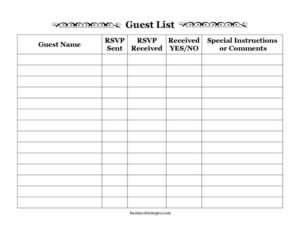
Large-Print Guest List
Track invitations and RSVPs with this free Large-Print Guest List template, designed for easy reading and accurate event planning. Free download in PDF and DOCX.
PDF
DOCX
2 downloads
0
likes
Download Files
- DOCX
A Large-Print Guest List is an easy-to-read tracking sheet that helps you record who you invited to an event, whether their invitation went out, and whether they have responded. People most often use it to keep wedding, party, reunion, or fundraiser RSVPs organized in one clear, accessible place. You can download it free in PDF and DOCX formats with no signup required.
What Is a Large-Print Guest List?
A Large-Print Guest List is a planning document that lists every person you plan to invite to an event, along with columns to track the invitation and response process. The “large-print” design uses bigger text and generous spacing so it is comfortable to read for anyone, including people with low vision, and easy to scan at a glance. Hosts, event planners, family coordinators, and volunteers use it to know exactly who has been invited, who has confirmed, and who still needs a follow-up. Unlike a formal seating chart or budget spreadsheet, this form focuses on one job: keeping invitation and RSVP status clear and current.
When Do You Need a Large-Print Guest List?
This template fits any occasion where you need to track invitations and replies without losing track of names. Common situations include:
- Weddings and engagement parties — managing dozens or hundreds of guests across multiple households.
- Birthday parties, anniversaries, and milestone celebrations — keeping a running count of confirmed attendees.
- Family reunions and holiday gatherings — coordinating relatives spread across different cities.
- Community events, fundraisers, and club meetings — where volunteers share one master list.
- Baby showers, retirement parties, and graduations — tracking who replied so you can finalize catering and seating.
- Accessibility-focused planning — when the organizer or a helper benefits from larger, easier-to-read text.
Because the layout is simple and printable, it also works well as a shared paper checklist that several people can update by hand at a registration table or during phone follow-ups.
What a Large-Print Guest List Should Have
A complete guest list keeps the host from double-counting or accidentally skipping anyone. The essential elements are a clear field for each guest’s name, a way to mark when the invitation was sent, a way to confirm the RSVP was received, a simple yes or no indicator for attendance, and a space for special instructions or comments. Good design also means readable spacing, consistent columns, and enough room to write by hand. Adding a date at the top and a running total of confirmed guests at the bottom helps you see your headcount progress at a glance and makes the list useful for catering, seating, and budgeting decisions.
How to Fill Out a Large-Print Guest List
- Guest Name: Write each invitee’s full name on its own row. For couples or families, you can list them together (for example, “The Garcia Family — 4”) or give each person a separate line, whichever makes your headcount clearer.
- RSVP Sent: Mark this column when the invitation actually goes out — by mail, email, or text. Adding the send date here helps you know when to expect a reply and when to follow up.
- RSVP Received: Check this column when you hear back from the guest, regardless of whether they said yes or no. This separates “no response yet” from “replied,” so you know exactly who still needs a nudge.
- Received YES/NO: Record the guest’s actual answer. Circle or write YES for attending and NO for declining. This is the figure you use for your final headcount.
- Special Instructions or Comments: Note anything important — dietary restrictions, plus-ones, accessibility needs, gift notes, or a reminder to call again. Keep entries short so the list stays scannable.
Tips for Keeping Your Guest List Accurate
Update the list in real time as replies arrive rather than relying on memory. If you are tracking a large event, sort guests alphabetically or by household so duplicates are easy to spot. When several people share the list — say, two parents planning a wedding — agree on who owns the master copy to avoid conflicting edits. Tally your confirmed YES responses regularly so you can give accurate numbers to caterers, venues, and rental companies as deadlines approach. Finally, keep the original invitation send dates handy; if a guest hasn’t replied within a week or two of your RSVP deadline, a quick reminder usually closes the gap.
Paper vs. Digital Guest Lists
The DOCX version lets you type entries, expand rows, and add columns such as table numbers or meal choices, which is ideal if you want to email or print fresh copies. The PDF version is best when you want a clean, fixed layout to print and fill in by hand at a registration desk or during phone calls. Many hosts use both: a digital master file for the official count and printed copies for helpers who collect replies in person. Because the form is in large print, either version stays comfortable to read.
Common Mistakes to Avoid
- Confusing “RSVP Received” with “Received YES/NO.” A guest who declines still counts as a received reply — mark both columns accordingly.
- Forgetting plus-ones. If an invitation allows a guest, note it in the comments so your headcount stays right.
- Not dating the invitations. Without send dates, it’s hard to know who is overdue for a follow-up.
- Leaving non-responders blank and forgetting them. Mark unconfirmed guests clearly so they don’t disappear from your radar.
- Skipping the comments column. Dietary and accessibility notes are easy to lose if they aren’t written down beside the guest’s name.
- Keeping multiple unsynced copies. Designate one master list to prevent conflicting numbers.
Frequently Asked Questions
What is a Large-Print Guest List used for? It is a tracking sheet for recording invitees and managing their RSVP status for an event. It helps you see who was invited, who replied, and who is attending, all in an easy-to-read format. Hosts use it to finalize headcounts for catering, seating, and venue planning.
How do I fill out the RSVP columns correctly? Mark “RSVP Sent” when the invitation goes out, check “RSVP Received” when the guest replies at all, and use “Received YES/NO” to record whether they are actually attending. Keeping these three steps separate prevents you from confusing a non-responder with someone who declined.
Is this template free to download? Yes. You can download the Large-Print Guest List for free in both PDF and DOCX formats, with no signup or account required. Use it as many times as you need for any event.
Can I edit the columns or add more fields? Yes. Open the DOCX version in your word processor to add columns such as table assignments, meal preferences, or contact numbers, or to expand the number of rows for larger guest lists. The PDF is best if you prefer to print and fill it in by hand.
Why is the large-print format helpful? The larger text and wider spacing make the list comfortable to read for everyone, including organizers or volunteers with low vision. It also makes the sheet easy to scan quickly at a registration table or while making phone calls.
How should I list couples or families? You can place a whole household on one line with a guest count (for example, “The Lee Family — 3”) or give each attendee a separate row. Choose one method and stay consistent so your final headcount remains accurate.
This Large-Print Guest List template is provided as a general example for informational purposes only and is not legal, financial, or professional advice. Event and accessibility requirements vary, so adapt the form to your needs and consult a qualified professional where appropriate.
Related Forms
- Petsitting Instructions
- US Time Zones Chart
- Weekly Schedule By Name
- Do Not Adjust Thermostat Sign
- Customer Complaint Form
- Testimonial Form
Browse more in Miscellaneous.