
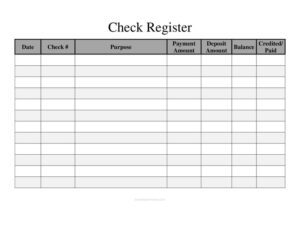
Large Check Register
Track every check, deposit, and balance with our free Large Check Register template, with extra space for high-volume accounts — free download.
PDF
DOC
5 downloads
0
likes
Download Files
- DOC
A Large Check Register is a wide-format ledger for recording every check you write, every deposit you make, and your running account balance — all on a single, roomy page. People most often use it to keep a clear, manual record of a busy checking account so they never overdraw or lose track of transactions. It’s free to download here in both PDF and DOCX, with no signup required.
What Is a Large Check Register?
A Large Check Register is an expanded version of the small register that comes tucked inside a checkbook. It gives you generous columns and many more rows so you can log a high volume of transactions without cramped handwriting. Individuals, bookkeepers, treasurers, and small business owners use it to document the date, check number, purpose, payment amount, deposit amount, and resulting balance for each entry. It functions as your own running ledger — independent of the bank’s statement — so you always know what you have actually spent and what should still be in the account. The “Credited/Paid” column lets you reconcile each line against your bank record.
When Do You Need a Large Check Register?
This format shines whenever a standard checkbook register runs out of room. Consider keeping one if you:
- Write or deposit dozens of transactions a month and need ample space to log them all clearly.
- Manage a household budget and want a single sheet to see income, spending, and the live balance.
- Serve as treasurer for a club, church, PTA, or small nonprofit that issues regular checks.
- Run a small business or side hustle and prefer a simple manual ledger before or alongside accounting software.
- Want to reconcile your records against a monthly bank statement line by line.
- Like to keep a paper backup in case of online banking errors, disputed charges, or fraud.
What a Large Check Register Should Have
A complete register makes every transaction easy to read and verify. The essentials are a date for chronological order, a check number to match physical checks, a purpose or description so you remember what each entry was, separate columns for payment amount (money out) and deposit amount (money in), a running balance that updates after every line, and a credited/paid checkbox or note for reconciliation. The large layout also benefits from clear column headers, enough rows to cover a full statement period, and a starting-balance line at the top so the math has a foundation.
How to Fill Out a Large Check Register
Work top to bottom, one row per transaction, using the actual columns on this template:
- Starting balance: Before your first entry, write your current account balance on the top line so every running total stays accurate.
- Date: Enter the transaction date — the day you wrote the check or made the deposit.
- Check #: Record the check number. For non-check items, write “DEP,” “ATM,” “EFT,” or “FEE” so the entry still has a label.
- Purpose: Briefly describe the transaction (for example, “Rent,” “Payroll,” or “Customer deposit”).
- Payment Amount: Enter the amount leaving the account for any check, withdrawal, or fee.
- Deposit Amount: Enter the amount added to the account for any deposit or credit.
- Balance: Subtract a payment or add a deposit to the previous balance and write the new total.
- Credited/Paid: Check or initial this column once the item clears and appears on your bank statement.
Tips for Accurate Reconciliation
Reconciling means matching your register against the bank’s record so the two agree. Once a month, set your register beside your statement and tick the Credited/Paid column for every transaction that has cleared. Any entry without a checkmark is “outstanding” — a check that hasn’t been cashed yet or a deposit still in transit. Add the bank’s ending balance, add deposits not yet shown, subtract outstanding checks, and the result should equal your register balance. If it doesn’t, look for transposed digits, a skipped fee, or a forgotten ATM withdrawal. Catching these promptly prevents bounced payments and overdraft charges.
Paper Register vs. Banking Apps
Online banking shows what has already cleared, but a register shows what will clear once every outstanding check is cashed — which is often a very different number. A check you mailed last week may not appear in your app for days, yet that money is effectively spent. Keeping a Large Check Register gives you the true “available” picture and a durable backup you control. Many people use both: the app for clearing confirmation and the register for forward-looking budgeting and dispute records.
Common Mistakes to Avoid
- Skipping the running balance: If you don’t update the balance after each line, the register loses its main value — knowing your true total at a glance.
- Forgetting fees and automatic payments: Bank charges, subscriptions, and EFT debits leave the account just like checks; log them too.
- Mixing payment and deposit columns: Putting an amount in the wrong column throws off every balance below it.
- Vague purpose notes: “Misc” tells you nothing months later; write a specific description.
- Never reconciling: An un-checked Credited/Paid column means errors and fraud can hide for months.
- Rounding amounts: Always record exact cents so your math matches the bank to the penny.
Frequently Asked Questions
What is a Large Check Register used for? It is a wide-format ledger for tracking checks written, deposits made, and your running account balance with plenty of space for high-volume accounts. Households, treasurers, and small businesses use it to stay organized and to reconcile against bank statements.
How do I calculate the balance column? Start with your current balance, then subtract each payment amount and add each deposit amount as you go. The number you write in the Balance column on every row is the previous balance adjusted by that row’s transaction.
What does the Credited/Paid column mean? It’s a reconciliation marker. You check or initial it once a transaction has cleared and appears on your bank statement, which lets you quickly spot outstanding checks and deposits still in transit.
Is a check register legally binding? A register itself is a personal or internal record, not a contract, so it isn’t legally binding the way a check or agreement is. However, it can serve as helpful supporting documentation if you ever need to demonstrate your transaction history during a dispute or audit.
Do I still need a register if I use online banking? Many people find it valuable because the register shows money you’ve committed but that hasn’t cleared yet, while the app only shows cleared activity. Keeping both gives you the most accurate, forward-looking view of available funds.
How much does this Large Check Register template cost? Nothing — it’s completely free to download here in PDF and DOCX formats with no signup required. Print the PDF for handwritten use or edit the DOCX to customize columns and add your account details.
This Large Check Register template is provided as a general example for informational purposes only and does not constitute financial, accounting, tax, or legal advice. Banking practices and recordkeeping requirements vary, so consult a qualified financial professional or your bank for guidance specific to your situation.
Official resource: for the rules that apply to your situation, see the Consumer Financial Protection Bureau.
Related Forms
- Daily Cash Sheet
- Employee Sales Commission Tracker
- Roommate Utilities Tracker
- Full Page Check Register
- Report Lost Or Stolen Credit Card
- List of Accounts
Browse more in Money.