
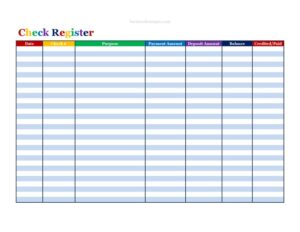
Check Register Colorful
Track every check, deposit, and balance with this free Check Register Colorful template — organized, easy to read, free download in PDF and DOCX.
PDF
DOCX
1 downloads
0
likes
Download Files
- DOCX
A Check Register Colorful is a simple ledger you use to record every check you write, deposit you make, and the running balance in your checking account. People most often use it to keep an accurate, at-a-glance picture of their available funds so they never bounce a payment or overdraw. You can download this template free in both PDF and DOCX, with no signup required.
What Is a Check Register Colorful?
A Check Register Colorful is a personal or small-business accounting tool that documents the flow of money through a checking account. It is typically maintained by the account holder, a bookkeeper, or anyone responsible for managing day-to-day finances. Each row captures a single transaction — the date, the check number, what the money was for, the amount paid or deposited, and the updated balance afterward. The “colorful” layout uses color-coded columns and rows so payments, deposits, and balances stand out visually, making the register faster to scan and harder to misread. Unlike a bank statement, which arrives after the fact, a check register is updated in real time as you transact, giving you a current and self-maintained record.
When Do You Need a Check Register Colorful?
This register is useful any time you want to stay on top of your account activity rather than relying solely on the bank’s reporting. Common situations include:
- You still write paper checks for rent, contractors, or vendors and need to track which checks have cleared.
- You want to reconcile your records against your monthly bank statement and catch errors or unauthorized charges.
- You run a small business or side hustle and need a clean log of payments and deposits for bookkeeping.
- You share an account with a spouse or partner and want a shared, easy-to-read ledger of who paid what.
- You’re budgeting closely and need to know your true available balance before making a purchase.
- You manage funds for a club, household, or nonprofit and must show where money came from and where it went.
What a Check Register Colorful Should Have
A complete and useful register includes a handful of essential columns that, together, tell the full story of each transaction. At minimum it should capture the transaction date, a reference such as a check number, a clear description of the purpose, separate columns for money going out and money coming in, a running balance, and a way to mark whether the item has cleared the bank. The color coding should distinguish debits from credits so you can spot patterns quickly. Leaving any of these elements out makes reconciliation harder and increases the chance of an arithmetic error carrying forward through every line that follows.
How to Fill Out a Check Register Colorful
- Date: Enter the date of the transaction — the day you wrote the check, made the deposit, or the charge posted.
- Check #: Write the check number for checks you’ve written. For deposits, electronic transfers, or debit purchases, note a short reference like “DEP,” “ACH,” or “DC” instead.
- Purpose: Describe the transaction briefly but clearly — for example, “Rent — May,” “Electric bill,” or “Client payment.” Specific notes help during reconciliation.
- Payment Amount: Record the amount leaving your account for any check, withdrawal, or debit. Leave this blank for deposits.
- Deposit Amount: Record money coming into the account, such as a paycheck or transfer. Leave this blank for payments.
- Balance: Update the running total by subtracting the payment amount or adding the deposit amount to the previous balance. This is your current available figure.
- Credited/Paid: Place a checkmark or “X” here once the transaction clears your bank, so you know which items are still outstanding.
How to Reconcile Your Register With Your Bank Statement
Reconciling means comparing your register against your bank’s record to confirm they agree. When your statement arrives, go line by line and mark the Credited/Paid column for every transaction that appears on the statement. Anything in your register that hasn’t cleared yet is an “outstanding” item — usually a recently written check that the payee hasn’t deposited. Add your outstanding deposits to and subtract your outstanding payments from the bank’s ending balance; the result should match your register’s balance. If the two numbers don’t agree, work backward through recent entries to find a transposed figure, a missed transaction, or a bank fee you forgot to log. Reconciling monthly keeps small errors from snowballing.
Tips for Keeping an Accurate Register
Record transactions as soon as they happen rather than relying on memory at the end of the week. Don’t forget recurring or automatic items like subscription charges, bank fees, interest earned, and ATM withdrawals — these are easy to overlook and throw off your balance. Use the Purpose column generously; a few extra words now save confusion later. If you make a mistake, draw a single line through it and write the correction on the next line rather than erasing, so your history stays intact. Keep completed registers with your other financial records for reference at tax time or in case of a dispute.
Common Mistakes to Avoid
- Forgetting to update the running balance after each entry, which leaves you guessing at your true available funds.
- Mixing payments and deposits in the same column instead of using the separate Payment and Deposit fields.
- Skipping small or automatic transactions like fees, tips, and subscription charges.
- Leaving the Purpose column blank, making it impossible to identify a charge weeks later.
- Never marking the Credited/Paid column, so you lose track of which checks are still outstanding.
- Doing the math in your head — a single arithmetic slip carries forward through every line below it.
Frequently Asked Questions
What is a check register used for? A check register is used to record every transaction in a checking account — checks written, deposits made, and other debits and credits — so you always know your current balance. It also serves as your personal record for reconciling against the bank statement and spotting errors or fraud.
How do I calculate the running balance? Start with your previous balance, then subtract any amount in the Payment column or add any amount in the Deposit column for the new transaction. The result goes in the Balance field and becomes the starting point for the next line.
What does the Credited/Paid column mean? That column is where you mark whether a transaction has actually cleared your bank. Checking it off as items post lets you quickly see which checks or deposits are still outstanding during reconciliation.
Can I use this register for a business account? Yes. The same columns work well for tracking small-business or side-business payments and deposits. For tax and bookkeeping purposes, just be diligent about the Purpose field so each entry is easy to categorize later.
Is this Check Register Colorful template really free? Yes, it is completely free to download in both PDF and DOCX formats with no signup or payment required. You can print the PDF for handwriting entries or edit the DOCX version on your computer.
Do I still need a register if I use online banking? Many people find it helpful even with online banking, because your register reflects pending checks before they clear. That gives you a more accurate picture of available funds than the bank’s posted balance alone.
This template is a general example provided for informational purposes only and is not financial, accounting, or tax advice. Account practices and record-keeping requirements can vary by institution and jurisdiction, so consult a qualified financial professional for guidance specific to your situation.
Official resource: for the rules that apply to your situation, see the Consumer Financial Protection Bureau.
Related Forms
- Bill Organizer
- Projected Sales
- Hobby Cash Envelope
- Appointment Of Collection Agent
- Debt Worksheet
- Bad Check Notice
Browse more in Money.