
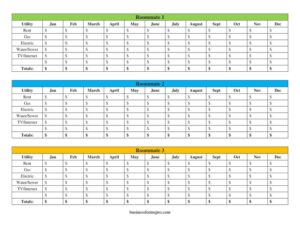
Roommate Utilities Tracker
Track shared rent, gas, electric, water and internet costs with this free Roommate Utilities Tracker template — free download in PDF and DOCX.
PDF
DOCX
0
likes
Download Files
- DOCX
A Roommate Utilities Tracker is a simple shared-expense spreadsheet that records what each roommate owes for rent and monthly utilities so the household can split bills fairly. People most often use it to keep a clear, month-by-month record of who paid what for rent, gas, electric, water/sewer, and TV/internet. You can download this Roommate Utilities Tracker for free in both PDF and DOCX formats, with no signup required.
What Is a Roommate Utilities Tracker?
A Roommate Utilities Tracker is a recurring expense log used by people who share a home or apartment. It lists each roommate across the top and breaks out the household’s regular bills — rent, gas, electric, water/sewer, and TV/internet — down the side, with a column for every month from January through December. It is not a lease or a legal contract; instead, it is a practical accounting tool that documents shared costs and helps everyone see at a glance whether they are paid up. Roommates, sublets, family members sharing a flat, or even small group houses use it to avoid the awkward guesswork of “who owes whom” at the end of each month.
When Do You Need a Roommate Utilities Tracker?
Anytime two or more people share household bills, a written record prevents disputes. Common situations include:
- Moving in with new roommates and wanting a transparent system for splitting rent and utilities from day one.
- Bills that vary month to month — like gas in winter or electric in summer — where a flat split feels unfair and you want to track real amounts.
- One roommate pays a bill and the others reimburse, so you need to log who fronted which utility and who still owes.
- A three-person household where rent and TV/internet are split evenly but other utilities shift depending on usage.
- End-of-year reconciliation, when you want a full annual picture of total household spending and each person’s share.
- A roommate moving out mid-year, when you need a clean record of what was paid and what remains outstanding.
What a Roommate Utilities Tracker Should Have
A complete tracker captures both who shares the costs and what those costs are, organized so totals are easy to calculate. The key elements are: the names of each roommate (this template fits up to three); a row for each utility type — rent, gas, electric, water/sewer, and TV/internet; a column for each month, January through December; and a totals row or column so you can sum spending per category, per month, or per person. The strongest trackers also note the due date or payment date and who actually paid, so reimbursement is straightforward. Keeping it consistent month after month is what turns the tracker from a one-off note into a reliable financial record everyone can trust.
How to Fill Out a Roommate Utilities Tracker
- Enter the roommates. Fill in Roommate 1, Roommate 2, and Roommate 3 with the full names of everyone sharing the household expenses.
- List the utilities. The Utility column already includes the standard categories: Rent, Gas, Electric, Water/Sewer, and TV/Internet. Add or rename rows if your household has other shared costs.
- Pick the month. Use the columns for Jan, Feb, March, April, May, June, July, August, Sept, Oct, Nov, and Dec to record the period the amounts apply to.
- Record each bill amount. For the chosen month, enter the actual dollar figure for Rent, then Gas, Electric, Water/Sewer, and TV/Internet as each statement arrives.
- Note each roommate’s share. Under each name, write the portion that person owes or paid for that utility — either an even split or a usage-based amount.
- Calculate the Totals. Sum each utility row and each monthly column in the Totals fields to see overall spending and each roommate’s running balance.
How to Split the Costs Fairly
There is no single “correct” way to divide shared bills — choose the method everyone agrees on before the first payment. An equal split divides each utility evenly among all roommates and works well when usage is similar. A usage-based split assigns more of a bill to whoever uses it most — for example, charging a roommate who works from home a larger share of electric and internet. Some households use a room-size split, where rent is weighted by the square footage or quality of each bedroom. Whatever you pick, write the agreement down and apply it consistently in the tracker so the numbers always reflect the same rules.
Tips for Keeping the Tracker Accurate
Update the tracker the moment a bill is paid rather than waiting until month’s end, when amounts are easy to forget. Keep digital copies of the underlying statements so any disputed figure can be verified. Set a regular check-in — payday or the first of the month — to settle balances and reset for the new period. If you handle reimbursements through a payment app, note the transaction date in the tracker so it matches your records. At year-end, review the Totals row to spot trends, such as seasonal spikes, and to plan a fairer budget for the months ahead.
Common Mistakes to Avoid
- Logging estimates instead of actual bills — always enter the real amount from the statement, not a guess.
- Forgetting to record who paid, which makes reimbursement confusing and breeds resentment.
- Mixing months by entering a bill in the wrong column, throwing off the monthly totals.
- Changing the split method midway without telling everyone, so the figures stop being consistent.
- Skipping the totals, which defeats the purpose of seeing each person’s true share.
- Relying on memory or text messages rather than keeping one shared, agreed-upon tracker.
Frequently Asked Questions
Is the Roommate Utilities Tracker free to download? Yes. You can download this tracker completely free in both PDF and DOCX formats, with no signup or account required. Use the editable DOCX version if you want to enter amounts on your computer, or print the PDF to fill it in by hand.
How do I split utilities fairly between roommates? The most common methods are an equal split, a usage-based split, or a split weighted by room size. Agree on the method before the first bill and apply it consistently in the tracker so the numbers stay fair and predictable for everyone.
Can I use this tracker for fewer or more than three roommates? Yes. The template includes three roommate columns, but in the DOCX version you can add or remove columns to match your household. For a single roommate pair, simply leave the third column blank.
Is a utilities tracker a legally binding document? No. It is a personal accounting tool that records shared expenses, not a lease or contract. For legally binding obligations between roommates, you would need a separate written roommate agreement signed by everyone.
What utilities should I include? This template covers the most common shared costs — rent, gas, electric, water/sewer, and TV/internet. You can add rows for other recurring expenses such as trash service, parking, or shared subscriptions if your household splits them.
How often should I update the tracker? Update it each time a bill arrives or is paid, ideally at least once a month. Regular entries keep the totals accurate and make it easy to settle balances on a consistent schedule, such as the first of every month.
This Roommate Utilities Tracker template is provided as a general example for informational purposes only and is not legal, financial, or tax advice. Rules and rental obligations vary by jurisdiction and by the terms of your lease — consult a qualified professional or your landlord for guidance specific to your situation.
Official resource: for the rules that apply to your situation, see the Consumer Financial Protection Bureau.
Related Forms
- Kids Cash Envelope
- Hobby Cash Envelope
- Brokerage Accounts Ledger
- Credit Card History
- Emergency Cash Envelope
- Overdue Account History
Browse more in Money.