
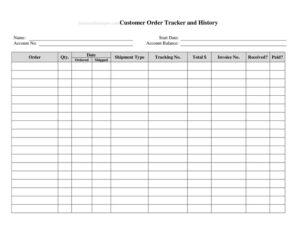
Customer Order Tracker
Track every customer order, payment, and delivery with this free Customer Order Tracker template, available as a free download in PDF and DOCX.
PDF
DOCX
0
likes
Download Files
- DOCX
A Customer Order Tracker is a simple record-keeping sheet that lets a business log every customer order from the moment it is placed through to fulfillment and payment. People most often reach for it to stop orders from slipping through the cracks during busy periods. You can download this template free in PDF and DOCX, with no signup required.
What Is a Customer Order Tracker?
A Customer Order Tracker is a document used by small businesses, online sellers, and service providers to monitor incoming orders in one organized place. It typically lists each customer, the items they purchased, the order date, the amount due, the payment status, and the shipping or delivery progress. Rather than relying on scattered emails or memory, the tracker gives the owner a single, at-a-glance view of who has ordered what and where each order stands. It serves both an operational purpose, helping staff fulfill orders correctly, and a financial one, helping the business see which orders are paid, partially paid, or still outstanding so cash flow stays clear.
When Do You Need a Customer Order Tracker?
This tracker earns its keep any time orders start coming in faster than you can hold them in your head. Common situations include:
- Running an online shop, Etsy store, or social-media-based business where orders arrive throughout the day from different channels.
- Managing a seasonal rush such as the holidays, a product launch, or a craft-fair pre-order list when volume spikes.
- Handling custom or made-to-order items that each move through several production and shipping stages.
- Tracking partial payments or deposits, so you know which customers still owe a balance before delivery.
- Coordinating a small team, where everyone needs to see which orders are packed, shipped, or still open.
- Reconciling sales at month-end and matching deliveries against payments received.
Types of Order Trackers
Although the core idea is the same, businesses adapt the tracker to fit their workflow. A retail or e-commerce tracker focuses on items, quantities, and shipping dates. A service-based tracker emphasizes appointment or completion dates rather than shipment. A wholesale or bulk tracker adds purchase-order numbers and longer payment terms. This template is general enough to cover all of these — you simply use the columns that apply and ignore the rest.
What a Customer Order Tracker Should Have
A useful tracker captures enough detail to act on an order without being so cluttered that it slows you down. The essentials are an order identifier, the customer’s name and contact, the date the order was placed, a description of what was ordered with quantity, the total amount and payment status, and the fulfillment or delivery status. Many trackers also reserve a notes column for special instructions, discounts, or follow-up reminders. The goal is for any team member to glance at one row and understand the full picture of a single order.
How to Fill Out a Customer Order Tracker
Work through the sheet one row per order, completing the columns from left to right:
- Order number / ID: Assign a unique reference (sequential numbers or a date-based code) so you can find the order again quickly.
- Order date: Record the day the order was placed; this anchors any delivery deadlines and payment terms.
- Customer name: Enter the buyer’s full name or business name exactly as it appears on the order.
- Contact details: Add a phone number or email so you can reach the customer about questions or delays.
- Item / description: List the products or services ordered, including size, color, or variant where it matters.
- Quantity: Note how many of each item, which feeds into the total and your inventory.
- Order total / amount: Enter the price due, including any tax or shipping charges.
- Payment status: Mark whether the order is paid, partially paid (note the balance), or unpaid.
- Fulfillment / delivery status: Update this as the order moves from pending to packed, shipped, or delivered.
- Notes: Capture special requests, tracking numbers, or follow-up dates.
Tips for Keeping Your Tracker Accurate
A tracker is only as good as the habit behind it. Update it the moment something changes — when a payment lands or a parcel ships — rather than at the end of the week, when details are easy to forget. Use consistent status labels (for example, always “Shipped” rather than mixing it with “Sent” or “Out”) so you can sort and filter reliably in the DOCX or spreadsheet version. Color-coding payment status can make overdue balances jump off the page. If you store customer contact details, keep the file secure and share it only with staff who need it, since it holds personal information.
How It Differs from an Invoice
People sometimes confuse an order tracker with an invoice, but they do different jobs. An invoice is a formal bill sent to one customer requesting payment for one transaction. An order tracker is an internal management tool that summarizes many orders across many customers so the business can see the whole pipeline at once. You might issue an invoice for each order and still log that order in your tracker to monitor whether it has been paid and shipped.
Common Mistakes to Avoid
- Leaving the payment status blank, which makes it impossible to tell which orders still owe money.
- Reusing or skipping order numbers, leading to duplicates and confusion when you search.
- Forgetting to update the delivery status after shipping, so an order looks open when it is actually done.
- Recording item descriptions too vaguely to fulfill correctly — always include variant details.
- Letting the tracker fall out of date by batching updates instead of logging changes as they happen.
- Keeping only one copy with no backup, risking the loss of your entire order history.
Frequently Asked Questions
What is a Customer Order Tracker used for? It is used to record and monitor every order a business receives, from the order date through payment and delivery. It gives you a single view of who ordered what, whether they have paid, and whether the order has shipped, which reduces missed or duplicated orders.
How do I fill out a Customer Order Tracker? Add one row for each order and complete the columns: order number, date, customer name and contact, item description, quantity, total, payment status, and delivery status. Update the payment and fulfillment columns whenever the status changes so the sheet always reflects reality.
Is this Customer Order Tracker free to download? Yes. You can download the template free in both PDF and DOCX formats from Business Forms Pro, with no signup or payment required. The editable DOCX version lets you add, rename, or remove columns to match your business.
Should I use the PDF or DOCX version? Use the editable DOCX (or import it into a spreadsheet) if you want to type entries, sort, and customize the columns on your computer. Choose the PDF if you prefer to print a clean copy and fill it in by hand or keep a fixed-layout reference.
Is a Customer Order Tracker a legal or financial document? It is an internal management tool, not a legally binding contract or an official accounting record by itself. That said, because it can support your bookkeeping and sales records, keep it accurate and consistent so it agrees with your invoices and receipts.
How is an order tracker different from a sales report? An order tracker is a live, ongoing list of individual orders and their current status, while a sales report usually summarizes totals over a period of time. You can build a sales report from the data in your tracker once orders are completed and paid.
This template is provided as a general example for informational purposes only and does not constitute legal, financial, or tax advice. Record-keeping and reporting requirements vary by jurisdiction and business type, so consult a qualified accountant or professional for guidance specific to your situation.
Official resource: for the rules that apply to your situation, see the Consumer Financial Protection Bureau.
Related Forms
- Full Page Check Register
- Client Income Tracker
- Fund Raiser Source Log
- Debt Payment Organizer
- Roommate Utilities Tracker
- Large Check Register
Browse more in Money.