
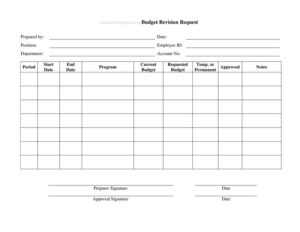
Budget Revision Request
Use our free Budget Revision Request form template to formally request and approve budget changes by line item — free download in PDF and DOCX.
PDF
DOCX
3 downloads
0
likes
Download Files
- DOCX
A Budget Revision Request is a formal document used to ask for a change to an approved budget — increasing, decreasing, or reallocating funds for a department, program, or account. People most often use it when actual spending no longer matches the original plan and a written, approvable record is needed. You can download this template free in PDF and DOCX, with no signup required.
What Is a Budget Revision Request?
A Budget Revision Request is an internal form that documents a proposed change to a previously approved budget and routes it for sign-off. It is typically prepared by a manager, project lead, or department staff member and submitted to a supervisor, finance team, or budget owner for approval. The form captures who is requesting the change, which account and program are affected, the current versus requested amounts, the budget period involved, and whether the change is temporary or permanent. Because it creates a clear paper trail with signatures from both the preparer and the approver, it protects everyone involved and keeps financial records accurate. It is the standard way organizations make controlled, accountable adjustments to budgets mid-cycle.
When Do You Need a Budget Revision Request?
Budgets are estimates, and circumstances shift. This form is used whenever an approved budget needs an authorized adjustment. Common situations include:
- A project runs over its original estimate and the program needs additional funds to finish on schedule.
- A department wants to move money from an underused line item to one that is over budget.
- Grant or program funding changes mid-period and the account allocation must be updated.
- A planned expense is canceled or delayed, freeing budget that should be formally reassigned.
- A temporary spending increase is needed to cover a one-time cost, such as seasonal demand or an unexpected repair.
- Leadership requests a permanent reallocation to reflect a long-term change in priorities or staffing.
Temporary vs. Permanent Revisions
The form asks you to mark whether the change is temporary or permanent, and the distinction matters. A temporary revision applies only to the current period — for example, borrowing from one quarter to cover an urgent expense, with the expectation that the budget returns to its baseline afterward. A permanent revision changes the budget going forward and usually signals a lasting shift in how funds are allocated. Marking this field correctly helps finance teams forecast accurately and prevents a one-time adjustment from being mistaken for a new ongoing baseline.
What a Budget Revision Request Should Have
A complete request leaves no ambiguity about what is changing and why. The essentials are:
- Preparer details — name, position, employee ID, and department for accountability.
- The specific account number and program affected by the revision.
- The budget period, including start and end dates.
- Both the current budget figure and the requested budget figure.
- Whether the change is temporary or permanent.
- A notes section explaining the justification for the change.
- Signature and date lines for both the preparer and the approver.
How to Fill Out a Budget Revision Request
- Prepared by: Enter your full name as the person submitting the request.
- Date: Record the date you complete the form.
- Position: State your job title so approvers know your role.
- Employee ID: Add your ID number for internal tracking.
- Department: Identify the department the budget belongs to.
- Account No: Enter the specific account or budget line being revised.
- Period: Note the budget cycle, such as the fiscal year or quarter.
- Start Date / End Date: Define the exact range the revision covers.
- Program: Name the program, project, or cost center affected.
- Current Budget: Write the existing approved amount.
- Requested Budget: Write the new amount you are requesting.
- Temp. or Permanent: Mark whether this is a one-time or lasting change.
- Approved: Leave for the approver to indicate the decision.
- Notes: Explain the reason and supporting details.
- Preparer Signature / Date and Approval Signature / Date: Sign and date, then route to the approver to do the same.
Tips for Getting Your Revision Approved
Approvers move faster when a request is clear and justified. Show the difference between the current and requested amounts in plain figures so the size of the change is obvious at a glance. In the notes field, explain not just what you want but why — tie the request to a concrete cause such as a price increase, a scope change, or a reallocation from a line that came in under budget. If funds are being moved rather than added, state where they are coming from so the net impact on the overall budget is transparent. Attach any supporting documents, like quotes or revised forecasts, when your organization allows. A well-documented request reduces back-and-forth and builds trust for future submissions.
Common Mistakes to Avoid
- Leaving the notes field blank — without a justification, approvers have no basis to say yes.
- Entering the wrong account number, which can route funds to the incorrect line.
- Confusing temporary and permanent changes, which distorts future forecasting.
- Omitting the period or start and end dates, so the revision’s scope is unclear.
- Submitting without the preparer’s signature, leaving the request incomplete.
- Requesting a change without confirming the current budget figure is accurate first.
Frequently Asked Questions
What is a Budget Revision Request used for? It is used to formally propose and approve a change to an existing approved budget, whether that means adding funds, reducing them, or reallocating money between line items. The form documents who requested the change, the amounts involved, and who approved it, creating an accountable record.
How do I fill out a Budget Revision Request? Start with your preparer details, then identify the account, program, and budget period being changed. Enter the current and requested amounts, mark whether the change is temporary or permanent, explain your reasoning in the notes, and sign before routing it to the approver.
What is the difference between a temporary and permanent revision? A temporary revision applies only to the current budget period and is expected to return to baseline afterward, while a permanent revision changes the budget going forward. Marking this field correctly helps your finance team forecast accurately.
Does a Budget Revision Request need to be approved by someone? Yes — the form includes an approval signature line because the change is not effective until an authorized person signs off. Who that approver is depends on your organization’s spending policies and approval thresholds.
Is this form legally binding? It is an internal control document rather than a legal contract, but once signed by an authorized approver it serves as an official authorization within your organization. Treat it as a binding instruction for accounting purposes and keep a copy on file.
How much does this template cost? Nothing — this Budget Revision Request template is completely free to download in both PDF and DOCX formats, with no signup or account required. You can customize the fields to match your organization’s accounts and approval workflow.
This template is a general example provided for informational purposes only and is not legal, financial, or tax advice. Budgeting policies, approval thresholds, and reporting requirements vary by organization and jurisdiction — consult your finance department or a qualified professional before relying on it.
Official resource: for the rules that apply to your situation, see the Consumer Financial Protection Bureau.
Related Forms
- Daily Cash Sheet
- Profit And Loss Worksheet
- Monthly Receipts List
- Hair Cash Envelope
- Debt Repayment Plan
- Christmas Cash Envelope
Browse more in Money.