
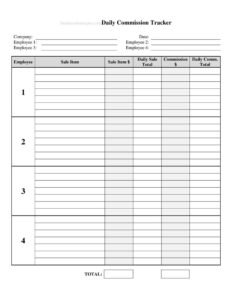
Daily Sales Commission Tracker
Track daily sales, rates, and earned commissions with this free Daily Sales Commission Tracker template, available as a free PDF and DOCX download.
PDF
DOCX
2 downloads
0
likes
Download Files
- DOCX
A Daily Sales Commission Tracker is a simple worksheet that records each day’s sales activity and calculates the commission earned on those sales. People most often use it to keep a clear, running record of how much they have sold and what they are owed, so payday holds no surprises. It is free to download here in both PDF and DOCX formats, with no signup required.
What Is a Daily Sales Commission Tracker?
A Daily Sales Commission Tracker is a document used by salespeople, account representatives, retail staff, and small business owners to log sales transactions day by day and apply a commission rate to calculate earnings. It captures the date, the customer or order, the sale amount, the applicable commission percentage or flat rate, and the resulting commission figure. Managers may also use it to reconcile payroll, while independent reps rely on it to verify their own income. In short, it documents the link between activity and pay, turning scattered sales into an organized, totaled record that both employee and employer can trust when it comes time to settle commissions.
When Do You Need a Daily Sales Commission Tracker?
This tracker is useful any time pay depends on sales output rather than a fixed wage alone. Common situations include:
- Commission-based sales roles where reps earn a percentage of each deal and need to confirm their paycheck matches their performance.
- Retail or showroom floors where multiple associates split sales and each wants an accurate personal log of what they closed.
- Real estate, automotive, or insurance work involving larger, less frequent transactions that must be tracked individually.
- Small business owners who pay a sales team and want a daily reconciliation tool before running payroll.
- Freelancers and independent contractors who earn referral fees or commissions and need records for invoicing and taxes.
- Disputes or audits where a written, dated breakdown of sales and rates resolves disagreements over what was earned.
What a Daily Sales Commission Tracker Should Have
A complete tracker leaves no ambiguity about how each commission figure was reached. It should identify who made the sale (the salesperson name), when (the date), and what was sold (a product, order, or customer reference). It must show the sale amount, the commission rate applied, and the commission earned for each line. A running or daily total ties the entries together, and a notes column captures special cases such as returns, split deals, or tiered rates. Finally, space for the pay period and a signature or approval line makes the record useful for payroll and easy to verify later.
How to Fill Out a Daily Sales Commission Tracker
- Enter your name and the period. Write the salesperson’s full name and the date range the sheet covers, such as a single day, week, or pay period.
- Log the date of each sale. In the first column of each row, record the calendar date the transaction occurred so entries stay in chronological order.
- Describe the sale. Note the product, service, order number, or customer name so the line item can be matched to records later.
- Record the sale amount. Enter the gross or net sale value used as the basis for commission, being consistent about which figure you use.
- Add the commission rate. Write the percentage or flat amount that applies to that sale, accounting for any tiered or special rates.
- Calculate commission earned. Multiply the sale amount by the rate and enter the result, or copy a flat fee directly.
- Use the notes column for returns, splits, bonuses, or pending payments.
- Total the column. Sum the commission earned to get your daily or period total, then have it reviewed or signed if required.
Tips for Keeping an Accurate Commission Log
Fill the tracker in at the end of each business day rather than reconstructing a week from memory; details fade fast and small errors compound. Decide upfront whether commissions are based on gross sales, net sales after discounts, or collected revenue, and apply that rule consistently across every line. Keep the original sales receipts or order confirmations alongside the sheet so each figure can be backed up. If your plan uses tiered rates or bonuses for hitting targets, note the threshold in the notes column so you can see exactly why a rate changed. Storing both a digital DOCX version and a printed copy gives you a backup and a signable record.
How It Differs From a Pay Stub or Invoice
A Daily Sales Commission Tracker is a working record you maintain, not an official payment document. A pay stub is issued by an employer and reflects what was actually paid after taxes and deductions, while an invoice is a formal request for payment sent to a client. The tracker sits earlier in the process: it gathers the raw daily data that feeds those documents and lets you verify them. Think of it as your source of truth for checking whether a stub or commission statement is correct before money changes hands.
Common Mistakes to Avoid
- Mixing up the commission basis — switching between gross and net sale amounts produces inconsistent totals.
- Skipping the date on entries, which makes it impossible to tie sales to a specific pay period or shift.
- Forgetting to subtract returns or cancellations, leaving commissions on the books for sales that fell through.
- Applying the wrong rate when tiers, promotions, or product-specific rates are in play.
- Math errors in the commission column — always double-check totals before submitting for payroll.
- Not keeping a backup copy, so a lost or damaged sheet erases your record of what you earned.
Frequently Asked Questions
What is a Daily Sales Commission Tracker used for? It is used to record each sale, the rate that applies, and the commission earned on a daily basis. Salespeople use it to verify their pay, and managers use it to reconcile payroll. It turns daily activity into an organized, totaled record everyone can trust.
How do I calculate commission on the tracker? Multiply the sale amount by the commission rate for each line — for example, a $2,000 sale at 5% earns $100. For flat-fee structures, simply enter the set amount per sale. Add the commission column to get your daily or period total.
Is this tracker legally binding? On its own, the tracker is a record-keeping tool rather than a binding contract. The actual commission terms come from your employment agreement or commission plan. However, a signed and dated tracker can serve as supporting evidence if a dispute arises over what was sold and earned.
Can I use it for multiple salespeople? You can keep a separate sheet per person, which is cleanest for individual pay verification, or add a salesperson column to track a team on one sheet. For payroll, a per-person sheet usually makes reconciliation simpler and reduces mix-ups.
How much does this template cost? Nothing — it is completely free to download here in both PDF and DOCX formats, with no signup or payment required. You can print the PDF for daily handwritten logging or edit the DOCX to match your own commission structure.
Should I track gross or net sales? That depends on your commission agreement; some plans pay on gross sales while others pay on net revenue after discounts or returns. Confirm which basis your plan uses and apply it consistently to every line so your totals stay accurate and verifiable.
This template is provided as a general example for informational purposes only and is not legal, financial, or tax advice. Commission rules, wage laws, and payroll requirements vary by jurisdiction and by individual agreement, so consult a qualified professional or your employer’s policies for guidance specific to your situation.
Official resource: for the rules that apply to your situation, see the Consumer Financial Protection Bureau.
Related Forms
- Accounts Receivable Form
- Request Credit Card Chargeback
- Charity Tax Deduction Log
- Release Of Security Agreement
- Savings Passbook
- Debt Snowball Form
Browse more in Money.