
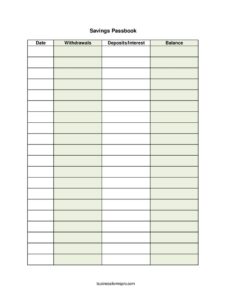
Savings Passbook
Track deposits, withdrawals, and balances with a free Savings Passbook template, available as a free download in PDF and DOCX formats.
PDF
XLSX
6 downloads
0
likes
Download Files
- XLSX
A Savings Passbook is a simple running record of money you put into and take out of a savings account, with a running balance after each entry. People most often use it to keep a clear, chronological log of deposits, interest, and withdrawals so they always know exactly how much they have saved. You can download this Savings Passbook template free in both PDF and DOCX formats, with no signup required.
What Is a Savings Passbook?
A Savings Passbook is a booklet-style or sheet-style ledger that documents every transaction on a savings account in date order. Traditionally issued by banks and credit unions, a passbook lists each deposit, interest credit, and withdrawal alongside the resulting balance, giving the account holder a portable, at-a-glance history of their savings. Today the same format works equally well for personal savings logs, family savings jars, club funds, cooperatives, and small organizations that want a tidy paper trail. The core purpose is transparency: anyone reading the passbook can see what came in, what went out, and what remains, without needing to log into an app or call the bank.
When Do You Need a Savings Passbook?
This template suits anyone who wants a clear, written history of their savings activity. Common situations include:
- Recording deposits and withdrawals for a personal or household savings account when you prefer paper over a banking app.
- Tracking a shared savings goal, such as a holiday fund, emergency fund, or down-payment fund, where multiple family members contribute.
- Managing a small savings club, rotating savings group, or community cooperative that collects regular contributions.
- Keeping a treasurer’s record for a club, class fund, or informal group that pools money for a project.
- Teaching children or students how saving and interest work by logging each transaction by hand.
- Reconciling against monthly bank statements to spot errors, missing interest, or unexpected fees.
What a Savings Passbook Should Have
A complete passbook keeps every entry consistent so the running balance stays accurate. The essentials are a date for each transaction, a column for deposits and interest (money added), a column for withdrawals (money removed), and a balance showing the total after that entry. A useful passbook also leaves room for a brief description of each line — for example, “payroll deposit” or “ATM withdrawal” — and ideally a header section identifying the account holder and account number. Whatever format you choose, the golden rule is that each row’s balance must equal the previous balance, plus any deposit or interest, minus any withdrawal.
How to Fill Out a Savings Passbook
This template uses four straightforward columns. Work down the page one row at a time, in chronological order:
- Date: Enter the date of the transaction in a consistent format (for example, MM/DD/YYYY). Always record entries in the order they happened so the balance flows correctly.
- Deposits/Interest: If money was added to the account — a cash deposit, a transfer in, or interest credited by the bank — write that amount in this column. Leave it blank for withdrawal-only rows.
- Withdrawals: If money left the account — a cash withdrawal, transfer out, or fee — record that amount here. Leave it blank for deposit-only rows.
- Balance: Calculate the new running total. Take the balance from the row above, add any deposit or interest, then subtract any withdrawal. Write the result here so each line shows the current account total.
Begin the very first row with your opening balance, then enter each transaction beneath it. Update the balance every single time, even for small amounts, so the passbook always matches reality.
Keeping the Balance Accurate
The strength of a passbook is its running balance, and the discipline of recalculating it after every entry is what catches mistakes early. After posting a transaction, double-check your arithmetic against the previous line. If you record interest, note the period it covers so you can verify it against your bank’s statement later. When the page fills, carry the closing balance forward as the opening balance on the next page or sheet. Periodically compare your passbook totals to your official bank statement — this reconciliation step is where you’ll discover a forgotten fee, an unrecorded deposit, or a transposed digit before it snowballs.
Passbook vs. Bank Statement
A passbook and a bank statement document the same activity but serve different roles. A statement is the bank’s official, periodic summary, generated automatically and authoritative for disputes. A passbook is your own continuous, hand-updated record that you control in real time. Many savers keep both: the passbook gives you an instant balance and a personal history, while the statement provides independent confirmation. Using them together makes reconciliation simple and gives you confidence that your figures are correct.
Common Mistakes to Avoid
- Forgetting to update the balance after a transaction, which breaks the running total for every row below it.
- Recording entries out of order, making the chronological balance impossible to verify.
- Putting a deposit in the withdrawals column (or vice versa), which throws the balance off by double the amount.
- Skipping small fees, ATM charges, or interest credits that quietly cause your passbook to drift from the bank’s figures.
- Using inconsistent date formats, which leads to confusion about the true order of events.
- Never reconciling against the bank statement, so errors go unnoticed for months.
Frequently Asked Questions
What is a Savings Passbook used for? It is used to keep a chronological record of all the deposits, interest, and withdrawals on a savings account, along with a running balance. This gives you an at-a-glance history of your savings without needing to check an app or statement. It is equally useful for personal accounts, family savings goals, and small club or group funds.
How do I fill out a Savings Passbook? Start with your opening balance on the first row, then enter each transaction in date order. For every entry, record the date, the deposit or interest in one column or the withdrawal in another, then recalculate the balance by adding deposits and subtracting withdrawals from the prior balance. Update the balance after every single transaction so it always stays current.
Is a Savings Passbook an official bank document? Traditionally, banks and credit unions issued and stamped passbooks as official records. This template is a personal or organizational tracking tool, not a bank-issued document, so it does not replace your official bank statement. It is best used alongside your statements to keep your own clear, real-time record.
How is a passbook different from a bank statement? A bank statement is the institution’s official periodic summary, while a passbook is your own continuous, manually updated log. The passbook gives you an instant balance and personal history; the statement provides independent confirmation. Comparing the two regularly helps you catch errors and missing entries.
Can I use this passbook for a savings club or group fund? Yes. The four-column format works well for treasurers tracking contributions, withdrawals, and interest for a club, cooperative, or pooled fund. Just be consistent with dates and balances so every member can follow exactly where the money stands.
How much does this Savings Passbook template cost? It is completely free to download here in both PDF and DOCX formats, with no signup or payment required. You can print it for handwritten entries or edit the DOCX version on your computer. Use as many copies as you need for different accounts or goals.
This Savings Passbook template is a general example provided for informational purposes only and is not financial, tax, or legal advice. It does not replace official bank records, and account rules and interest calculations vary by institution and jurisdiction. For guidance specific to your situation, consult a qualified financial professional or your bank.
Official resource: for the rules that apply to your situation, see the Consumer Financial Protection Bureau.
Related Forms
- Debt Payment Organizer
- Roommate Utilities Tracker
- Payment Calculator per $1000
- Pocket Payment Calculator
- Accounts Receivable Ledger
- Daily Cash Sheet
Browse more in Money.