
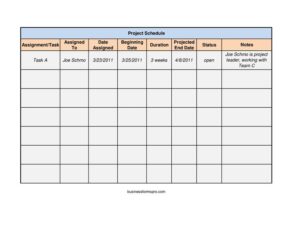
Project Schedule
Plan and track every task with this free Project Schedule template, organizing assignments, owners, dates, and status in one clear sheet — free download.
PDF
XLSX
3 downloads
0
likes
Download Files
- XLSX
A Project Schedule is a planning document that lists every task in a project alongside who owns it, when it starts, how long it takes, and where it currently stands. People most often use it to keep a multi-step project on track and visible to the whole team. You can download this Project Schedule template free in PDF and DOCX, with no signup required.
What Is a Project Schedule?
A Project Schedule is a structured list that turns a project plan into a timeline of concrete, assignable work. It is typically created by a project manager, team lead, or coordinator and shared with everyone involved in delivery. The schedule documents each assignment or task, the person responsible, the dates the work begins and is expected to finish, its duration, and its current status. Unlike a vague to-do list, a proper schedule connects ownership to dates so progress can be measured against a plan. It serves as a single source of truth that managers use for check-ins, that team members use to know their priorities, and that stakeholders use to see whether the project is on time.
When Do You Need a Project Schedule?
Almost any effort with more than a handful of steps benefits from a written schedule. Common situations include:
- Launching a new initiative — breaking a big goal into tasks with owners and deadlines so nothing falls through the cracks.
- Coordinating a team — when several people work in parallel and need to see who is responsible for what and by when.
- Client or vendor projects — providing a clear delivery timeline that sets expectations and protects against scope creep.
- Event or campaign planning — sequencing dependent tasks like booking, promotion, and setup so each begins on time.
- Recurring weekly or sprint work — tracking short-cycle assignments and updating status as items move from open to complete.
- Status reporting to leadership — summarizing progress at a glance using the status and notes columns instead of long emails.
What a Project Schedule Should Have
A complete Project Schedule should make each row self-explanatory so anyone can read it without further context. At minimum it should capture a clear task description, a single named owner, the date the work was assigned, a planned start and end date, the expected duration, a current status label, and a space for notes. The most useful schedules use consistent status terms — such as Not Started, In Progress, Blocked, and Complete — and keep durations and dates in the same format throughout. A header identifying the project name, the manager, and the date the schedule was last updated also helps readers trust that they are looking at the current version.
How to Fill Out a Project Schedule
Work through the template one task per row, completing each field:
- Assignment/Task: Write a short, action-oriented description of the work, such as “Draft homepage copy” or “Order materials.” Keep it specific enough that the owner knows exactly what “done” means.
- Assigned To: Name the single person responsible. Avoid listing a whole team here — split shared work into separate rows so accountability stays clear.
- Date Assigned: Record the date the task was handed off. This shows how long an item has been active and helps spot stalled work.
- Beginning Date: Enter the planned start date for the task, which may differ from the assigned date if work depends on something earlier.
- Duration: Note how long the task should take — for example, “3 days” or “2 weeks.”
- Projected End Date: Calculate the expected finish from the start date and duration, accounting for weekends or holidays where relevant.
- Status: Mark the current state using consistent labels so the whole sheet reads uniformly.
- Notes: Add blockers, dependencies, or links to deliverables that explain the status or flag a risk.
Keeping the Schedule Accurate Over Time
A Project Schedule only delivers value if it stays current, so treat it as a living document rather than a one-time plan. Set a regular cadence — a weekly review or a brief daily stand-up — where owners update their status and adjust projected end dates if reality has shifted. When a task slips, change the date and note the reason in the Notes column rather than quietly leaving an outdated estimate. Highlight or sort by status so blocked and overdue items rise to the top of attention. If a single task grows too large, break it into smaller rows with their own owners and dates. Saving the DOCX version in shared cloud storage lets the team edit one authoritative copy instead of trading conflicting versions by email.
Project Schedule vs. Project Plan
People sometimes use these terms interchangeably, but they serve different purposes. A project plan is the broader document covering scope, goals, budget, risks, and resources — the strategy behind the work. A Project Schedule is the operational timeline: the specific tasks, owners, and dates that turn the plan into day-to-day execution. You can think of the schedule as one section of the larger plan, focused entirely on sequencing and accountability. For small efforts, this schedule template may be all you need; for complex programs, it complements a fuller plan.
Common Mistakes to Avoid
- Assigning tasks to a group: shared ownership often means no ownership — name one accountable person per row.
- Leaving status fields blank or stale: an out-of-date status is worse than none because it misleads the team.
- Vague task descriptions: entries like “marketing” give the owner no clear definition of done.
- Ignoring dependencies: setting a start date without checking what must finish first creates impossible timelines.
- Overlooking duration vs. dates: a duration that doesn’t match the gap between start and end dates confuses readers.
- Never revisiting the schedule: a plan set once and forgotten quickly drifts from reality.
Frequently Asked Questions
What is a Project Schedule used for? It is used to organize a project’s tasks into a clear timeline that shows who is responsible for each item and when it should start and finish. Teams rely on it to track progress, spot delays early, and report status to stakeholders. It turns a general plan into actionable, accountable steps.
How do I fill out the Project Schedule template? List one task per row, then complete the assigned-to, date-assigned, beginning-date, duration, projected-end-date, status, and notes fields for each. Use consistent status labels and date formats throughout so the sheet is easy to scan. Update it on a regular schedule as work progresses.
Is this Project Schedule template free? Yes. You can download it free in both PDF and DOCX formats from Business Forms Pro, with no signup or payment required. The DOCX version is fully editable so you can add columns, rename fields, or insert your project name.
What’s the difference between duration and the projected end date? Duration is how long a task is expected to take, such as three days or two weeks, while the projected end date is the calendar date you expect it to finish. The projected end date is usually calculated from the beginning date plus the duration, adjusted for non-working days. Keeping the two consistent prevents confusing timelines.
How often should I update the schedule? Update it at least weekly, and ideally during any regular team check-in. Each owner should refresh the status of their tasks and revise projected end dates whenever the timeline changes. Frequent updates keep the document trustworthy and useful for decision-making.
Can I use this for personal or non-work projects? Absolutely. The same task, owner, dates, and status structure works well for home renovations, event planning, study schedules, or any multi-step effort. Simply adapt the field labels to fit your context in the editable DOCX file.
This Project Schedule template is provided as a general example for informational purposes only and does not constitute legal, financial, or professional project-management advice. Project requirements and best practices vary by organization and situation — consult a qualified professional for guidance specific to your needs.
Official resource: for the rules that apply to your situation, see the U.S. Small Business Administration.
Related Forms
- Phone Memo
- Meeting Agenda Simple
- Appointment Reminder Card
- Blue Appointment Reminder Card
- Recurring Appointment Reminder Card
- Hotel Reservation Form
Browse more in Office.