
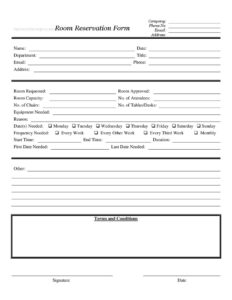
Room Reservation Form
Download a free Room Reservation Form template to book meeting rooms, set times, and request equipment with no signup — free PDF and DOCX download.
PDF
DOCX
6 downloads
0
likes
Download Files
- DOCX
A Room Reservation Form is a simple document used to request and confirm the use of a meeting room, conference space, or shared facility for a specific date and time. People use it most often to avoid double-booking and to make sure the right room, seating, and equipment are ready before a meeting begins. You can download this Room Reservation Form free in both PDF and DOCX formats — no signup required.
What Is a Room Reservation Form?
A Room Reservation Form is a request-and-approval document that records who wants to use a room, when, for how long, and for what purpose. It is typically issued by an office manager, facilities team, building administrator, or community organization, and completed by the person or department booking the space. The form documents the requested room, expected attendance, equipment needs, recurring schedule, and the terms the requester agrees to. Once approved, it serves as the official record that a particular room is held for a particular group, giving everyone a clear paper trail and reducing scheduling conflicts across departments, tenants, or members who share the same limited spaces.
When Do You Need a Room Reservation Form?
This form is useful any time access to a shared space must be coordinated and tracked. Common situations include:
- Internal meetings: A department needs a conference room for a weekly planning session or quarterly review.
- Training and workshops: Reserving a large room with tables, chairs, and a projector for staff onboarding or skills training.
- Recurring bookings: A team that meets every week or every other week and wants the same room held on a standing schedule.
- Community or nonprofit use: Outside groups requesting space in a church, library, school, or community center.
- Client-facing events: Booking a presentation room with specific seating capacity for a customer demo or board meeting.
- One-time special events: Reserving space for a celebration, interview panel, or all-hands gathering on a single date.
What a Room Reservation Form Should Have
A complete Room Reservation Form captures both the requester’s identity and the full details of the space being booked. The essential elements include contact and organizational information (company, name, department, title, phone, email, and address), the specifics of the request (room requested, room capacity, number of attendees, and the equipment or furniture needed), and the schedule (dates needed, days of the week, frequency, start and end times, and duration). It should also include an approval field so a facilities administrator can confirm or assign a room, a terms and conditions section, and a signature with date. Together these fields turn a casual request into a documented, accountable reservation.
How to Fill Out a Room Reservation Form
- Enter your Company, Phone No., Email, and Address at the top so the facilities team knows who is requesting.
- Add the requester’s Name, Date of the request, Department, Title, and personal Email, Phone, and Address.
- Specify the Room Requested; leave Room Approved for the administrator. Note the Room Capacity if known.
- Record the No. of Attendees, plus the No. of Chairs and No. of Tables/Desks you’ll need set up.
- List any Equipment Needed (projector, microphone, whiteboard) and a brief Reason for the booking.
- Enter the Date(s) Needed and check the applicable days: Monday through Sunday.
- Choose a Frequency Needed — Every Week, Every Other Week, Every Third Week, Monthly, or Other.
- Fill in the Start Time, End Time, and total Duration, then the First Date Needed and Last Date Needed.
- Read the Terms and Conditions, then add your Signature and the Date.
Handling Recurring and One-Time Reservations
One of the most useful parts of this form is the frequency section. For a single event, simply enter the same date in both the First Date Needed and Last Date Needed fields and leave the frequency options blank or select “Other” with a note. For a standing meeting, check the appropriate weekday boxes and a frequency such as Every Week or Monthly, then use the first and last date fields to define the start and end of the booking series. This prevents you from having to submit a separate form for each session and gives the facilities administrator a clear window to hold the room. If your needs change mid-series, submit a brief follow-up note referencing your original request rather than booking over an existing reservation.
Tips for Faster Approval
Approval moves quickly when your request is realistic and complete. Match your number of attendees to the room capacity so you aren’t assigned a space that’s too small or wastefully large. Be specific about equipment and furniture counts so the room is fully prepared before you arrive — vague requests often bounce back for clarification. Submit recurring bookings well in advance, since shared rooms fill up fastest for popular weekday morning slots. Finally, keep a copy of the signed and approved form; it is your evidence that the space was reserved if a scheduling dispute ever arises.
Common Mistakes to Avoid
- Skipping the approval step: A submitted form is only a request — the room isn’t yours until the Room Approved field is filled and confirmed.
- Underestimating attendees: Booking a room whose capacity is below your No. of Attendees leads to overcrowding and a scramble for a bigger space.
- Leaving equipment blank: Forgetting to list a projector or microphone often means arriving to a room that isn’t set up.
- Vague dates: Not completing First Date Needed and Last Date Needed for recurring bookings creates open-ended holds that conflict with others.
- Ignoring the terms: Signing without reading the Terms and Conditions can leave you responsible for cleanup, damage, or cancellation rules.
- Wrong time math: Entering start and end times that don’t match the stated duration causes overlapping bookings.
Frequently Asked Questions
What is a Room Reservation Form used for? It is used to request and confirm the use of a shared room — such as a conference room, training space, or community hall — for a specific date, time, and purpose. The form records who is booking, how many people will attend, what equipment is needed, and whether the request has been approved. This keeps shared spaces organized and prevents double-booking.
How do I fill out a Room Reservation Form? Start with your contact and department details, then specify the room requested, the number of attendees, and the chairs, tables, and equipment you need. Add the dates, days of the week, frequency, and start and end times, then sign and date after reviewing the terms. The administrator completes the Room Approved field to confirm your booking.
Does a Room Reservation Form need to be signed? Yes — the signature confirms that you have read and agreed to the Terms and Conditions for using the space. The date next to the signature establishes when the request was made. An approving administrator’s confirmation then completes the reservation.
Can I use this form for recurring meetings? Absolutely. The form includes weekday checkboxes and frequency options such as Every Week, Every Other Week, Every Third Week, and Monthly. Combine these with the First Date Needed and Last Date Needed fields to define a recurring booking series in a single request.
Is a Room Reservation Form legally binding? It is primarily an internal administrative document rather than a formal contract, though the Terms and Conditions section may create obligations such as cancellation notice or responsibility for damage. The specific weight it carries depends on your organization’s policies. Check with your facilities team if you have questions about liability.
How much does this Room Reservation Form cost? The template is completely free to download from Business Forms Pro in both PDF and DOCX formats, with no signup required. You can edit the DOCX version to add your organization’s logo, rooms, or specific terms. Use the PDF version when you want a clean, ready-to-print form.
This Room Reservation Form template is provided as a general example for informational purposes only and does not constitute legal, financial, or professional advice. Facility policies and requirements vary by organization and jurisdiction — consult your facilities administrator or a qualified professional before relying on this document.
Official resource: for the rules that apply to your situation, see the U.S. Small Business Administration.
Related Forms
- Insertion Order
- Annual Salary Increase
- Appointment Request Form
- Postal Holidays
- Purple Appointment Reminder Card
- Bank Holidays
Browse more in Office.