
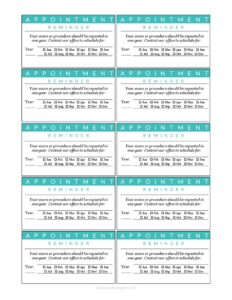
Annual Appointment Reminder Card
Download a free Annual Appointment Reminder Card template in PDF and DOCX to prompt clients to schedule their yearly visit—free download, no signup.
PDF
DOC
4 downloads
0
likes
Download Files
- DOC
An Annual Appointment Reminder Card is a short, printable card that tells a client, patient, or customer when their next yearly visit is due and how to book it. Businesses use it most often to bring people back for routine annual check-ups, services, or renewals before they forget. You can download this template free in both PDF and DOCX, with no signup required.
What Is an Annual Appointment Reminder Card?
An Annual Appointment Reminder Card is a compact notice—mailed, handed over, or printed—that prompts someone to schedule their next yearly appointment. It is commonly issued by dental offices, optometrists, veterinarians, salons, HVAC and auto service shops, and other businesses that run on a recurring annual cycle. The card documents who the appointment is for, roughly when it is due, the service or visit type, and the contact details needed to book. Unlike a confirmation, it is a gentle nudge sent in advance rather than a record of a fixed booking. Its single goal is simple: keep clients on schedule and reduce the number who lapse between yearly visits.
When Do You Need an Annual Appointment Reminder Card?
Reminder cards work for almost any business with a once-a-year service rhythm. Common situations include:
- Dental and medical practices reminding patients that their annual cleaning, exam, or wellness visit is coming due.
- Optometry offices prompting yearly eye exams and prescription updates.
- Veterinary clinics nudging pet owners about annual vaccinations and checkups.
- HVAC, plumbing, or auto shops reminding customers about yearly system tune-ups or inspections.
- Salons, spas, and wellness studios encouraging repeat annual or membership-renewal visits.
- Professional services such as tax preparers or financial advisors flagging an annual review.
In each case, the card arrives ahead of the due date so the recipient has time to call, reply, or book online before their slot fills.
What an Annual Appointment Reminder Card Should Have
A complete reminder card balances brevity with the details a client needs to act. The essentials are the business name and logo, the recipient’s name, the type of visit or service that is due, and the timeframe in which they should schedule. Just as important is a clear call to action: a phone number, website, or instruction telling them exactly how to book. Many cards also leave space for a suggested or pre-set appointment date and time, a short courtesy message, and the office hours. Keep the layout clean—if the card looks cluttered, the booking instruction gets lost. The whole point is that someone can glance at it and know what to do in seconds.
How to Fill Out an Annual Appointment Reminder Card
Because this is a flexible template, adapt each line to your business and the client you are reminding. Work through it in this order:
- Add your business identity. Enter your company or practice name, logo, and contact details at the top so the recipient instantly recognizes who sent the card.
- Fill in the recipient’s name. Personalize the card with the client or patient name to make it feel less like generic mail.
- State the service or visit type. Write what is due—”annual exam,” “yearly cleaning,” “system tune-up,” or similar.
- Enter the due timeframe. Note the month or window when the appointment should happen, or pencil in a specific suggested date and time.
- Add booking instructions. Include the phone number, website, or email and a short prompt such as “Please call to confirm.”
- List your hours. Add office or business hours so the client knows when they can reach you.
- Add a closing courtesy line. A brief “We look forward to seeing you” warms up the message.
Mailed Cards vs. Digital Reminders
This template is designed as a physical card, which still works well for older clients, mailing lists, or handing out at the end of a visit. A printed card sits on a fridge or desk as a visible cue all year. That said, many businesses pair it with digital follow-ups—a text or email a week before the due date—to catch people who set the card aside. You can use the same wording across both: print the card from the PDF for in-person handoffs and mailings, then copy the text into your reminder software for the digital version. Using consistent language keeps your messaging clear no matter how the client receives it.
Tips for Getting More Bookings
A reminder card only works if it drives action. Send it three to four weeks before the due date so clients have time to plan, but not so early that they forget. Make the call to action unmistakable—one phone number or one booking link, not a list of options. Keep the tone friendly and brief; a card crammed with text gets ignored. If you mail in batches, double-check that each name matches the correct due date, and consider adding a small incentive line, such as a reminder of a loyalty benefit, where appropriate for your business.
Common Mistakes to Avoid
- Leaving out a clear way to book. A reminder with no phone number or link gives the client nothing to act on.
- Sending it too late. If the card arrives the same week the visit is due, your schedule may already be full.
- Using a generic greeting. Cards without the recipient’s name feel like junk mail and get tossed.
- Forgetting the service type. “You’re due for an appointment” is weaker than naming the actual yearly visit.
- Overcrowding the design. Too much text buries the one message that matters: when and how to book.
- Not tracking responses. Without a way to log who booked, you can’t tell which clients still need a follow-up.
Frequently Asked Questions
What is an Annual Appointment Reminder Card used for? It is used to prompt a client, patient, or customer to schedule their next yearly visit before they forget. Businesses send it ahead of the due date so the recipient has time to call or book. It helps reduce lapsed clients and keeps a recurring service schedule full.
How do I fill out the reminder card? Add your business name and contact details, the recipient’s name, the type of service that is due, and the timeframe to book. Then include clear instructions on how to schedule, plus your hours. Keep it short so the booking prompt stands out.
Is this Annual Appointment Reminder Card free to download? Yes. You can download this template free in both PDF and DOCX formats, with no signup or payment required. Use the PDF for quick printing or the DOCX to customize the wording and layout for your business.
When should I send the reminder card? A common practice is to send it three to four weeks before the appointment is due. That gives the client enough time to plan and call while leaving room in your schedule. Sending too early risks it being forgotten and too late risks a full calendar.
Can I customize the card for my business? Absolutely. The DOCX version lets you add your logo, change the wording, adjust the service type, and match your branding. You can reuse the same text in email or text reminders for consistency.
Does a reminder card need to be mailed, or can it be digital? Either works. The template is designed as a printable card for mailing or handing out in person, but you can copy the content into a text or email reminder. Many businesses use both to reach more clients.
This template is a general example provided for informational purposes only and is not legal, financial, or professional advice. Communication and privacy requirements vary by industry and jurisdiction—consult a qualified professional to ensure your reminders comply with applicable rules.
Official resource: for the rules that apply to your situation, see the U.S. Small Business Administration.
Related Forms
- Market Map
- 2024 Postal Holidays
- Password List
- Meeting Agenda Simple
- Project Schedule
- Driver Delivery Schedule
Browse more in Office.