
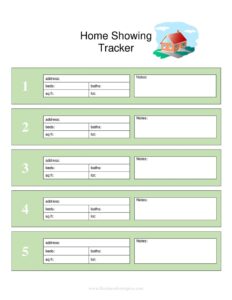
Home Showing Tracker
Track every home showing, agent feedback, and follow-up with our free Home Showing Tracker template—download in PDF or DOCX with no signup.
PDF
DOCX
8 downloads
0
likes
Download Files
- DOCX
A Home Showing Tracker is a simple log used to record every visit to a property that is for sale or for rent, capturing who toured the home, when, and what they thought. Most people use it to keep showings organized and to spot patterns in buyer feedback so they can adjust price or presentation. It’s free to download here in PDF and DOCX, with no signup required.
What Is a Home Showing Tracker?
A Home Showing Tracker is a record-keeping sheet used by home sellers, landlords, and real estate agents to document each time a prospective buyer or renter views a property. It typically lists the showing date and time, the visitor or agent’s name and contact details, how the lead was sourced, and any feedback or follow-up notes. Rather than relying on memory or scattered texts, the tracker consolidates this information into one organized place. It serves as both a planning tool and a feedback diary—helping you see how much interest a listing is generating, which marketing channels work best, and whether buyers consistently flag the same concerns about the property.
When Do You Need a Home Showing Tracker?
This tool is useful any time a property is being actively marketed and shown to multiple parties. Common situations include:
- Selling your own home (FSBO): When you list without an agent, you handle every showing yourself and need a way to log appointments and feedback.
- Working with a listing agent: Agents often share showing reports with sellers, and a tracker lets you keep your own running summary of activity.
- Renting out a unit: Landlords showing an apartment or house to several applicants can record who toured and which prospects seemed serious.
- An open house: Use the tracker as a sign-in and follow-up sheet to capture every attendee’s contact information.
- A listing that isn’t selling: When showings happen but offers don’t, the accumulated feedback helps you decide whether to adjust price, staging, or condition.
- Managing multiple properties: Investors and property managers can keep a separate tracker per listing to compare interest across their portfolio.
What a Home Showing Tracker Should Have
A complete tracker captures enough detail to be genuinely useful without becoming a chore to fill out. The essentials include the property address at the top so the sheet stays tied to one listing, the date and time of each showing, the name and contact information of the visitor or their agent, and the source of the lead (online listing, sign call, referral, or open house). Just as important are the feedback notes—what the prospect liked, disliked, or questioned—and a follow-up column to track whether you’ve reached back out and what came of it. A rating or interest-level field rounds it out, giving you a quick visual sense of which leads deserve attention.
How to Fill Out a Home Showing Tracker
Because this is a flexible log, fill it in row by row as showings happen:
- Enter the property address at the top of the sheet so the entire tracker is clearly assigned to one listing.
- Log the date and time of each showing as soon as it’s scheduled or completed, keeping entries in chronological order.
- Record the visitor’s name—the prospective buyer or renter—and, if applicable, the name of their real estate agent.
- Add contact details such as a phone number or email so you can follow up later.
- Note the lead source (for example, Zillow, a yard sign, a referral, or an open house) to track which channels drive traffic.
- Write feedback notes immediately after the showing while impressions are fresh—pricing comments, condition concerns, or features they loved.
- Assign an interest level or rating, like hot, warm, or cold, to prioritize follow-up.
- Update the follow-up column when you contact the prospect, noting the date and outcome (offer, second showing, or no interest).
Using Feedback to Improve Your Listing
The real power of a Home Showing Tracker emerges once you have several entries. Read the feedback column as a whole rather than reacting to any single comment. If three out of five visitors mention that the price feels high, that’s a signal worth taking seriously. If buyers repeatedly note a dated kitchen or a cluttered room, a modest improvement may pay off. Conversely, consistent praise for a feature tells you what to emphasize in your marketing. Tracking the lead source alongside this feedback also reveals where your serious buyers are coming from, helping you focus advertising dollars on the channels that actually produce showings and offers.
Tracker vs. Open House Sign-In Sheet
People sometimes confuse a showing tracker with an open house sign-in sheet, but they serve different purposes. A sign-in sheet is a single-event document used to capture attendee names and contacts during one open house. A Home Showing Tracker is an ongoing log that spans the entire marketing period and includes private showings, agent-accompanied tours, and follow-up status. You can certainly feed open house sign-in data into your tracker, but the tracker remains the master record of all activity on the listing from list date to close.
Common Mistakes to Avoid
- Filling it out from memory days later: Feedback fades fast—jot notes immediately after each showing for accuracy.
- Skipping the follow-up column: A promising lead can go cold simply because no one circled back; track every follow-up.
- Recording only positive feedback: Negative comments are the most valuable for fixing what’s holding the sale back.
- Forgetting to capture contact details: Without a phone or email, even an interested buyer becomes a dead end.
- Ignoring lead sources: If you don’t note where prospects came from, you can’t tell which marketing is working.
- Using one sheet for multiple properties: Keep a separate tracker per listing so data never gets tangled.
Frequently Asked Questions
What is a Home Showing Tracker used for? It’s a log for recording every showing of a property that’s for sale or rent, including who visited, when, how they found the listing, and their feedback. Sellers, landlords, and agents use it to stay organized and to spot trends that can help them adjust price or presentation.
How do I fill out a Home Showing Tracker? Add the property address at the top, then complete one row per showing with the date, visitor and agent names, contact info, lead source, feedback, an interest rating, and follow-up status. Filling it in right after each showing keeps the notes accurate and useful.
Is this tracker only for real estate agents? No. While agents use trackers regularly, the template is just as helpful for homeowners selling on their own and for landlords showing rental units. Anyone managing multiple visits to a property benefits from keeping the information in one place.
Does a Home Showing Tracker need to be signed or notarized? No. It is an internal organizational tool, not a contract or legal filing, so it requires no signatures, witnesses, or notarization. You simply use it to track activity and feedback during your marketing period.
How much does this template cost? Nothing—it’s a free download available in both PDF and DOCX formats with no signup required. Use the DOCX version if you’d like to add or remove columns to match how you manage your showings.
How long should I keep the tracker? Keep it at least until the property sells or rents and the transaction closes. Many sellers and landlords hold onto it afterward as a reference for future listings or to recall which marketing channels and improvements made the biggest difference.
This template is a general example provided for informational purposes only and does not constitute legal, financial, or real estate advice. Practices and disclosure requirements vary by jurisdiction—consult a qualified real estate professional or attorney for guidance specific to your situation.
Official resource: for the rules that apply to your situation, see HUD.
Related Forms
- Closed Sales Tracker
- Landlord Lease Renewal Letter
- Neighborhood Checklist
- Covid Eviction Moratorium Tenant
- Property Management Agreement
- Real Estate Listing Tracker
Browse more in Rental and Real Estate.