
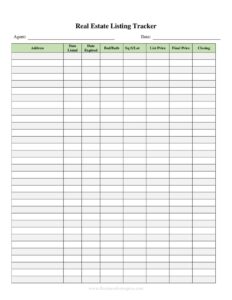
Real Estate Listing Tracker
Organize every property listing with this free Real Estate Listing Tracker template, available as a free download in PDF and DOCX for agents and brokers.
PDF
DOCX
2 downloads
0
likes
Download Files
- DOCX
A Real Estate Listing Tracker is a simple, organized document that helps agents, brokers, and investors keep tabs on every property they have listed for sale or rent in one consolidated place. People most often use it to avoid losing track of asking prices, showing activity, and follow-up deadlines across multiple active listings. It is free to download here in both PDF and DOCX formats, with no signup required.
What Is a Real Estate Listing Tracker?
A Real Estate Listing Tracker is a working spreadsheet-style form used by real estate professionals to record and monitor the status of each property listing from the moment it goes live until it closes or expires. It is typically maintained by a listing agent, a broker’s office, or a property manager, and it documents key details such as the property address, list price, listing and expiration dates, seller information, and current marketing status. Rather than serving as a legal contract, the tracker is an internal management tool that turns scattered notes, emails, and MLS printouts into a single reference sheet. It helps teams see at a glance which listings need attention, which are pending, and which have sold.
When Do You Need a Real Estate Listing Tracker?
This form earns its place whenever you are juggling more than one property and need a reliable way to see status at a glance. Common situations include:
- Managing multiple active listings as a busy agent who cannot keep every price and deadline in their head.
- Running a brokerage or team where several agents share a portfolio and need one updated source of truth.
- Preparing for weekly sales meetings where each listing’s showing count, feedback, and price reductions are reviewed.
- Tracking listing agreement expirations so you can renew, re-list, or release a property before the contract lapses.
- Reporting to sellers with a clean summary of activity, offers received, and days on market.
- Monitoring rental inventory for property managers handling vacancies, applications, and lease-up timelines.
Types of Information a Listing Tracker Captures
Most trackers blend property data, financial data, and activity data. Property data includes the address, type, and bedroom/bathroom count. Financial data covers the list price, any price changes, and commission terms. Activity data is where the real value lives: showing counts, buyer feedback, offers, and the current status. Some agents add a marketing column to record where the listing is advertised, while others include a column for the cooperating or selling agent once a property goes under contract.
What a Real Estate Listing Tracker Should Have
A complete tracker should let anyone scan a row and understand a listing instantly. At minimum it should include the property address, the seller or client name, the listing date and expiration date, the current list price, and a status field (active, pending, sold, expired, or withdrawn). Strong trackers also capture days on market, the number of showings, summarized buyer feedback, the agreed commission rate, and a notes column for follow-up tasks. Consistency matters more than complexity: pick a fixed set of status labels and date formats so the sheet stays sortable and easy to read across dozens of entries.
How to Fill Out a Real Estate Listing Tracker
- Property address: Enter the full street address, unit, city, and ZIP so each listing is uniquely identifiable.
- Listing/MLS number: Record the MLS or internal reference number to link the row back to the official listing.
- Seller/client name: Note the owner or client you represent for that property.
- Property type: Specify single-family, condo, multi-family, land, or rental, plus beds and baths if useful.
- List price: Enter the current asking price and log any reductions with the date they took effect.
- Listing date: Record the day the listing went live; this drives your days-on-market calculation.
- Expiration date: Note when the listing agreement ends so you can act before it lapses.
- Status: Mark it active, pending, under contract, sold, expired, or withdrawn.
- Showings/feedback: Tally showings and summarize buyer comments to guide price or staging adjustments.
- Notes/next steps: Capture follow-ups, offers received, and reminders to keep the listing moving.
Tips for Keeping Your Tracker Useful
A tracker only helps if it stays current, so build updating into your routine. Update status and showing counts on the same day they happen rather than batching them at month’s end, when details get fuzzy. Use a single, consistent date format and a short list of approved status labels so you can sort and filter without confusion. If you work on a team, decide who owns the tracker and how edits are logged. Review the sheet before every seller call so your conversation is grounded in current numbers, and archive sold or expired listings to a separate tab or section so your active view stays clean.
How It Differs From the MLS
The MLS is the official, public-facing database that markets your listing to other agents and buyers, while your tracker is a private management layer that sits on top of it. The MLS enforces strict data fields and rules; your tracker is flexible and can hold internal notes, seller mood, and follow-up reminders you would never publish. Think of the MLS as the storefront and the tracker as your back-office checklist. Many agents copy the MLS number and core facts into the tracker so the two systems stay linked without duplicating effort.
Common Mistakes to Avoid
- Letting it go stale: An outdated tracker is worse than none because it creates false confidence about a listing’s status.
- Inconsistent status labels: Mixing terms like “pending,” “under contract,” and “in escrow” makes the sheet impossible to sort.
- Skipping expiration dates: Missing a listing agreement’s end date can mean lost commissions or awkward renewal conversations.
- Ignoring feedback columns: Showing data and buyer comments are early warnings about pricing problems.
- Storing client data carelessly: Seller details deserve the same privacy and security as any other confidential record.
- Overcomplicating it: Too many columns discourage updates; keep only the fields you will actually maintain.
Frequently Asked Questions
What is a Real Estate Listing Tracker used for? It is an internal tool for monitoring the status, price, activity, and deadlines of every property you have listed. Agents and brokers use it to stay organized across multiple listings and to prepare for seller updates and team meetings. It complements, rather than replaces, the MLS.
Is this tracker a legal contract? No. The tracker is a management and record-keeping document, not a listing agreement or any binding contract. The actual legal relationship between an agent and a seller is governed by a separate signed listing agreement.
How do I fill it out for a new listing? Add a new row, enter the property address and MLS number, then record the seller name, list price, listing date, and expiration date. Set the status to active and update the showings, feedback, and notes columns as activity comes in.
Can I customize the columns? Yes. Because the template downloads in editable DOCX, you can add, rename, or remove columns to match your market, your brokerage’s terminology, or whether you focus on sales or rentals. Keep your status labels and date formats consistent so the sheet stays sortable.
How much does the template cost? It is completely free to download from Business Forms Pro in both PDF and DOCX formats, with no signup or payment required. You can use it for as many listings as you like.
How often should I update the tracker? Update it the same day events happen, especially status changes, price reductions, showings, and offers. A tracker that is refreshed in real time gives you accurate days-on-market figures and lets you walk into any seller conversation fully prepared.
This template is a general example provided for informational purposes only and is not legal, financial, or real estate advice. Listing rules, disclosure obligations, and recordkeeping requirements vary by state and local jurisdiction, so consult a qualified real estate broker, attorney, or other professional before relying on this document.
Official resource: for the rules that apply to your situation, see HUD.
Related Forms
- Complaint Letter Against Landlord
- Intent To Vacate Apartment
- Rental Agreement
- Tenant Lease Renewal Letter
- Reasonable Accommodation Request Wheelchair
- Lawn Care Form
Browse more in Rental and Real Estate.