
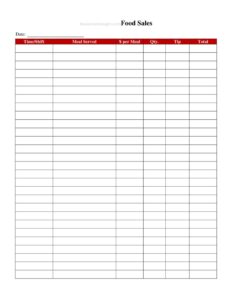
Daily Food Sales Log
Track daily restaurant revenue with our free Daily Food Sales Log template, designed to record sales, payments, and totals — free download in PDF and DOCX.
PDF
DOCX
2 downloads
1
likes
Download Files
- DOCX
A Daily Food Sales Log is a simple record that captures every food and beverage sale a restaurant makes in a single day, broken down by item, category, time, or payment type. Most operators reach for one because it gives a clean, end-of-day picture of how much money came in and where it came from — perfect for reconciling the till and spotting trends. You can download this Daily Food Sales Log free in both PDF and DOCX formats, with no signup required.
What Is a Daily Food Sales Log?
A Daily Food Sales Log is a one-page (or one-day) tracking sheet used by restaurants, cafés, food trucks, bakeries, and catering operations to document the value of food and drink sold over a single business day. It is typically filled out by a manager, shift lead, or owner at closing, drawing on register tapes, point-of-sale reports, and cash counts. The log records what was sold, when, by which channel, and how it was paid for. Its purpose is twofold: to provide an accurate daily revenue snapshot for bookkeeping, and to build a running history that reveals patterns in volume, popular items, and busy periods over time.
When Do You Need a Daily Food Sales Log?
This log is useful any time you need a reliable daily record of food revenue. Common situations include:
- Closing out each shift or day — reconciling the cash drawer and card receipts against recorded sales before locking up.
- Running a food truck or pop-up where there may be no full POS system and totals are tallied by hand.
- Tracking item performance to see which dishes, specials, or drinks sell best on a given day of the week.
- Preparing for bookkeeping or tax filing, giving your accountant clean daily figures rather than a shoebox of receipts.
- Monitoring sales tax collected so the taxable portion of each day is separated from net food revenue.
- Catering and event work, where each job or day needs its own documented sales total.
Types of Daily Sales Tracking
Not every restaurant logs sales the same way. A small bakery may track only total sales, cash versus card, and sales tax. A full-service restaurant might break the day into meal periods — breakfast, lunch, dinner — and split food from beverage and alcohol. A food truck may log by location or event. Choose the level of detail that matches how you actually run the business; the goal is consistency, so the same categories appear on every day’s log and the numbers stay comparable week over week.
What a Daily Food Sales Log Should Have
A complete log captures enough detail to reconcile the day and analyze it later. The core elements are the business name and date, a breakdown of sales by item or category, the quantity and price for each line, payment methods (cash, card, mobile, gift card), gross sales, discounts or refunds, sales tax collected, and a final net total. A space for the staff member who prepared the log and a notes line for unusual events — a power outage, a big party, a sold-out special — round out a record you can trust months later.
How to Fill Out a Daily Food Sales Log
Work through the log in order at the end of the business day:
- Enter the header: write your restaurant or business name, the date, and the day of the week so the record is easy to file and compare.
- List each item or category: record menu items or sales categories on separate rows — for example, entrées, appetizers, beverages, and desserts.
- Add quantity and unit price: note how many of each were sold and the price per unit, then multiply for the line total.
- Record payment methods: tally totals received as cash, credit/debit card, mobile pay, and gift cards so they reconcile against your drawer and processor.
- Subtract discounts and refunds: note any comps, voids, or returns that reduce gross sales.
- Calculate sales tax: enter the tax collected so it is separated from net food revenue.
- Total the day: add line totals for gross sales, then arrive at net sales after adjustments.
- Sign and add notes: have the closing staff member print and initial their name, and jot any notes that explain unusual numbers.
Reconciling and Filing the Log
The log only works if the numbers tie out. After totaling, compare the recorded sales against your POS report and the physical cash count. Any gap — an over or short drawer — should be noted on the same sheet while the day is fresh in memory, rather than discovered weeks later. File completed logs in date order, whether in a binder or scanned to a dated folder, so a full month can be tallied quickly. Many operators staple the day’s register tape or POS summary to the log as supporting documentation, which makes year-end bookkeeping and any future review far smoother.
Common Mistakes to Avoid
- Skipping days: a gap in the record makes weekly and monthly comparisons unreliable and harder to audit.
- Lumping tax into gross sales: always separate sales tax collected so your true food revenue is clear.
- Forgetting refunds and comps: unrecorded voids inflate sales and throw off your drawer reconciliation.
- Mixing payment types: failing to split cash from card totals makes it impossible to balance the till.
- Leaving it for later: filling the log days after the fact invites memory errors and lost receipts.
- No signature or notes: without the preparer’s name, you can’t trace questions back to the right shift.
Frequently Asked Questions
What is a Daily Food Sales Log used for? It is used to record all food and beverage sales for a single business day, broken down by item, payment type, and tax. Restaurants rely on it to reconcile the cash drawer, support their bookkeeping, and track which items and periods bring in the most revenue over time.
Who should fill out the log? Usually the closing manager, shift lead, or owner completes it at the end of the day. Whoever counts the drawer and pulls the POS report is in the best position to enter accurate figures and explain any discrepancies in the notes.
How is this different from a POS report? A POS report is generated automatically by your register software, while this log is a flexible, standardized sheet you can use with or without a POS — ideal for food trucks, markets, and small operations. Many businesses use both, attaching the POS summary to the handwritten log as backup.
Do I need to record sales tax separately? Yes, it is good practice to keep sales tax collected on its own line so your net food revenue is clear and tax remittance is easy. Tax rates and rules vary by jurisdiction, so check your local requirements.
Is this Daily Food Sales Log free to download? Yes. You can download it free in both PDF and DOCX formats from Business Forms Pro with no signup required. Use the PDF to print blank copies or the DOCX to customize categories to match your menu.
How long should I keep completed sales logs? Many businesses retain financial records for several years to support tax filings and reviews, but retention periods vary. Confirm the recommended period with your accountant or local tax authority and store the logs securely in date order.
This Daily Food Sales Log template is a general example provided for informational purposes only and does not constitute legal, financial, or tax advice. Recordkeeping and sales tax requirements vary by jurisdiction — consult a qualified accountant or tax professional for guidance specific to your business.
Related Forms
- Employees Only Sign
- Restaurant Meal Comp Or Discount Log
- Lunch Menu Casual
- Freezer Temperature Log
- Drink Menu
- Pantry Inventory Log
Browse more in Restaurant.