
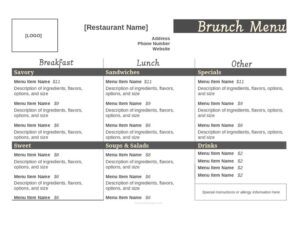
Brunch Menu
Create a polished brunch menu with our free Brunch Menu template, organized by section and easy to edit — free download in PDF and DOCX.
DOC
3 downloads
0
likes
Download Files
- DOC
A Brunch Menu is a single-page restaurant document that lists the food and drink offerings served during the late-morning-to-early-afternoon brunch service. Most operators reach for one when launching a weekend brunch program or refreshing seasonal dishes, and you can grab this template as a free download in both PDF and DOCX formats with no signup required.
What Is a Brunch Menu?
A Brunch Menu is the printed or digital list a cafe, bistro, hotel, or full-service restaurant gives guests during brunch hours — typically a hybrid of breakfast and lunch served between roughly 10 a.m. and 2 p.m. It is created by the owner, chef, or front-of-house manager and presented to diners at the table, posted online, or displayed at the host stand. The document organizes dishes into logical sections such as starters, mains, sweets, sides, and beverages, with names, short descriptions, and prices. Beyond simply listing food, a well-built Brunch Menu sets the tone for the meal, highlights signature plates and cocktails, and helps servers upsell. It functions as both a sales tool and a clear reference for kitchen and guests alike.
When Do You Need a Brunch Menu?
A dedicated brunch menu is worth building whenever your offering differs from your regular breakfast or dinner service. Common situations include:
- Launching weekend brunch — rolling out a Saturday and Sunday program that needs its own distinct lineup and pricing.
- Seasonal refreshes — swapping in spring asparagus dishes, summer fruit plates, or autumn squash specials a few times a year.
- Bottomless or prix-fixe events — promoting bottomless mimosas, a fixed-price brunch package, or holiday brunch buffets for Mother’s Day or Easter.
- Pop-ups and catering — a one-off brunch pop-up, private event, or catered office gathering that requires a tailored handout.
- New restaurant openings — a first-time cafe or bistro establishing its brunch identity from day one.
- Online ordering and delivery — a clean, printable menu to upload to your website, third-party apps, or QR-code table displays.
What a Brunch Menu Should Have
A complete brunch menu balances clarity with appetite appeal. The essentials include a header with your restaurant name and brunch service hours; clearly labeled sections (for example, Starters, Egg Dishes, Sweet Plates, Sides, and Drinks); each item’s name followed by a concise, mouthwatering description; accurate prices; and notations for dietary options such as vegetarian, vegan, or gluten-free. Many operators also add a beverage section covering coffee, fresh juices, and brunch cocktails like mimosas and bloody marys. A short footer noting service times, allergen disclaimers, automatic gratuity policies for large parties, or sourcing notes rounds out the page. Keep the design uncluttered so guests can scan it in seconds.
How to Fill Out a Brunch Menu
Because this is an open template, build it from the top down so the structure stays clean and legible:
- Add your header. Enter your restaurant or cafe name, an optional logo, and the brunch service hours and days at the top of the page.
- Create your sections. Decide on category headings — common ones are Starters, Eggs & Mains, Sweet Plates, Sides, and Beverages — and place them in the order you want guests to read.
- List each dish. Under each section, type the item name, then a one-line description naming the key ingredients and preparation.
- Set prices. Add a clear price beside each item, aligned consistently down the right side or after the description.
- Flag dietary options. Mark vegetarian (V), vegan (VG), and gluten-free (GF) items with simple symbols and add a legend.
- Build the drinks section. List coffee, tea, juices, and brunch cocktails with their prices, noting any bottomless or add-on options.
- Finish with a footer. Include service times, allergen language, and any large-party gratuity note.
- Proofread and export. Check spelling, prices, and spacing, then save as PDF for printing or keep DOCX for future edits.
Designing a Menu That Sells
The way you present dishes influences what guests order. Place your most profitable or signature plates near the top of each section or in a visually boxed “house favorites” area, where eyes naturally land first. Use vivid but honest descriptions — “buttermilk pancakes with whipped maple butter and seasonal berries” reads better than “pancakes.” Avoid currency symbols stacked in a rigid price column if you want guests focused on the food rather than cost comparison; many restaurants list prices subtly right after the description. Keep the menu to a single page when possible so it feels curated rather than overwhelming, and limit each section to a handful of strong items.
Pricing and Seasonal Updates
Brunch ingredients like eggs, produce, and specialty coffee fluctuate in cost, so review your prices regularly to protect margins. Because this template is editable in DOCX, you can update a single dish or an entire seasonal section without rebuilding the whole document. When you change offerings, update both your printed copies and any online versions, and re-export a fresh PDF so every channel matches. Keep a dated master file so you can track which version was live during a given promotion or holiday.
Common Mistakes to Avoid
- Listing dishes without prices — guests dislike asking, and missing prices slow service and erode trust.
- Overcrowding the page — too many items or tiny fonts make the menu hard to scan and dilute your best sellers.
- Vague descriptions — failing to name standout ingredients misses an easy chance to build appetite.
- Ignoring dietary labels — omitting vegetarian, vegan, or gluten-free flags frustrates guests and increases server questions.
- Forgetting service hours — leaving off brunch times leads to confusion when breakfast or lunch menus overlap.
- Outdated pricing — running old prices after a cost change quietly cuts into your margins.
Frequently Asked Questions
What is a Brunch Menu? It is a restaurant document listing the food and drinks offered during brunch service, usually a blend of breakfast and lunch dishes served in the late morning. It organizes items into sections with names, descriptions, and prices so guests can choose easily and servers can guide orders.
How do I fill out this Brunch Menu template? Start by adding your restaurant name and service hours, then create category headings, list each dish with a short description and price, flag any dietary options, and finish with a beverage section and footer. The template is fully editable, so you can rearrange sections and update items at any time.
Is this Brunch Menu template free? Yes. You can download it free in both PDF and DOCX formats with no account or signup required. Use the DOCX version when you want to edit text and the PDF when you are ready to print or post.
How many items should a brunch menu have? There is no fixed rule, but a focused menu of roughly six to twelve well-chosen dishes plus a short drinks list usually works best. A tighter selection keeps your kitchen efficient, reduces food waste, and helps guests decide quickly.
Should I include cocktails on a brunch menu? Brunch cocktails like mimosas, bloody marys, and bellinis are popular and often high-margin, so many restaurants feature them prominently. Be sure to follow any local rules on listing and serving alcohol, and clearly state the terms of any bottomless or package offers.
Can I use this template for online ordering or delivery apps? Yes. Export the finished menu as a clean PDF to upload to your website or third-party platforms, or use the content to populate an online ordering system. Keep your printed and digital versions in sync whenever you update items or prices.
This Brunch Menu template is provided as a general example for informational purposes only and does not constitute legal, financial, tax, or food-safety advice. Menu, labeling, allergen, and alcohol-service requirements vary by jurisdiction — consult the appropriate local authorities or a qualified professional before publishing your menu.
Related Forms
- Order At Counter Sign
- Freezer Temperature Log
- Smoking Section Sign
- Food Charity Donation Log
- Specials Menu
- Pantry Inventory Log
Browse more in Restaurant.