
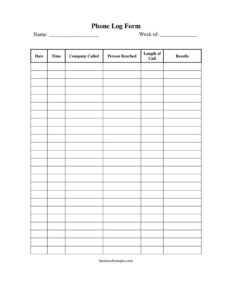
Sales Phone Log
Track every prospect call with this free Sales Phone Log template, recording dates, contacts, and results for a free download in PDF and DOCX.
PDF
DOCX
2 downloads
0
likes
Download Files
- DOCX
A Sales Phone Log is a simple tracking sheet salespeople use to record every outbound and inbound call they make during a workweek. The most common reason people reach for one is to keep an organized, week-by-week record of who they called, what was said, and what happened next so no follow-up slips through the cracks. This template is free to download in PDF and DOCX with no signup required.
What Is a Sales Phone Log?
A Sales Phone Log is a structured record of phone-based sales activity, typically kept by individual reps or shared across a small team. It captures the basic facts of each call — the date, time, company contacted, person reached, how long the conversation lasted, and the outcome. Sales managers use these logs to review activity levels, coach reps, and spot which leads need attention, while reps use them to remember commitments and plan their next moves. Unlike a full CRM entry, the phone log is fast and lightweight: it lives on a single page, fills in quickly between calls, and gives an at-a-glance summary of a week’s worth of dialing without any software or learning curve.
When Do You Need a Sales Phone Log?
This log fits any situation where the phone is a primary selling tool and activity needs to be documented. Common scenarios include:
- Daily prospecting: A rep working through a call list wants a clean record of each attempt and result for the week.
- Following up on leads: Tracking which prospects were reached, who asked for a callback, and when to circle back.
- Manager reviews: A sales lead reviews weekly logs to measure call volume, connect rates, and outcomes during one-on-ones.
- Territory or account coverage: Ensuring every company on a target list has been contacted within a given period.
- Onboarding new reps: Giving trainees a structured habit for logging activity before they graduate to a full CRM.
- Backup documentation: Keeping a paper or printable trail when CRM access is limited, or as a quick reference at a desk.
Who Uses It
Inside sales reps, outbound business development teams, account managers, telemarketers, small business owners, and freelancers who pitch clients by phone all benefit. Even non-sales roles — like recruiters making candidate calls or support staff returning inquiries — can adapt the same simple structure to their work.
What a Sales Phone Log Should Have
A complete log makes each call easy to identify and act on later. The essentials are an owner’s name and the week being tracked, plus a row for every call that captures the date and time, the company called, the person reached, the call length, and a clear note on results. The results column is the heart of the form: it should record the outcome and any agreed next step, such as a scheduled callback, a demo booked, a proposal requested, or a flat no. Well-kept logs use consistent shorthand so totals and patterns are easy to read at the end of the week.
How to Fill Out a Sales Phone Log
- Name: Enter your name at the top so the log is clearly tied to its owner — important when several reps share a folder or the manager collects sheets.
- Week of: Write the start date of the workweek this sheet covers (for example, the Monday date). One sheet per week keeps records tidy.
- Date: For each call, record the calendar date so you can sequence follow-ups accurately.
- Time: Note the time you placed or received the call — useful for learning which hours produce the best connect rates.
- Company called: Enter the business name you contacted so accounts are easy to group and search.
- Person reached: Write the name and, ideally, the title of whoever you actually spoke with, or note “voicemail” or “gatekeeper” if you didn’t reach the target.
- Length of call: Record how long the conversation lasted, in minutes, to gauge engagement.
- Results: Summarize the outcome and the next step — callback date, meeting set, info sent, or not interested. Keep it brief but specific.
Tips for Getting the Most From Your Log
The log only helps if you fill it in consistently, ideally right after each call while details are fresh. Develop a short results code system — CB for callback, DEMO for booked demo, NI for not interested, VM for voicemail — so you can tally outcomes quickly and compare weeks. Highlight rows that require action so your next-day call list almost builds itself. At the end of the week, scan the sheet to count total dials, conversations, and positive outcomes; those three numbers reveal your activity rate and where the funnel is leaking. Store completed sheets together so you can trace the history of any account back through several weeks.
Phone Log vs. CRM Entry
A phone log and a CRM serve overlapping but different needs. The log is fast, visual, and self-contained — perfect for a single week of dialing and for reps who want momentum without clicking through screens. A CRM stores the long-term relationship history, links calls to deals, and reports across the whole team. Many reps use both: they log calls on paper or in a printable sheet during a calling session, then transfer the meaningful outcomes into the CRM at the end of the day. This hybrid approach keeps live calling distraction-free while preserving a permanent record.
Common Mistakes to Avoid
- Leaving the results blank: A call with no recorded outcome is a lost follow-up. Always note what happened and what’s next.
- Skipping the date or week: Without dates, you can’t sequence callbacks or measure weekly trends.
- Vague person-reached notes: “Someone in sales” won’t help later — capture the actual name and role when you can.
- Inconsistent shorthand: Mixing codes and full sentences makes the log hard to total. Pick one style and stick to it.
- Filling it in from memory: Logging hours later leads to errors. Record each call as you go.
- Never reviewing it: The log’s value comes from end-of-week analysis, not just data entry.
Frequently Asked Questions
What is a Sales Phone Log used for? It is used to record every sales call you make in a week, capturing the date, time, company, contact, call length, and outcome. Reps use it to manage follow-ups, and managers use it to review activity and coach performance.
How do I fill out a Sales Phone Log? Add your name and the week-of date at the top, then create one row per call with the date, time, company called, person reached, length of call, and results. Filling it in immediately after each call keeps the details accurate.
Is this Sales Phone Log free to download? Yes. You can download this template free in both PDF and DOCX formats with no signup required. Use the PDF to print and write by hand, or edit the DOCX in your word processor.
How is a phone log different from a CRM? A phone log is a quick, single-page record built for a week of calling, while a CRM stores long-term account history and connects calls to deals. Many reps log calls on the sheet first and transfer key outcomes into a CRM later.
How often should I start a new log sheet? Most users start a fresh sheet each week, using the “week of” field for the starting date. This keeps records organized and makes it easy to compare activity from one week to the next.
Can I customize the fields for my team? Absolutely. Because the DOCX version is fully editable, you can rename columns, add a results code key, or insert a callback-date column to match how your team tracks calls.
This Sales Phone Log template is a general example provided for informational purposes only and does not constitute legal, financial, or professional advice. Business practices and record-keeping requirements vary by organization and jurisdiction; consult a qualified professional or your company’s policies for guidance specific to your situation.
Need to work out sales tax? Use our free Sales Tax Calculator to add or remove sales tax from any amount in seconds.
Official resource: for the rules that apply to your situation, see the U.S. Small Business Administration.
Related Forms
- Vendor Performance Warning Letter
- Customer Referral Form
- Sales Projection
- Acceptance Of Defective Goods letter
- Items to Sell
- Rejected Goods Notification
Browse more in Sales.