
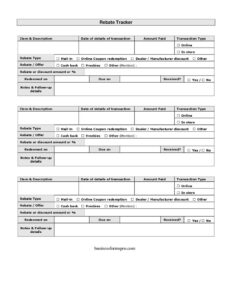
Rebate Tracker
Track every mail-in rebate, coupon, and manufacturer discount with this free Rebate Tracker template — download in PDF and DOCX, no signup.
PDF
DOCX
2 downloads
0
likes
Download Files
- DOCX
A Rebate Tracker is a simple worksheet that helps you log every rebate, coupon, and discount you submit so you actually receive the money you are owed. The most common reason people use one is to stop losing track of mail-in rebates that take weeks to arrive — and this template is free to download in both PDF and DOCX formats with no signup required.
What Is a Rebate Tracker?
A Rebate Tracker is a personal or business record-keeping form used to monitor outstanding rebates and discounts from the moment a purchase is made until the refund is in hand. It is used by individual shoppers, small business owners, office managers, and procurement staff who buy products that come with mail-in rebates, online coupon offers, or dealer and manufacturer discounts. The form documents what was bought, how much was paid, the type and value of the rebate, when it was redeemed, when it is due, and whether it has been received. Because rebates often take 6 to 12 weeks to process, the tracker creates an at-a-glance audit trail so nothing slips through the cracks.
When Do You Need a Rebate Tracker?
Anytime money is promised back to you after a purchase, a tracker keeps the claim from being forgotten. Common scenarios include:
- Mail-in rebates on electronics or appliances — you bought a TV or printer with a $50 rebate and need to confirm the check actually shows up.
- Online coupon redemptions — verifying that a promo code or cash-back offer was applied correctly to your order or account.
- Dealer or manufacturer discounts — tracking multi-step rebates on cars, tools, or seasonal promotions that require proof of purchase.
- Office or bulk supply purchases — a business buying equipment in volume and reconciling every supplier rebate against its budget.
- Tax or expense reconciliation — keeping a clean record of refunds received so reimbursements and deductions match the books.
- Seasonal or holiday shopping sprees — managing several rebate offers at once when it is easy to lose paperwork.
What a Rebate Tracker Should Have
A complete Rebate Tracker captures enough detail to identify each claim and chase it if it never arrives. The essential elements are: a clear description of the item, the transaction date and amount paid, whether the purchase was made online or in store, the rebate type (mail-in, online coupon, dealer/manufacturer discount, or other), the rebate amount or percentage, the date it was redeemed or submitted, the date it is expected (due on), a received status, and a notes column for follow-up. Together these fields turn a vague “I think I sent that in” into a documented, trackable record you can act on.
How to Fill Out a Rebate Tracker
- Item & description: Enter the product name and any model or detail that identifies it, such as “Brand X air fryer, model 220.”
- Date / details of transaction: Record the purchase date and any reference number, order ID, or store location.
- Amount paid: Write the price you actually paid before the rebate is applied.
- Transaction type: Check whether the purchase was made online or in store.
- Rebate type: Mark the category — mail-in, online coupon redemption, dealer/manufacturer discount, or other.
- Rebate or discount amount or %: Note the dollar value or percentage you expect back.
- Redeemed on: Enter the date you submitted the rebate form, mailed the documents, or applied the code.
- Due on: Add the expected arrival date based on the rebate terms (often 6–12 weeks out).
- Received?: Mark yes or no, and update it the moment the refund arrives.
- Notes & follow-up details: Log tracking numbers, customer service contacts, or reminders to call if the deadline passes.
Tips for Getting Every Rebate Paid
Rebates are frequently missed not because they are denied, but because the paperwork or deadline is forgotten. Make a habit of filling in the tracker the same day you make a qualifying purchase, while the receipt is still in front of you. Photograph or scan the receipt, UPC barcode, and submission form before mailing anything, since most rebate programs require the original and you will need proof if the claim is questioned. Set a calendar alert for the “due on” date so you can follow up if the refund is late. When the money arrives, immediately switch the received column to “yes” so your outstanding list always reflects what is still owed.
Rebate Tracker vs. Expense Report
It is easy to confuse a Rebate Tracker with a general expense log, but they serve different purposes. An expense report records money you spent and need reimbursed or categorized; a Rebate Tracker focuses specifically on money coming back to you after a purchase. The tracker emphasizes redemption dates, due dates, and received status — fields an expense report rarely includes. Many people use both side by side: the expense report to manage outgoing spend and the Rebate Tracker to make sure promised refunds are actually collected.
Common Mistakes to Avoid
- Forgetting the “due on” date — without an expected date, you will not know when a rebate is overdue and worth chasing.
- Skipping the rebate type — mail-in and online redemptions have very different timelines and proof requirements.
- Not recording the redeemed-on date — if a claim is disputed, the submission date is your best evidence.
- Leaving the received column blank — an empty status makes it impossible to tell paid claims from pending ones.
- Throwing away receipts before the refund clears — keep copies until the money is confirmed received.
- Tracking everything in your head — multiple overlapping offers are exactly where rebates get lost.
Frequently Asked Questions
What is a Rebate Tracker used for? It is a worksheet for logging every rebate, coupon, and discount you submit so you can confirm each one is paid. It records the purchase, the rebate amount, the submission and due dates, and whether the refund has arrived. This prevents promised money from being forgotten or lost.
How do I fill out a Rebate Tracker? Start with the item description, transaction date, and amount paid, then mark whether you bought online or in store and the rebate type. Add the rebate value, the date you redeemed it, and the date it is due. Update the received column to “yes” when the refund arrives and use the notes field for follow-up.
Is this Rebate Tracker template free? Yes. You can download it from Business Forms Pro at no cost in both PDF and DOCX formats, and no signup or account is required. The DOCX version is fully editable so you can add rows or adjust columns to fit your needs.
How long do rebates usually take to arrive? Processing times vary by program, but mail-in rebates commonly take 6 to 12 weeks, while online coupon redemptions and instant discounts may apply immediately. Always check the specific rebate terms and record that expected date in the “due on” column so you know when to follow up.
Can a business use this Rebate Tracker? Absolutely. Office managers, procurement staff, and small business owners can use it to reconcile supplier and manufacturer rebates against purchases and budgets. The notes column is useful for storing vendor contacts and claim reference numbers.
What should I keep besides the tracker? Keep copies of your receipts, the completed rebate forms, any UPC barcodes you mailed, and confirmation emails or tracking numbers. These documents are your proof if a rebate is delayed or denied, so retain them until the refund is confirmed received.
This Rebate Tracker template is a general example provided for informational purposes only and is not legal, financial, or tax advice. Rebate terms, deadlines, and requirements vary by program and jurisdiction — review each offer’s official terms and consult a qualified professional for guidance specific to your situation.
Need to work out sales tax? Use our free Sales Tax Calculator to add or remove sales tax from any amount in seconds.
Official resource: for the rules that apply to your situation, see the U.S. Small Business Administration.
Related Forms
- Layaway Plan Record
- Price Quotes List
- Vendor Performance Warning Letter
- Proposal Form
- Gift Certificate Log
- Request For Appointment
Browse more in Sales.