
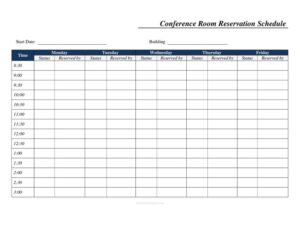
Weekly Conference Room Reservation
Download a free Weekly Conference Room Reservation template in PDF and DOCX to schedule meeting spaces by day, time slot, and building with no signup.
PDF
DOC
11 downloads
0
likes
Download Files
- DOC
A Weekly Conference Room Reservation form is a simple scheduling sheet that lets a team book a shared meeting space across the workweek by date, time slot, and building. People most often use it to prevent double-booking and to see at a glance which half-hour slots are free. It’s free to download here in both PDF and DOCX, with no signup required.
What Is a Weekly Conference Room Reservation?
A Weekly Conference Room Reservation is a single-page grid that maps out room availability for one week at a time. It is typically issued or maintained by an office manager, administrative assistant, or front-desk coordinator, and used by anyone who needs to claim a meeting space. Each column represents a weekday (Monday through Friday), and each row represents a fixed time slot — from 8:30 in the morning through 4:00 in the afternoon. The sheet documents who reserved the room, when, and the current status of each booking. Because it lives in one shared place, it serves as the authoritative record everyone checks before scheduling a meeting in that space.
When Do You Need a Weekly Conference Room Reservation?
This form is useful any time a limited number of meeting rooms must be shared among many people. Common situations include:
- A growing office with one or two conference rooms and frequent competing requests for the same time block.
- Coordinating recurring weekly meetings — like a Monday standup or a Friday review — that should hold the same slot every week.
- Booking interview rooms when a hiring team needs back-to-back 30-minute candidate sessions.
- Managing a training space across multiple buildings or floors, where the Building field clarifies which location is reserved.
- Reserving a room for a client visit or vendor demo that needs guaranteed, uninterrupted time.
- Posting an at-a-glance schedule outside a room door so passersby can see whether it is free now or reserved later.
What a Reservation Sheet Should Have
A complete weekly reservation sheet balances structure with clarity so anyone can read it in seconds. At minimum it should include the Start Date of the week being scheduled, the Building or location identifier, and a clearly labeled grid of weekdays. Each cell should make room for the name of the person who reserved the slot and a status indicator. The half-hour time increments — running from 8:30 to 4:00 — give enough granularity for short meetings without crowding the page. A good sheet also leaves space to note the meeting purpose or attendee count if your office tracks that. The clearer the labels, the fewer conflicts and the less back-and-forth your team will face.
How to Fill Out a Weekly Conference Room Reservation
- Enter the Start Date at the top so everyone knows which Monday-to-Friday week the sheet covers.
- Fill in the Building field to identify the location or facility where the conference room sits — helpful when an organization has more than one site.
- If your sheet tracks a single room, label it; if it covers a specific space, note the room name or number near the Time column header.
- Find the row matching the time slot you want — for example, 10:00 or 2:30 — then move across to the correct weekday column: Monday, Tuesday, Wednesday, Thursday, or Friday.
- In that cell or the adjoining Reserved by field, write your name (and a short meeting description if space allows).
- Update the Status field to show whether the slot is confirmed, tentative, or available.
- For a meeting longer than 30 minutes, claim every consecutive row it spans — a 90-minute meeting starting at 9:00 fills the 9:00, 9:30, and 10:00 rows.
- Post or share the completed sheet so the whole team works from the same version.
Tips for Managing Room Bookings Smoothly
The form only works as well as the habits around it. Decide early whether bookings are first-come-first-served or require approval, and keep one master copy rather than several conflicting versions. If you print the sheet, write reservations in pencil so changes are easy; if you use the DOCX version, fill cells digitally and re-share after each update. Encourage people to release slots they no longer need by clearing the Reserved by field and resetting the Status, which frees the room for someone else. For recurring meetings, agree on a standing slot so the same block is reserved each week without repeated requests.
How It Differs from a Daily Calendar or Sign-In Sheet
A weekly reservation grid is broader than a daily sign-in sheet, which records who used a room on a single day, and more lightweight than a full calendaring app. Its strength is the at-a-glance weekly view: anyone can scan five days of half-hour slots in seconds and spot openings without scrolling through software. It complements digital calendars rather than replacing them — many offices print this sheet for the door while keeping bookings in a shared calendar too. Because it is a static document, it is also a clean record you can save week to week.
Common Mistakes to Avoid
- Forgetting to write the Start Date, which makes the sheet useless once the week passes or copies pile up.
- Leaving the Reserved by field blank, so no one knows who to contact about a conflict.
- Booking only the start time of a long meeting and leaving later slots open for someone else to claim.
- Skipping the Building field when your organization has multiple locations or identical room names.
- Not updating the Status when a meeting is canceled, leaving a usable room marked as taken.
- Maintaining several copies of the sheet instead of one shared master, which reintroduces the double-booking the form is meant to prevent.
Frequently Asked Questions
What is a Weekly Conference Room Reservation form? It is a one-page weekly grid for booking a shared meeting space by weekday and time slot. It records the date, building, who reserved each half-hour block, and the booking status, so a team can avoid double-booking the same room.
How do I fill it out? Enter the start date and building at the top, then find the row for your time slot and the column for your weekday. Write your name in the corresponding cell or the Reserved by field and set the status. For longer meetings, claim every consecutive time row the meeting covers.
What time range does the template cover? The sheet runs in 30-minute increments from 8:30 in the morning through 4:00 in the afternoon, Monday through Friday. That granularity suits standard office hours and short back-to-back meetings, and you can adjust the labels in the DOCX version if your hours differ.
Can I use it for more than one conference room? Yes. The simplest approach is to use one sheet per room and label each clearly, or to add the room name near the Time column. The Building field also helps distinguish identical room names across different locations.
Is this reservation sheet legally binding? No. It is an internal scheduling and coordination tool, not a contract. Its purpose is to organize shared space within an office, and any policies around priority or approval are set by your own organization.
How much does the template cost? It is completely free to download here in both PDF and DOCX formats, with no signup or account required. You can print it for a room door or edit the editable version to match your office hours, room names, and status labels.
This template is a general example provided for informational purposes only and is not legal, financial, or administrative advice. Office policies and requirements vary by organization and location, so consult your facilities manager or a qualified professional for guidance specific to your workplace.
Related Forms
- Group Meeting Attendance Log
- Meeting Sign In Sheet
- Sign In Sheet
- Sign Up Sheet
- Daily Conference Room Reservation
- Gifts Sent List
Browse more in Sign In / Sign Up Sheets.