
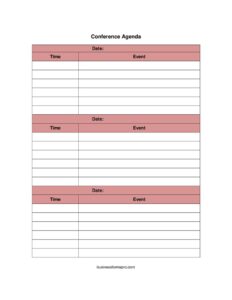
Conference Agenda
Plan your event with our free Conference Agenda template — organize sessions by time, date, and event in minutes with a free download in PDF or DOCX.
PDF
DOCX
0
likes
Download Files
- DOCX
A Conference Agenda is a structured schedule that lists every session, speaker, and break across a conference by time and date, giving attendees and organizers a single reference for the whole event. People use it most often to communicate the day’s flow so everyone knows where to be and when. You can download this Conference Agenda template free in PDF and DOCX formats, with no signup required.
What Is a Conference Agenda?
A Conference Agenda is a planning and communication document that breaks an event into time-bound segments, each tied to a specific date and a named activity. It is typically created by an event planner, organizing committee, or executive assistant and distributed to attendees, speakers, sponsors, and venue staff. The agenda documents exactly what happens, when, and in what order — from opening keynotes and breakout sessions to lunch, networking blocks, and closing remarks. Beyond a simple timetable, it sets expectations, keeps presenters on schedule, and helps participants plan their own attendance. Because it uses the same three core building blocks — time, date, and event — it works for one-day summits and multi-day conferences alike.
When Do You Need a Conference Agenda?
A Conference Agenda is useful any time multiple sessions or activities need to be coordinated across hours or days. Common scenarios include:
- Annual company conferences where departments present updates and the full day must be mapped out for hundreds of attendees.
- Multi-day industry summits with parallel tracks, keynotes, and workshops that need clear start and end times.
- Academic or research conferences featuring paper presentations, panels, and poster sessions scheduled back-to-back.
- Nonprofit or association events that combine member meetings, guest speakers, and networking receptions.
- Sales kickoffs and training conferences where each block has a defined topic, facilitator, and duration.
- Virtual or hybrid conferences that depend on a published schedule so remote attendees can join the right session at the right time zone.
Types of Conference Agendas
Although every agenda shares the same skeleton, the format flexes to fit the event. A single-track agenda lists one event per time slot, ideal for smaller gatherings where everyone attends together. A multi-track agenda shows concurrent sessions side by side so attendees can choose their path. A high-level agenda shows only major blocks — registration, keynote, lunch, breakouts, closing — while a detailed agenda drills into every speaker and topic. This template’s simple time–date–event structure adapts to any of these styles: keep entries broad for a one-page overview, or add rows for a minute-by-minute run sheet.
What a Conference Agenda Should Have
A complete Conference Agenda gives readers everything they need to follow the event without asking questions. The essential elements are:
- The conference name or title at the top so the document is easy to identify.
- The date (or dates) the schedule covers.
- A clear time column with start and, ideally, end times for each segment.
- The event or session description — what is happening in each slot.
- Optional supporting details such as speaker names, room or track locations, and session formats.
- Breaks, meals, and transition time built in so the schedule stays realistic.
How to Fill Out a Conference Agenda
This template centers on three fields — time, date, and event — repeated for each line of the schedule. Follow these steps:
- Add the conference title. At the top, name your event so attendees instantly recognize the document.
- Enter the date. In the date field, record the day the agenda covers. For multi-day conferences, create a separate section or page for each date.
- Set the first time slot. In the time field, write the start time of the first activity — for example, registration or check-in — and add an end time if your format allows.
- Describe the event. In the event field, enter what happens in that slot, such as “Opening Keynote: Industry Outlook” or “Breakout Session A.”
- Repeat for every block. Continue adding time, date, and event rows in chronological order, including breaks, lunch, and networking.
- Build in buffers. Leave a few minutes between sessions for transitions so the day does not run behind.
- Review and finalize. Confirm times do not overlap unintentionally and that the last entry marks the close of the conference.
Tips for Building a Schedule That Runs on Time
The most common reason agendas fail is that they are too ambitious. Pad each session with a small buffer, and place high-energy items — interactive workshops or panels — after meals when attention dips. List the time zone clearly if any attendees join remotely, and consider noting both start and end times so speakers self-manage. Distribute the agenda in advance so attendees can plan travel and choose breakout tracks, and bring printed copies or a digital version to the venue. When changes happen on the day, update one master copy rather than several conflicting versions.
Sharing and Updating Your Agenda
An agenda is only useful if the right people have the current version. Send the finalized schedule to speakers, volunteers, and venue staff alongside attendees, since each group relies on different details. Post it on the event page or app, and keep a master copy that you control. If sessions shift, reissue the agenda with a clear version date so no one works from an outdated copy. After the conference, the agenda also doubles as a record of what took place, which is helpful for reporting to sponsors and planning next year’s program.
Common Mistakes to Avoid
- Omitting end times — listing only start times makes it hard for speakers to gauge how long they have.
- Forgetting breaks — a schedule with no buffer or meal time exhausts attendees and runs late.
- Leaving off the date — especially on multi-day events, an undated page causes confusion.
- Overpacking slots — squeezing too many events into one block guarantees the day falls behind.
- Ignoring time zones — virtual and hybrid events need clear time-zone labels.
- Not version-controlling — circulating multiple edited copies leaves people following different schedules.
Frequently Asked Questions
What is a Conference Agenda used for? It is used to organize and communicate the schedule of a conference, listing each session by time, date, and event. Organizers use it to plan the flow of the day, and attendees use it to know where to be and when. It keeps everyone — speakers, staff, and guests — aligned on the program.
How do I fill out the Conference Agenda template? Start by adding your event title and date, then enter each session in chronological order using the time and event fields. Include start times, descriptions, breaks, and a closing entry. Repeat the rows as needed and add a separate section for each day of a multi-day event.
Is this Conference Agenda template free to download? Yes. You can download it free in both PDF and DOCX formats with no signup or payment required. Use the DOCX version if you want to edit it in a word processor, or the PDF version to print and distribute as-is.
Can I use this template for a multi-day conference? Absolutely. Use the date field to mark each day and create a separate schedule block or page per date. This keeps each day’s time and event entries organized and easy to follow without overcrowding a single sheet.
What is the difference between an agenda and a run sheet? A conference agenda is the attendee-facing schedule showing sessions, times, and topics. A run sheet is a more detailed internal document for organizers that adds cues, responsibilities, and technical notes. This template works well as an agenda and can be expanded into a basic run sheet by adding detail.
Should I include speaker names and room locations? If your event has multiple speakers or tracks, adding names and room or track details to the event field makes the agenda far more useful. For a small single-track conference, a simple time, date, and event description is often enough.
This Conference Agenda template is provided as a general example for informational purposes only and does not constitute legal, financial, or professional event-planning advice. Requirements and best practices vary by organization and venue — consult a qualified professional for guidance specific to your event.
Related Forms
- Large-Print Petition
- Daycare Sheet Individual
- Silent Auction Bid Sheet
- Daily Conference Room Reservation
- Vendor Registration Form
- Group Meeting Attendance Log
Browse more in Sign In / Sign Up Sheets.