
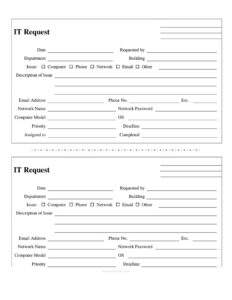
IT Request Form
Download a free IT request form template to log help desk tickets, hardware issues, and support needs in PDF or DOCX with a quick free download.
PDF
DOC
7 downloads
0
likes
Download Files
- DOC
An IT request form is a simple document employees use to report a technology problem or ask the IT team for support, capturing what’s wrong, who’s affected, and how urgent it is. People most often use it to log a help desk ticket for a broken computer, a network outage, or an email issue in one organized place. This template is free to download in PDF and DOCX with no signup required.
What Is an IT Request Form?
An IT request form is a standardized intake document that routes technology problems and service requests to your IT department or help desk. It is typically filled out by an employee, contractor, or department head and submitted to a technician or support coordinator. The form documents the type of issue, a description of the problem, the affected device or account, and details such as priority and deadline. By gathering everything up front, the IT request form reduces back-and-forth, helps technicians triage faster, and creates a record that can be tracked from submission to completion. It works equally well for hardware repairs, software glitches, account access, and new equipment requests.
When Do You Need an IT Request Form?
This IT request form fits almost any moment a staff member needs technical help. Common scenarios include:
- A broken or slow computer — a desktop or laptop won’t boot, freezes, or runs sluggishly and needs a technician’s attention.
- Network or connectivity problems — Wi-Fi keeps dropping, a wired port is dead, or a shared drive is unreachable.
- Email trouble — a mailbox is full, messages bounce, or a user is locked out of their account.
- Phone or extension issues — a desk phone has no dial tone, voicemail fails, or an extension needs reassigning.
- New hardware or software setup — onboarding a new hire, requesting a monitor, or installing an approved application.
- Account and password support — a forgotten network password or a request to reset access after a role change.
Whether the request is an emergency outage or a routine setup, the form gives IT a consistent starting point.
What an IT Request Form Should Have
A complete IT request form balances enough detail for the technician to act with enough simplicity that busy employees actually fill it out. The essentials are the requester’s name and department so support knows who to contact, the date the request was made, a clear category for the issue (computer, phone, network, email, or other), and a written description of the problem. Equally important are contact details — email address, phone, and extension — so the technician can follow up. Device and account specifics such as computer model, operating system, network name, and password fields help diagnose faster. Finally, the form should track workflow status: priority, deadline, who the ticket is assigned to, and whether it’s marked completed.
How to Fill Out an IT Request Form
- Date — enter the day you’re submitting the request.
- Requested by — write your full name as the person reporting the issue.
- Department and Building — note your team and physical location so the technician can find you.
- Issue category — check the box that fits: Computer, Phone, Network, Email, or Other.
- Description of Issue — describe the problem in plain language, including what you were doing when it happened and any error messages.
- Email Address, Phone No., and Ext. — provide the best ways to reach you for follow-up.
- Network Name and Network Password — supply login details only if your IT policy requires them for the fix.
- Computer Model and OS — list the device make/model and operating system version.
- Priority and Deadline — indicate urgency and any date the fix is needed by.
- Assigned to and Completed — leave these for the IT team to record who handled it and when it was resolved.
Setting Priority and Deadlines Effectively
The priority and deadline fields are where good triage happens, so use them honestly. A printer that won’t connect is inconvenient but rarely an emergency; a server outage affecting an entire department is. Reserve high priority for problems that stop work, affect many people, or involve security and data loss. For everything else, a realistic deadline helps IT plan their queue rather than treating every ticket as a fire. If a request is tied to a real event — a presentation tomorrow morning or a new hire starting Monday — put that date in the deadline field and mention it in the description. Clear, accurate prioritization keeps the whole support system fair and responsive.
Handling Network Names and Passwords Safely
This form includes fields for network name and password, which can speed up certain fixes but also carry risk. Only enter credentials when your organization’s policy explicitly allows it, and avoid writing passwords on paper forms that may be left on a desk or scanned into shared folders. Many IT teams prefer to reset access themselves rather than collect existing passwords, so check your internal procedure. If you do record sensitive details, hand the form directly to the technician and ask that the credentials be changed once the issue is resolved. Treat the completed form as a confidential document throughout its lifecycle.
Common Mistakes to Avoid
- Vague descriptions — “it’s broken” gives the technician nothing; describe symptoms, timing, and error text.
- Missing contact info — leaving the email, phone, or extension blank stalls follow-up.
- No issue category checked — failing to mark Computer, Phone, Network, or Email slows routing to the right specialist.
- Overusing high priority — flagging everything urgent makes real emergencies harder to spot.
- Skipping device details — omitting the computer model or OS forces the technician to gather basics before troubleshooting.
- Storing passwords carelessly — never leave credentials on a visible or shared copy of the form.
Frequently Asked Questions
What is an IT request form used for? It’s used to report technology problems or request support from your IT department in a structured way. The form captures who’s affected, what the issue is, which device or account is involved, and how urgent it is. This helps technicians triage and resolve requests faster.
How do I fill out an IT request form? Start with the date, your name, department, and building, then choose the issue category and write a clear description. Add your contact details and any device specifics like computer model and operating system. Leave the “Assigned to” and “Completed” fields for the IT team to fill in.
Should I include my network password on the form? Only if your organization’s IT policy specifically asks for it. Many teams prefer to reset access themselves rather than collect existing passwords, so check your internal procedure first. If you do provide credentials, hand the form directly to the technician and have the password changed afterward.
How do I decide what priority to assign? Reserve high priority for problems that stop work, affect many people, or involve security risks. Use medium or low priority for issues that are inconvenient but not blocking. Adding a realistic deadline in the deadline field helps IT plan their queue fairly.
Can I customize this IT request form? Yes. The DOCX version is fully editable, so you can add your company logo, adjust the issue categories, or include extra fields like an asset tag or ticket number. The PDF is ideal if you want a ready-to-print version for a help desk binder.
Is this IT request form free to download? Yes, you can download it free in both PDF and DOCX formats with no signup or payment required. Use it as-is or adapt it to match your organization’s support workflow. There are no usage limits or hidden fees.
This IT request form template is provided as a general example for informational purposes only and does not constitute legal, security, or IT compliance advice. Data handling and security requirements vary by organization and jurisdiction — consult your IT and security professionals before adopting any procedure involving credentials or sensitive information.
Related Forms
- Child Care Sign In Sheet
- Bowling Sponsorship Form
- Daily Conference Room Reservation
- Group Meeting Attendance Log
- Silent Auction Bid Sheet
- Vendor Registration Form
Browse more in Sign In / Sign Up Sheets.