
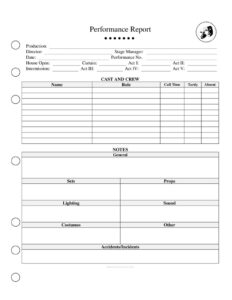
Performance Report
Use this free Performance Report template to document each theater show's attendance, technical notes, and incidents — free PDF and DOCX download.
PDF
DOC
5 downloads
0
likes
Download Files
- DOC
A Performance Report is a standardized document used by theater stage managers and production teams to record exactly what happened during a single live performance. It is the most common way to keep a clear, time-stamped account of a show — from curtain times to technical issues — and it is free to download here in both PDF and DOCX formats with no signup required.
What Is a Performance Report?
A Performance Report is a written record completed by the stage manager (or assistant stage manager) immediately after each performance of a play, musical, opera, or other live production. It documents the basic facts of the night — the date, the act and intermission timings, audience attendance, and any notable events such as missed cues, prop failures, injuries, or audience disruptions. The report is distributed to the production team, director, producers, and house management so everyone has an accurate, shared account of how the show ran. Over the course of a run, a series of Performance Reports becomes a reliable history of the production, useful for tracking trends, resolving disputes, and maintaining the artistic and technical integrity of the show.
When Do You Need a Performance Report?
A Performance Report should be completed after every public performance, but it becomes especially valuable in these situations:
- Long-running productions where consistency must be maintained across dozens or hundreds of shows and multiple cast changes.
- Touring shows that play different venues each week and need a uniform record of how each house and stage affected the performance.
- When an incident occurs — an actor injury, a scenery malfunction, a fire-curtain test, or a medical emergency in the audience that must be documented for safety and insurance purposes.
- Tracking running times so the director and producers can see if the show is creeping longer or rushing, which affects pacing and union break schedules.
- Union and contractual compliance, where accurate call times, hold times, and overtime must be logged for actors and crew.
- Educational and community theater, where a written report teaches students professional habits and gives faculty a record of each performance.
What a Performance Report Should Have
A complete Performance Report captures both the routine facts and the exceptions of a single show. At minimum it should include the production name, performance date and number in the run, and the names of the stage manager and key personnel on duty. It should log the scheduled and actual times for the house opening, curtain up, each act, intermissions, and curtain down. Beyond timings, a strong report records attendance figures, weather or external factors, and a clearly separated section for notes — broken out by department such as cast, scenic, lighting, sound, props, wardrobe, and front of house. Finally, it should note any accidents or injuries, with enough detail to follow up the next day.
How to Fill Out a Performance Report
Because templates vary, adapt these steps to the exact fields in your version. A typical Performance Report is completed as follows:
- Header. Enter the production title, the venue or theater name, the performance date, and the performance number (for example, “Show 23 of 48”).
- Personnel. List the stage manager on duty, the assistant stage managers, and any covers or understudies who went on that night.
- Timings. Record the scheduled and actual times for house open, Act I up, intermission start and end, subsequent acts, and final curtain. Calculate total running time.
- Attendance. Note the audience count or house percentage, plus any comps, late seating, or capacity issues.
- Department notes. Under separate headings for cast, scenic, lighting, sound, props, and wardrobe, write concise notes on anything out of the ordinary.
- Incidents. Document any accidents, injuries, illnesses, or audience disturbances with the time and a factual description.
- Sign-off. Add the stage manager’s signature or initials and the date the report was submitted.
Writing Useful Department Notes
The notes section is where a Performance Report earns its value, so write it for the people who will act on it. Keep entries factual and specific: instead of “sound was off,” write “microphone 4 cut out during the Act II duet at approximately 9:12 — battery suspected.” Group notes by department so the lighting designer, props master, and wardrobe supervisor can each scan straight to their items. Distinguish between problems that were solved in the moment and ones that still need attention before the next show. Avoid blame or opinion; the goal is to inform, not to criticize a colleague. A consistent, neutral tone makes the report a trusted tool that the whole team relies on.
Distribution and Record-Keeping
A Performance Report is only useful if it reaches the right people promptly. Most stage managers send the report by email the same night or first thing the next morning to the director, producers, designers, company manager, and house management. Keep a complete, dated file of every report for the entire run; together they form the official record of the production. If an injury or insurance claim arises later, this archive can be essential. Store both the editable DOCX working copies and final PDF versions so the formatting stays intact when shared.
Common Mistakes to Avoid
- Submitting late or skipping reports — gaps break the continuity that makes the archive valuable.
- Vague entries that fail to record the time, location, or cause of a problem, making follow-up impossible.
- Mixing opinion with fact, which can create tension within the company and undermine the report’s credibility.
- Forgetting to log running times, which hides pacing drift and break-schedule issues.
- Omitting understudy or cover information, leaving no record of who actually performed.
- Failing to flag injuries clearly, which can cause problems with safety follow-up and insurance documentation.
Frequently Asked Questions
What is a Performance Report used for? It is used to document everything that happened during a single live performance, including timings, attendance, technical notes, and incidents. The stage manager distributes it to the production team so everyone shares an accurate record of the show. Over a run, these reports become the official history of the production.
Who fills out a Performance Report? The stage manager on duty is typically responsible for completing and distributing the report, often with input from assistant stage managers. In student or community theater, a designated student stage manager or supervisor may complete it. The person who ran the show that night is best placed to record what happened accurately.
How long should a Performance Report be? It should be as long as it needs to be to capture the facts — usually one to two pages. On a smooth night the notes may be brief, while a show with multiple incidents will run longer. Clarity matters more than length; concise, specific entries are more useful than padding.
Is a Performance Report a legal document? It is primarily an operational and communication tool, not a contract, but it can carry legal weight if it documents an injury or incident that later leads to an insurance claim or dispute. For that reason, the incident section should always be factual and dated. Treat every report as part of the production’s official record.
How much does this Performance Report template cost? Nothing — it is completely free to download from Business Forms Pro in both PDF and DOCX formats, with no signup required. You can use the DOCX version to customize departments, timings, and headers to match your production. Print it for nightly use or fill it out digitally.
Can I customize the report for my show? Yes. The DOCX template is fully editable, so you can rename department headings, add act structures, adjust timing rows, or include a company logo. Many stage managers tailor the form to a specific production and reuse it for the entire run for consistency.
This Performance Report template is a general example provided for informational purposes only and does not constitute legal, insurance, or professional advice. Reporting requirements and incident-documentation standards vary by venue, employer, and jurisdiction — consult your producer, venue management, or a qualified professional for guidance specific to your production.
Related Forms
- Page Blocking Breakdown
- Lighting Inventory Sheet
- Multiple Location Schedule
- Rehearsal Schedule
- Focus Chart
- Preliminary Props List
Browse more in Theater.