
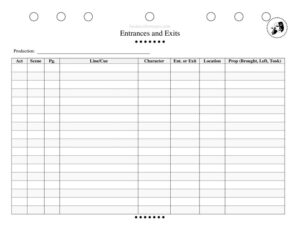
Entrance Exit Tracker
Track every cast entrance and exit by act, scene, page, and cue with this free Entrance Exit Tracker template — free download in PDF and DOCX.
PDF
DOCX
28 downloads
0
likes
Download Files
- DOCX
An Entrance Exit Tracker is a stage management worksheet that logs every time a character enters or exits during a production, along with the page, line or cue, location, and any props involved. Stage managers, assistant stage managers, and directors use it most often to build accurate run sheets and to keep blocking organized during rehearsals. It’s free to download here in both PDF and DOCX formats with no signup required.
What Is an Entrance Exit Tracker?
An Entrance Exit Tracker is a reference document used by the stage management team to record precisely when and where each actor moves on and off stage throughout a show. It captures the production title, the act and scene, the script page and the specific line or cue that triggers the movement, the character involved, whether it is an entrance or an exit, the stage location used, and any prop brought on, left behind, or carried off. By consolidating this information in one place, the tracker becomes a single source of truth for traffic patterns, helping the team coordinate cast, props, and backstage flow without flipping through a marked-up script.
When Do You Need an Entrance Exit Tracker?
This worksheet earns its place from the first blocking rehearsal through closing night. Common situations where it proves invaluable include:
- Building a master run sheet for a play or musical so every cast movement is documented in sequence.
- Pre-setting and tracking props by recording what is brought on, set down, or taken off at each entrance and exit.
- Calling cues confidently when the line or cue column tells you exactly what prompts a character’s appearance.
- Onboarding an understudy or swing who needs to learn entrances, exits, and stage locations quickly.
- Solving backstage traffic jams by spotting when multiple characters cross through the same wing or doorway at once.
- Touring a production to a new venue, where mapping entrances against different stage geography keeps the show consistent.
What an Entrance Exit Tracker Should Have
A complete tracker keeps the team aligned and leaves no movement to guesswork. The key elements are the production name for filing across multiple shows, the act and scene for structural reference, the page and line or cue for an exact script anchor, the character making the move, a clear entrance-or-exit designation, the location on stage, and a prop column noting what is brought, left, or taken. Together these fields let anyone read a single row and understand who moves, when, from where, and with what. Consistent abbreviations and a chronological order make the document fast to scan during a live run.
How to Fill Out an Entrance Exit Tracker
- Production: Write the full title of the show at the top so the sheet stays identifiable in a binder with multiple productions.
- Act: Enter the act number for the rows that follow, starting a new grouping when the act changes.
- Scene: Record the scene within that act to pinpoint structural placement.
- Pg.: Note the script page where the entrance or exit occurs for instant cross-reference.
- Line/Cue: Capture the spoken line, the cue line, or the cue number that triggers the movement.
- Character: Name the character (and, if helpful, the actor) entering or exiting.
- Ent. or Exit: Mark whether this is an entrance or an exit, using a consistent shorthand such as “E” or “X”.
- Location: Specify the stage location — for example, stage left, upstage right, or a named doorway or platform.
- Prop (Brought, Left, Took): List any prop and what happens to it, noting whether it is brought on, left on stage, or taken off.
Tips for an Accurate Run Sheet
Fill the tracker in performance order rather than by character, so the document reads top to bottom like the show plays out. Standardize your stage-location vocabulary and prop abbreviations across the whole team to prevent confusion during a fast quick-change. Update the sheet immediately whenever the director re-blocks a moment; an out-of-date tracker is worse than none, because the team will trust the wrong information. Many stage managers keep a master copy in DOCX for editing and print a clean PDF for the calling station and backstage crew once blocking is locked.
How It Differs From a Blocking Notation
Blocking notation lives inside a marked-up script and describes detailed movement, gestures, and stage pictures moment to moment. An Entrance Exit Tracker is a separate, summarized view focused only on who is on or off stage and the props that travel with them. The two complement each other: the prompt book holds the granular blocking, while the tracker gives the crew a quick chronological map of traffic. Use the tracker to brief deck crew, dressers, and prop runners who don’t need full blocking but must know exactly when a character appears and what they carry.
Common Mistakes to Avoid
- Skipping the line or cue — without an anchor, a missed entrance becomes hard to diagnose during notes.
- Vague locations like “side” instead of a specific wing, which slows down crew positioning.
- Forgetting the prop’s fate — noting it is brought on but not where it is left causes preset errors the next night.
- Mixing entrances and exits in the same column without a clear marker.
- Letting the sheet fall out of date after re-blocking, so the printed copy contradicts the actual show.
- Listing rows out of sequence, which breaks the chronological flow the run sheet depends on.
Frequently Asked Questions
What is an Entrance Exit Tracker used for? It is a stage management worksheet that documents every character’s entrance and exit during a production, along with the page, cue, stage location, and props involved. The team uses it to build run sheets, coordinate backstage traffic, and keep blocking consistent from rehearsal through performance.
Who fills out the Entrance Exit Tracker? Usually the stage manager or an assistant stage manager completes it during blocking rehearsals as movements are set. Once locked, it is shared with the calling station, deck crew, prop runners, and dressers so everyone works from the same information.
How is this different from my marked prompt book? The prompt book holds detailed blocking, line notes, and cue calls inside the script itself. The tracker is a condensed, chronological overview focused only on entrances, exits, locations, and the props that move with each character.
What goes in the Prop (Brought, Left, Took) column? Record any prop tied to the movement and what happens to it — whether the character brings it on, leaves it somewhere on stage, or takes it off. This helps the prop team manage presets and resets accurately each performance.
Can I edit the template for a musical with many quick changes? Yes. Download the DOCX version to add rows, adjust columns, or insert costume-change notes, then print a clean PDF for backstage use once your blocking is finalized.
Is the Entrance Exit Tracker free to download? Yes, this template is completely free to download in both PDF and DOCX formats with no signup required, so you can start tracking your production’s traffic right away.
This template is a general example provided for informational purposes only and is not professional production, safety, or legal advice. Theater practices and venue requirements vary, so adapt the form to your own production and consult your stage management and technical leadership for specific procedures.
Related Forms
- Rehearsal Sign-In Sheet
- Instrument Schedule
- Production Meeting Notes
- Multiple Location Schedule
- Costume Information Sheet
- Set Design
Browse more in Theater.