
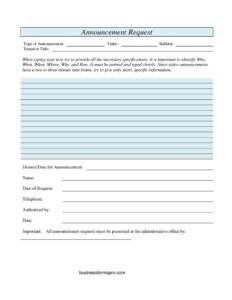
Announcement Request
Submit church bulletin or video announcements smoothly with our free Announcement Request form template — free download in PDF and DOCX, no signup.
PDF
DOCX
4 downloads
0
likes
Download Files
- DOCX
An Announcement Request form is a simple intake document churches use to collect and approve requests for sharing news, events, and ministry updates through the bulletin, video screens, or verbal announcements. The most common reason people use it is to make sure event details are accurate, scheduled on the right date, and reviewed by the right person before going public. You can download it free in PDF and DOCX with no signup required.
What Is an Announcement Request Form?
An Announcement Request form is a short, standardized template that members, ministry leaders, and staff fill out when they want something publicized to the congregation. It captures the type of announcement requested, a working title, the desired date it should run, and contact details for the person submitting it. The form also includes an authorization line so a pastor, administrator, or communications coordinator can sign off before the message is shared. By routing every request through one consistent document, a church keeps its bulletin, video loops, and verbal notices organized, accurate, and free of last-minute scrambling. It is especially valuable for medium and large congregations where multiple ministries compete for the same limited announcement space and screen time.
When Do You Need an Announcement Request Form?
This form is useful any time information needs to reach the wider church family in a controlled, scheduled way. Common situations include:
- Promoting an upcoming event such as a youth retreat, fundraiser, potluck, or community outreach day that needs advance notice.
- Requesting a bulletin insert or listing for a recurring ministry meeting, small group sign-up, or volunteer opportunity.
- Submitting a video or screen slide to be displayed before or during a service in the worship center or lobby.
- Sharing a congregational milestone like a baptism celebration, new member welcome, or special prayer request.
- Coordinating a time-sensitive notice, such as a schedule change, weather closure, or registration deadline that must appear by a specific date.
- Managing requests from outside groups who use the facility and want their event mentioned to attendees.
Types of Announcements This Form Covers
The template gives requesters a choice between formats so the communications team knows exactly how to handle the submission. A video announcement is typically a short clip or slide shown on screens before, during, or after the service. A bulletin announcement is printed text placed in the weekly program or inserted as a separate page. Some churches also read announcements aloud from the platform. Indicating the type up front prevents confusion and ensures the request lands with the right volunteer — graphic designer, bulletin editor, or worship host — who can prepare it in the correct medium and format.
What an Announcement Request Form Should Have
A complete form balances enough detail to act on the request with enough simplicity that busy volunteers will actually fill it out. The essentials are: the type of announcement (video or bulletin); a tentative title that summarizes the message; the desired publication or display date; the requester’s name and the date of request; a telephone number for follow-up questions; and an authorization line with the approver’s name and date. Many churches add a submission deadline stating that all requests must reach the administrative office by a certain day each week. Together these elements create a clear paper trail and a predictable workflow.
How to Fill Out an Announcement Request Form
- Type of Announcement: Mark whether this is a Video or Bulletin announcement. If it should appear in more than one place, note that clearly so each format gets prepared.
- Tentative Title: Write a short, descriptive working title — for example, “Fall Food Drive Sign-Up” — that captures the heart of the message at a glance.
- Desired Date for Announcement: Enter the date you want the announcement to run or display. List the first date if it should repeat over several weeks.
- Name: Print the name of the person making the request so staff know who to contact.
- Date of Request: Record the day you are submitting the form, which helps track lead time against any deadline.
- Telephone: Provide a reliable phone number for quick follow-up on wording, timing, or missing details.
- Authorized by: Have the ministry leader, pastor, or administrator sign or print their name to approve the request.
- Date: The approver records the date of authorization, completing the approval trail.
Finally, deliver the completed form to the administrative office by the stated weekly deadline so it can be processed in time.
Tips for a Smooth Submission
Submit early. Most communications volunteers prepare bulletins and video loops several days before Sunday, so a request that arrives on Friday for that weekend may miss the window entirely. Keep your title and message concise — screen slides and bulletin space are limited, and shorter announcements are read more often. Include all key details in the message itself: who, what, when, where, and how to respond or register. If your event recurs, mention how many weeks it should run so the editor can schedule it without back-and-forth. Providing accurate contact information also lets staff resolve questions quickly rather than dropping the announcement when something is unclear.
Common Mistakes to Avoid
- Missing the deadline: Turning in a request after the office cutoff is the top reason announcements don’t run on time.
- Vague titles: A title like “Meeting” tells readers nothing — be specific about the event and audience.
- Skipping authorization: Without an approver’s name and date, the request may stall waiting for sign-off.
- Choosing the wrong format: Leaving the video/bulletin box blank forces staff to guess how to prepare it.
- Omitting contact info: No phone number means no one can follow up when a detail is missing.
- Forgetting the run date: An announcement with no desired date may publish too early, too late, or not at all.
Frequently Asked Questions
What is an Announcement Request form used for? It is used to formally request that a church share information — such as an event, meeting, or ministry update — through the bulletin or on video screens. The form ensures details are accurate, scheduled, and approved before reaching the congregation.
How do I fill out an Announcement Request form? Indicate the type of announcement, write a tentative title, enter the desired date, and add your name, the request date, and your phone number. Then have it authorized by the appropriate leader and submit it to the administrative office by the posted deadline.
Who needs to authorize the request? Authorization typically comes from a pastor, ministry leader, or communications coordinator, depending on your church’s process. The “Authorized by” and date lines create a clear record that the announcement was reviewed and approved.
When should I submit the form? Submit it before your church’s weekly cutoff, which is often several days ahead of the service so volunteers have time to prepare the bulletin or video. Submitting early greatly increases the chance your announcement runs on the date you want.
Can I request both a bulletin and video announcement? Yes. Many churches allow the same message to appear in multiple formats — simply note that on the form so the team prepares both versions appropriately.
Is this Announcement Request template free? Yes. You can download it free in PDF and DOCX from Business Forms Pro with no signup required, then customize the fields and deadline to match your church’s workflow.
This template is a general example provided for informational purposes only and is not legal, financial, or professional advice. Church policies and procedures vary by congregation — adapt this form to your own organization’s needs and consult the appropriate staff or leadership for guidance.
Related Forms
- Church Wedding Log
- Ordination Anniversary Card 3 (2 per page)
- Church Funeral Log
- My Baptism Card (2 per page)
- Offering Count Sheet
- Prayer Of Saint Francis Funeral Card (2 per page)
Browse more in Church.