
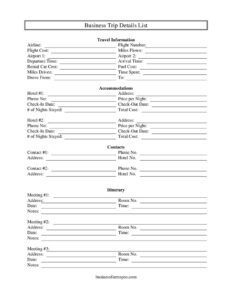
Business Trip Details List
Organize flights, hotels, meetings, and costs with this free Business Trip Details List template — free download in PDF and DOCX, no signup needed.
PDF
DOCX
2 downloads
0
likes
Download Files
- DOCX
A Business Trip Details List is a single-page planning and record sheet that captures every logistical detail of a work trip — flights, accommodations, meetings, driving routes, and costs — in one organized place. People most often use it to keep their itinerary and expense totals straight while traveling and to support an expense report when they get back. It’s free to download here in both PDF and DOCX formats, with no signup required.
What Is a Business Trip Details List?
A Business Trip Details List is a structured worksheet that consolidates the moving parts of a business trip into one document. Travelers, executive assistants, and office managers use it to record travel information such as airlines, flight numbers, arrival and departure times, hotel reservations, room numbers, rental car details, and driving distances. It also tracks the purpose of the trip through scheduled meetings and contacts, and it ties everything together with cost fields like flight cost, price per night, fuel cost, and total cost. Rather than digging through emails and confirmations, you keep the full picture on a single page — useful both for staying on schedule during the trip and for reconciling expenses afterward.
When Do You Need a Business Trip Details List?
This form is handy any time a work trip involves more than one moving piece. Common situations include:
- Flying to a multi-day conference where you need to track flight numbers, airport connections, hotel check-in and check-out dates, and several meetings.
- Driving to a regional client site and recording the route you drove from, miles driven, and fuel cost for reimbursement.
- Coordinating travel for an executive or team as an assistant, so everyone has the same itinerary and contact numbers.
- Visiting multiple cities in one trip with two airports, two hotels, and several scheduled meetings to keep separate.
- Preparing an expense report after returning, using the captured costs to total reimbursable spending.
- Documenting a sales or audit visit where you need a clean record of time spent, locations, and people you met.
What a Business Trip Details List Should Have
A complete trip details list answers three questions: where you’re going, how you’re getting there, and what it costs. To do that well, it should include travel information (airline, flight number, airports, arrival and departure times), accommodation details (hotel names, address, check-in and check-out dates, room number, number of nights, and price per night), ground transportation (drove from, miles driven, miles flown, rental car cost, fuel cost), an itinerary of meetings with times and locations, key contacts with phone numbers, and a cost summary that rolls up to a total cost. A notes section captures anything that doesn’t fit a labeled field, such as confirmation numbers or special instructions.
How to Fill Out a Business Trip Details List
- Enter the Date of the trip or the date you’re completing the form at the top.
- Under Travel Information, record the Airline, Flight Number, Airport 1 and Airport 2, plus the Departure Time and Arrival Time. Note the To destination and Flight Cost.
- If you’re driving, fill in Drove From, Miles Driven, and Fuel Cost; for flights, note Miles Flown and any Rental Car Cost.
- Under Accommodations, list Hotel #1 and Hotel #2 with the Hotel No., Address, Phone No., Room No., Check-In Date, Check-Out Date, # of Nights Stayed, and Price per Night.
- Build your Itinerary by adding Meeting #1, Meeting #2, and Meeting #3 with each Time and Time Spent.
- List Contacts such as Contact #1 and Contact #2 with their numbers.
- Total everything in Total Cost, then use Notes for confirmation numbers or reminders.
Trip Planning Versus Expense Reporting
This form does double duty, but it helps to think about the two phases separately. Before and during the trip, it works as a planning and itinerary tool: you fill in flight times, hotel addresses, room numbers, and meeting schedules so you always know where you need to be and how to reach key contacts. After the trip, the same sheet becomes an expense source document: the flight cost, fuel cost, rental car cost, price per night, and number of nights feed directly into your company’s expense report. Because the cost fields are already captured here, transcribing them into a formal reimbursement form takes minutes instead of an evening of receipt-hunting. Keep your receipts attached to this sheet so the numbers can be verified.
Tips for Accurate Mileage and Cost Tracking
Mileage and per-night charges are the figures most often questioned during reimbursement, so record them carefully. For driving trips, log the actual Miles Driven from your odometer or a mapping app rather than estimating, and note the Drove From location so the route is clear. For hotels, the Price per Night multiplied by the # of Nights Stayed should match your folio before taxes and fees — keep those extras in the Notes field. Update the Total Cost as you go rather than reconstructing it from memory after you’re home, and you’ll avoid the most common reimbursement delays.
Common Mistakes to Avoid
- Leaving cost fields blank and trying to remember amounts later — log flight, hotel, fuel, and rental car costs as they happen.
- Mixing up Airport 1 and Airport 2 on connecting flights, which makes the itinerary confusing.
- Skipping the room number and hotel phone, details you’ll wish you had if plans change mid-trip.
- Forgetting to attach receipts that back up the figures you entered.
- Not recording time spent in meetings, which is useful for billing clients or justifying the trip’s purpose.
- Failing to update the total cost after a change, so the summary no longer matches reality.
Frequently Asked Questions
What is a Business Trip Details List used for? It’s used to organize all the logistics and costs of a work trip — flights, hotels, driving, meetings, and contacts — on one page. Travelers use it to stay on schedule during the trip and to gather the figures needed for an expense report afterward.
How do I fill out a Business Trip Details List? Start with the trip date and travel information like airline, flight number, and times, then add accommodation details, ground transportation, your meeting itinerary, contacts, and a cost total. Fill in costs as you incur them so the total stays accurate.
Is this the same as an expense report? Not exactly. A Business Trip Details List captures both itinerary and cost details, while a formal expense report is usually a company-specific document focused purely on reimbursable spending. This sheet is an excellent source document to feed into your expense report.
Does a Business Trip Details List need to be signed or notarized? No. It’s an internal planning and record-keeping document, so it does not require a signature or notarization. Your employer may simply ask you to attach it to your expense report along with receipts.
Can I use it for a driving trip with no flights? Yes. Simply leave the airline and flight fields blank and complete the Drove From, Miles Driven, and Fuel Cost fields instead. The form works for any mix of air, rental car, and personal vehicle travel.
How much does this template cost? Nothing — it’s a free download in both PDF and DOCX formats with no signup required. You can print the PDF to fill in by hand or edit the DOCX version on your computer to match your needs.
This Business Trip Details List template is a general example provided for informational purposes only and is not legal, financial, or tax advice. Company travel and reimbursement policies vary, and requirements may differ by employer and jurisdiction — consult your organization’s policy or a qualified professional for guidance specific to your situation.
Related Forms
- Gas Mileage Reimbursement
- Travel Expenses
- Bill Tracker
- Balance Sheet Blank
- Check Register
- Expense Report Weekly
Browse more in Expense Reports.