
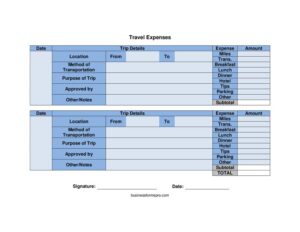
Travel Expenses
Use this free Travel Expenses form template to track mileage, meals, lodging, and trip costs for fast reimbursement — free PDF and DOCX download.
PDF
DOCX
3 downloads
0
likes
Download Files
- DOCX
A Travel Expenses form is a structured report employees use to document and claim reimbursement for costs incurred during business travel. The most common reason people reach for one is to organize receipts for transportation, meals, and lodging into a single, approvable summary. This template is free to download in both PDF and DOCX formats, with no signup required.
What Is a Travel Expenses Form?
A Travel Expenses form is a document that itemizes the costs a person incurs while traveling for work and submits them for company reimbursement. It is typically filled out by the traveling employee and reviewed by a manager or finance team before payment is issued. The form records trip details such as dates, destinations, and purpose, alongside categorized expenses like mileage, transportation, breakfast, lunch, dinner, hotel, tips, and parking. By consolidating everything into one sheet with a subtotal and signature line, it creates a clear paper trail that supports accounting, budgeting, and tax record-keeping for both the employee and the organization.
When Do You Need a Travel Expenses Form?
This form is useful any time business travel generates out-of-pocket costs that need to be reimbursed or recorded. Common scenarios include:
- Client visits — driving or flying to meet a customer and claiming mileage, parking, and meals along the way.
- Conferences and trade shows — documenting hotel stays, transportation, and daily meal costs across several days.
- Field or site work — recording recurring mileage and tolls for staff who travel between job sites.
- Training and seminars — submitting lodging and travel costs after attending an off-site course.
- Sales territory trips — tracking multiple legs of a journey, each with its own from/to locations and expenses.
- Vendor or supplier meetings — logging transportation and incidental tips that require manager approval before payment.
What a Travel Expenses Form Should Have
A complete and approvable Travel Expenses form captures both the context of the trip and a clear breakdown of every cost. It should identify when and why the travel happened, where the traveler went, how they got there, and exactly what they spent in each category. Key elements include the trip date and purpose, the origin and destination, the method of transportation, an itemized list of expenses with a running subtotal, an approval line for a supervisor, and the traveler’s signature with date. Space for notes lets the traveler explain unusual or one-off charges so the reviewer can approve confidently.
How to Fill Out a Travel Expenses Form
- Date: Enter the date of the trip or the date you are completing the report.
- Trip details and location: Describe the trip briefly and note the city or site you traveled to.
- From / To: Record your starting point and your destination for each leg of travel.
- Method of transportation: Indicate how you traveled — personal car, rental, flight, train, or rideshare.
- Purpose of trip: State the business reason, such as a client meeting, conference, or training.
- Approved by: Leave space for the manager who authorizes the travel or the reimbursement.
- Itemize expenses: Fill in the cost columns — expense, miles, trans. (transportation), breakfast, lunch, dinner, hotel, tips, parking, and other.
- Other / notes: Add explanations for any miscellaneous or unusual charges.
- Subtotal: Add the categories to show the total amount being claimed.
- Signature and date: Sign and date to certify the expenses are accurate and business-related.
Understanding the Expense Categories
Each cost column on this form serves a distinct purpose, and using them correctly speeds up review. The miles field is for personal-vehicle travel that is reimbursed at a per-mile rate rather than by receipt — record total miles driven so the finance team can apply the company’s rate. The trans. column covers paid transportation like flights, taxis, rideshares, train tickets, or rental cars. The meal columns — breakfast, lunch, and dinner — are separated so organizations can apply daily meal caps or per-diem limits to each. Hotel captures lodging, tips covers gratuities such as for shuttle drivers or hotel staff, and parking handles garage and lot fees. The other column is a catch-all for tolls, internet fees, or supplies, which is exactly why the notes field matters.
Tips for Faster Reimbursement
Submitting a clean report helps you get paid sooner and avoids back-and-forth with finance. Attach itemized receipts for every claimed expense, keep them in the same order as your form entries, and write a short explanation in the notes field for anything that might look unusual. Record mileage from your odometer or a mapping tool rather than estimating, and submit promptly while the trip is fresh in your memory. Confirm your company’s per-diem limits and approval thresholds before you travel so you do not exceed reimbursable amounts. Finally, double-check that your subtotal matches the sum of the individual columns before signing.
Common Mistakes to Avoid
- Missing receipts: Claiming hotel, transportation, or meal costs without attached documentation, which often triggers a rejected line item.
- Mixing personal and business expenses: Including non-reimbursable items like personal souvenirs or upgrades.
- Vague trip purpose: Writing only “meeting” instead of naming the client, project, or event.
- Math errors: A subtotal that does not equal the sum of the columns slows approval.
- Skipping the approval line: Submitting without the required manager authorization.
- Estimating mileage: Guessing miles instead of recording an accurate from/to distance.
Frequently Asked Questions
What is a Travel Expenses form used for? It is used to itemize and submit the costs an employee incurs during business travel so they can be reviewed and reimbursed. It captures trip details alongside categorized expenses like mileage, transportation, meals, lodging, tips, and parking. The signed form also serves as a record for company accounting and tax purposes.
How do I fill out the mileage field? Record the total miles driven in a personal vehicle for the trip, using your odometer readings or a trusted mapping tool for accuracy. The finance team typically multiplies that mileage by a per-mile rate to calculate your reimbursement. Do not also claim fuel separately if your company reimburses by mileage, since that would double the cost.
Do I need receipts to submit this form? Most organizations require itemized receipts for transportation, hotel, meals, and other paid expenses. Attach them in the same order as your entries on the form to make review faster. Mileage usually does not require a receipt since it is reimbursed at a flat rate, but you may need to show the distance traveled.
Does a Travel Expenses form need to be signed? Yes. The traveler signs and dates the form to certify that the expenses are accurate and business-related, and a manager signs the “approved by” line to authorize reimbursement. Both signatures create accountability and a clear approval trail.
Is this Travel Expenses form free to download? Yes, you can download it completely free in both PDF and DOCX formats, with no signup or payment required. The editable DOCX version lets you add your company logo, adjust expense categories, or insert per-diem limits before distributing it to staff.
What goes in the “other” expense column? The “other” column is a catch-all for costs that do not fit the named categories, such as tolls, internet access fees, baggage charges, or small supplies. Whenever you use it, add a short explanation in the notes field so the reviewer understands the charge and can approve it without questions.
This Travel Expenses template is a general example provided for informational purposes only and is not legal, financial, or tax advice. Reimbursement rules, mileage rates, per-diem limits, and tax treatment vary by company and jurisdiction. Consult a qualified accounting or finance professional to ensure your expense reporting meets your organization’s and your region’s requirements.
Related Forms
- Check Register
- Credit Card Minimum Payment
- Travel Expense Report
- Gas Mileage Reimbursement
- Business Trip Details List
- Expense Report
Browse more in Expense Reports.