
Travel Expense Report
Download a free Travel Expense Report template to log airfare, lodging, meals, and mileage and get reimbursed fast — free PDF and DOCX download.
PDF
DOC
3 downloads
0
likes
Download Files
- DOC
A Travel Expense Report is the form employees use to itemize and claim reimbursement for costs incurred during business travel — airfare, lodging, meals, mileage, taxis, tolls, and more. The most common reason people reach for one is to get paid back quickly and accurately after a trip while giving accounting a clean, documented record. You can download this template free in both PDF and DOCX formats, with no signup required.
What Is a Travel Expense Report?
A Travel Expense Report is an internal accounting document that a traveling employee completes after a business trip to summarize every expense and request reimbursement. It is typically issued by an employer and submitted to the finance or accounts payable team, often with original receipts attached. The report documents who traveled, where, when, why, and exactly what each cost was — broken down by category such as airfare, lodging, meals, and ground transportation. It also reconciles any travel advance the company already paid against the actual expenses, showing whether money is due to the traveler or due to the company. In short, it turns a stack of receipts into an auditable claim that ties spending back to company travel policy.
When Do You Need a Travel Expense Report?
Almost any time company money is spent away from the office, a written report keeps the reimbursement clean. Common situations include:
- An employee returns from a multi-day client visit and needs to claim airfare, hotel nights, and meals.
- A sales rep drives to several territories and wants mileage reimbursed for the route between destinations.
- A consultant attends a conference and must claim registration fees, lodging, and ground transport.
- A manager who received a cash travel advance must reconcile that advance against what was actually spent.
- A field technician racks up tolls, parking, car storage, and rental car charges over a week on the road.
- An employee needs to recover incidental costs like business phone calls, tips, and miscellaneous expenses.
What a Travel Expense Report Should Have
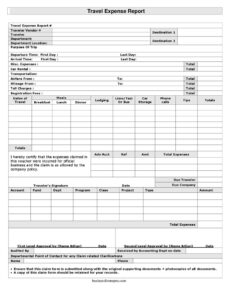
A complete report gives accounting everything it needs to approve the claim without follow-up questions. The essentials are: traveler identity and vendor number, the destination and purpose of the trip, the full date range and departure/arrival times, an itemized breakdown of every expense category, the total expenses, the reconciliation of any advance, and the resulting balance due to the traveler or company. It should also carry the accounting coding fields (account, fund, department, program, class, project, and type), a signed certification that the expenses were for official business, and sign-off lines for the auditor, accounting, and a departmental point of contact. Original supporting receipts plus photocopies round it out.
How to Fill Out a Travel Expense Report
- Enter the travel expense report # and your traveler vendor #, then your name in the traveler field.
- Fill in the destination, your department, the department location, and a clear purpose of trip.
- Record the dates of travel, the first day, your departure time, and your arrival time.
- Itemize transportation: airfare from, mileage from, car rental, transportation, toll charges, limo/taxi or bus, and car storage.
- Enter accommodation under lodging and conference costs under registration fees.
- Break out meals into breakfast, lunch, and dinner.
- Add incidentals: phone calls, tips, and any misc. expenses.
- Sum everything in total expenses, then enter your advance under adv acct, ref, and amt.
- Calculate due traveler or due company, complete the coding fields (account, fund, dept, program, class, project, type), and add your traveler’s signature.
Reconciling Travel Advances
One feature that distinguishes this report from a simple receipt log is the advance reconciliation. If your company issued cash or a card balance before the trip, you record it in the adv acct, ref, and amt fields. The form then compares that advance against your total expenses. If you spent more than the advance, the difference appears as due traveler and the company reimburses you. If you spent less, the leftover appears as due company, and you return it. Getting this math right is essential — a mismatch is the single most common reason a report gets sent back, so double-check that the advance amount, total expenses, and the balance line all agree before signing.
Supporting Documents and Recordkeeping
The certification line on this form states that the expenses were incurred for official business and are allowable under company policy — your signature makes that a formal attestation. To honor it, attach the original supporting documents plus photocopies of every receipt: boarding passes, hotel folios, rental agreements, toll statements, and meal receipts. Keep a copy of the completed report for your own records in case a question arises later. Well-organized documentation speeds approval, supports the audited by and received by accounting sign-offs, and gives the departmental point of contact what they need to clarify any claim questions quickly.
Common Mistakes to Avoid
- Leaving the purpose of trip blank or vague — auditors need a clear business reason for each claim.
- Forgetting to attach original receipts, which can stall or void the entire reimbursement.
- Mismatching the advance amount with total expenses so the due traveler/due company line is wrong.
- Mixing personal expenses into business categories instead of excluding them.
- Skipping the accounting codes (account, fund, dept, program, class, project, type), which delays posting.
- Submitting unsigned — the certification and traveler’s signature are required for the claim to be valid.
Frequently Asked Questions
What is a Travel Expense Report used for? It is used to itemize and document all costs from a business trip — such as airfare, lodging, meals, mileage, and tolls — so an employee can be reimbursed and accounting has an auditable record. It also reconciles any travel advance against actual spending.
How do I fill out a Travel Expense Report? Start with your traveler and trip details, then itemize each expense by category, total them, record any advance, and calculate the balance due to you or the company. Sign the certification and attach your original receipts before submitting to accounting.
Does a Travel Expense Report need to be signed or witnessed? It needs the traveler’s signature on the certification line, which attests that the expenses were for official business and comply with company policy. It does not typically require a witness or notarization, though your employer may require an approver’s sign-off.
What is the difference between “due traveler” and “due company”? “Due traveler” is the amount the company owes you when your expenses exceed the advance you received. “Due company” is the amount you must return when your advance was larger than what you actually spent.
Do I need to attach receipts? Yes — the form instructs you to submit original supporting documents plus photocopies of all receipts and to retain a copy for your own records. Missing receipts are a leading reason claims are rejected or returned.
How much does this Travel Expense Report template cost? Nothing — it is completely free to download from Business Forms Pro in both PDF and DOCX formats, with no signup required. You can customize the DOCX version to match your company’s categories and coding fields.
This Travel Expense Report template is a general example provided for informational purposes only and is not legal, financial, or tax advice. Reimbursement rules, allowable expenses, and recordkeeping requirements vary by company and jurisdiction — consult your finance department or a qualified professional before relying on this form.
Related Forms
- Business Trip Details List
- Company Overdue Accounts
- Mileage Reimbursement Form
- Expense Report Weekly
- Bill Tracker
- Gas Mileage Reimbursement
Browse more in Expense Reports.