
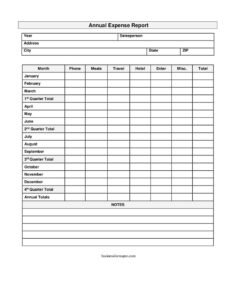
Expense Report
Track meals, travel, hotel, and miscellaneous costs all year with this free annual expense report template — free download in PDF and DOCX.
PDF
DOCX
3 downloads
0
likes
Download Files
- DOCX
An annual expense report is a single-page summary that records an employee’s or salesperson’s reimbursable business costs across an entire calendar year. People most often use it to consolidate twelve months of spending — meals, travel, hotels, and miscellaneous items — into one document for reimbursement, budgeting, and tax preparation. This template is free to download in both PDF and DOCX with no signup required.
What Is an Annual Expense Report?
An annual expense report is a financial form that totals a worker’s business-related expenses month by month and rolls them into quarterly and yearly figures. It is typically completed by a salesperson, field representative, or any employee who incurs costs on the company’s behalf, then submitted to a manager or accounting team. Unlike a single trip report, the annual version captures the full year in one place — making it useful for reconciling reimbursements, comparing spending across quarters, and supplying documentation at tax time. This particular template breaks expenses into clear categories (meals, travel, hotel, and miscellaneous) and organizes them by month and quarter so totals are easy to verify.
When Do You Need an Annual Expense Report?
This form fits any situation where business spending needs to be summarized over a full year rather than a single event. Common scenarios include:
- A traveling salesperson summarizing a year of client visits, mileage, and overnight stays for an annual reimbursement reconciliation.
- An employee preparing year-end documentation so accounting can close the books and verify all reimbursements were processed.
- A small business owner compiling deductible expenses for tax filing and handing the report to a bookkeeper or accountant.
- A department manager comparing each quarter’s spending to spot seasonal trends or budget overruns.
- A contractor or consultant tracking recoverable costs billed back to clients over the course of a year.
- A finance team auditing a representative’s spending history when reviewing performance or renewing a travel policy.
What an Annual Expense Report Should Have
A complete annual expense report identifies who spent the money, the period it covers, and a clear breakdown of every dollar by category and time. The header should name the salesperson and the reporting year, along with contact and address details so the report can be matched to the correct person and account. The body needs consistent expense categories — meals, travel, hotel, and miscellaneous — repeated for each month, with subtotals at the end of every quarter and a grand annual total. A notes area lets the filer explain unusual charges or attach context. Accuracy and consistent categorization are what make the report trustworthy when it reaches accounting.
How to Fill Out an Annual Expense Report
- Enter the year the report covers at the top so the period is unambiguous.
- Fill in the salesperson name, then the address, city, state, and zip fields to identify the person submitting the report.
- Add the phone number so reviewers can follow up on any questions.
- For each month — January through December — record amounts in the category columns: meals, travel, hotel, and misc. Use the enter column for any additional line as needed.
- Calculate the total for each month by adding the categories across the row.
- At the end of each three-month block, sum the monthly figures into the 1st quarter total, 2nd quarter total, 3rd quarter total, and 4th quarter total fields.
- Add the four quarters together to produce the annual totals at the bottom.
- Use the notes field to explain large or unusual entries, reference attached receipts, or flag items pending approval.
Tips for Accurate Year-Round Tracking
Because an annual report spans twelve months, the biggest risk is trying to reconstruct everything in December from memory. Update the form monthly while receipts are fresh, and store digital or paper copies of every receipt in a folder labeled by month. Keep your categories consistent — decide early whether parking goes under travel or miscellaneous, and apply that rule all year. If your company has a travel and expense policy, review its per-diem limits and approval thresholds before you submit, since amounts above a threshold often need extra documentation. Saving the DOCX version lets you build the running totals as you go, then export a clean PDF when it’s time to submit.
How It Differs From a Single Expense Report
A standard expense report usually covers one trip, one event, or one short period and may itemize individual receipts line by line. The annual version is a roll-up: it summarizes monthly figures rather than every transaction and emphasizes quarterly and yearly totals. Many people use both — detailed monthly or per-trip reports for reimbursement throughout the year, then this annual summary to tie everything together for review, budgeting, and tax preparation. Keep your detailed reports and receipts as backup; the annual report is the overview, not a replacement for source documentation.
Common Mistakes to Avoid
- Waiting until year-end to fill it in — reconstructing twelve months at once invites errors and missed expenses.
- Inconsistent categorization — putting similar costs in different columns from one month to the next makes totals unreliable.
- Math errors in the quarterly and annual rollups — always double-check that quarters sum to the annual total.
- Discarding receipts — without backup documentation, reimbursable or deductible items can be denied.
- Mixing personal and business spending — only legitimate business costs belong on the report.
- Leaving the notes field blank — unexplained large entries slow approval and raise questions during review.
Frequently Asked Questions
What is an annual expense report used for? It consolidates a person’s business expenses — such as meals, travel, hotel, and miscellaneous costs — for an entire year into one document. Companies use it for reimbursement reconciliation, budget review, and supporting tax preparation. It gives both the employee and accounting a single place to see the full year at a glance.
How do I fill out this annual expense report template? Start with the year, salesperson name, and contact details, then enter expense amounts by category for each month. Total each month, sum the months into quarterly totals, and add the quarters to get the annual total. Use the notes field to explain anything unusual.
Is an annual expense report legally binding? It is an internal financial document rather than a contract, so it isn’t “binding” in the legal sense. However, the figures you report should be accurate and supported by receipts, especially if they feed into tax filings or reimbursements. Submitting false expense information can have employment or legal consequences.
Do I need to attach receipts? Most companies require receipts as backup for the amounts you report, and you’ll generally want them for any tax deduction as well. The annual report summarizes totals, so keep receipts and detailed monthly reports as supporting documentation. Reference attached receipts in the notes field where helpful.
How much does this template cost? Nothing — it’s a free download from Business Forms Pro in both PDF and DOCX formats with no signup required. You can print the PDF or edit the DOCX to add your company name and adjust categories. Use it for as many years and people as you need.
Can I customize the categories? Yes. The DOCX version is fully editable, so you can rename or add categories — for example splitting out mileage, parking, or entertainment — to match your company’s expense policy. Just keep your categories consistent across all twelve months so the totals stay accurate.
This annual expense report template is provided as a general example for informational purposes only and does not constitute financial, tax, or legal advice. Reimbursement rules, deductibility, and recordkeeping requirements vary by company and jurisdiction — consult a qualified accountant or tax professional for guidance specific to your situation.
Related Forms
- Mileage Reimbursement Form
- Business Trip Details List
- Travel Expense Report
- Expense Reimbursement Request Report
- Gas Mileage Reimbursement
- Vehicle Expense Journal Monthly
Browse more in Expense Reports.