
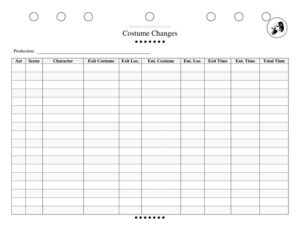
Costume Change Tracker
Download a free Costume Change Tracker template to map every quick change by act, scene, and timing for smooth, error-free theater productions.
PDF
DOCX
1 downloads
0
likes
Download Files
- DOCX
A Costume Change Tracker is a backstage tool that records every costume change in a production — which character changes, when, where, and how long the change takes. Stage managers and wardrobe crews use it most often to plan and time quick changes so no actor misses an entrance. It’s free to download here in both PDF and DOCX, with no signup required.
What Is a Costume Change Tracker?
A Costume Change Tracker is a wardrobe and stage management document that logs each costume transition during a play, musical, or live performance. It’s typically maintained by the wardrobe supervisor, dressers, or the deputy stage manager, and it captures the character changing, the act and scene involved, the costume being removed and the one being put on, the backstage locations for both, and the time available for the change. By laying all of this out in one place, the tracker turns a chaotic flurry of quick changes into a predictable, rehearsed routine that keeps the show running on schedule.
When Do You Need a Costume Change Tracker?
Any production with more than a few costume swaps benefits from a written tracker. Common situations include:
- Musicals with frequent quick changes where ensemble members shift looks between numbers in under a minute.
- One-actor or small-cast shows in which performers play multiple characters and need precise change choreography.
- Period dramas with layered, complex garments that require dressers and a clear staging location.
- Touring productions moving into unfamiliar venues, where backstage geography changes and exit/entrance locations must be re-mapped.
- Tech and dress rehearsals when the crew is timing changes for the first time and identifying which ones are too tight.
- Understudy or swing rehearsals where a new performer needs a written reference for an unfamiliar change sequence.
What a Costume Change Tracker Should Have
A complete tracker leaves no ambiguity about who changes, when, or where. The essential elements are the production title for filing and version control, the act and scene markers that place each change in the script, the character undergoing the change, and a clear description of both the exit costume (worn before) and the entrance costume (worn after). Just as important are the physical locations — the exit location where the actor leaves the stage and the entrance location where they return — plus exit time, entrance time, and the total time available. Together these fields tell the crew not only what to do but exactly how much time they have to do it.
How to Fill Out a Costume Change Tracker
- Production: Enter the show’s title at the top so the sheet stays with the correct prompt book or wardrobe binder.
- Act: Note the act in which the change occurs to keep entries in performance order.
- Scene: Add the scene number or label so the change ties directly to the script.
- Character: Write the character name (and actor, if helpful) who is making the change.
- Exit Costume: Describe the costume the performer is wearing as they leave the stage, including key pieces or accessories.
- Exit Loc.: Record where the actor exits — stage left, stage right, upstage, or a specific quick-change booth.
- Ent. Costume: Describe the costume the performer must be wearing when they return.
- Ent. Loc.: Note where they re-enter, which may differ from the exit point.
- Exit Time: Log the cue or clock time the actor leaves the stage.
- Ent. Time: Log when they must be back on stage.
- Total Time: Calculate the seconds or minutes available so the crew can flag tight changes.
Reading the Timing Columns
The most valuable data on the tracker lives in the three time fields. Exit Time, Ent. Time, and Total Time reveal which changes are comfortable and which are dangerously fast. A change with three minutes is routine; one with twenty seconds is a true quick change that may require pre-set garments, Velcro or magnetic closures, multiple dressers, and a dedicated change booth in the wings. Use the time column to sort your changes by urgency during tech week. When a total time is unrealistic, that’s a signal to adjust the staging, simplify the costume, add a dresser, or rewrite a transition. Reviewing these numbers as a team prevents the panic that comes from discovering an impossible change during the first preview.
Mapping Exit and Entrance Locations
The exit and entrance location fields exist because a performer rarely returns through the same wing they left. A character might exit stage right after a big number, sprint through a crossover behind the backdrop, change at a stage-left booth, and re-enter from the opposite side. Documenting both locations lets the crew pre-position the entrance costume in the right spot and assign dressers where they’re actually needed. In an unfamiliar touring venue, re-confirm these locations during the load-in, because backstage layouts vary widely from house to house.
Common Mistakes to Avoid
- Vague costume descriptions: writing only “red dress” when there are three red dresses leads to wrong pulls; name the specific look or costume number.
- Ignoring the total time: failing to calculate available time hides the changes most likely to cause a missed entrance.
- Assuming same exit and entrance points: not recording separate locations strands costumes and dressers in the wrong wing.
- Leaving accessories off the list: wigs, shoes, hats, and props are part of the change and should be noted.
- Not updating after re-blocking: an outdated tracker is worse than none; revise it whenever scenes or staging change.
- Skipping a dry run: never trust a paper change time you haven’t physically timed in a rehearsal.
Frequently Asked Questions
What is a Costume Change Tracker used for? It is used to plan, time, and rehearse every costume change in a production. By listing the character, act, scene, costumes, locations, and timing in one place, it helps the wardrobe and stage management teams ensure each change happens accurately and on schedule.
Who fills out the Costume Change Tracker? Usually the wardrobe supervisor, head dresser, or deputy stage manager completes it during tech rehearsals. It is often built collaboratively, with the stage manager confirming cue times and the wardrobe team verifying costume details and locations.
How do I calculate the total change time? Subtract the exit time from the entrance time to find how long the performer has between leaving the stage and returning. Record that figure in the Total Time field so you can quickly spot the tightest changes that may need extra dressers or simplified garments.
Is this tracker only for big musicals? No. While large musicals benefit greatly, the tracker is equally useful for plays with doubled roles, small touring shows, school productions, and any performance where timing and accuracy of costume changes matter.
Can I edit the template to add more columns? Yes. The DOCX version is fully editable, so you can add fields for dresser assignments, wig or makeup notes, or costume numbers to match your production’s needs.
How much does the Costume Change Tracker cost? It is completely free to download here in PDF and DOCX formats, with no signup or payment required. You can print copies for the wardrobe binder or fill in the digital version.
This template is provided as a general example for informational purposes only and is not professional production, safety, or legal advice. Backstage practices and venue requirements vary; consult your production’s stage management and wardrobe leadership to confirm what works for your show.
Related Forms
- Script Assignment Tracker
- Theater Wallet Cards
- Audition Sheet
- Rehearsal Schedule Month
- Focus Chart
- Blank Schedule Ongoing
Browse more in Theater.