
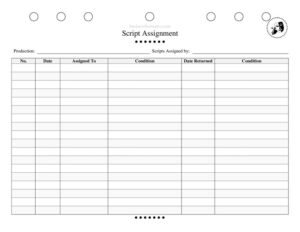
Script Assignment Tracker
Track every script handed out and returned during your production with this free Script Assignment Tracker template — free download in PDF and DOCX.
PDF
DOCX
0
likes
Download Files
- DOCX
A Script Assignment Tracker is a simple log used by theater companies and production teams to record which scripts were handed out, to whom, and in what condition — so nothing goes missing before opening night. It’s the fastest way to keep your script inventory accountable across a cast and crew, and it’s completely free to download in PDF and DOCX with no signup required.
What Is a Script Assignment Tracker?
A Script Assignment Tracker is a record-keeping sheet that documents the distribution and return of physical (or numbered digital) scripts for a stage production. It is typically maintained by a stage manager, production manager, or company manager. The form captures who issued each script, the date, the recipient, the script’s condition when handed out, and the date and condition when it comes back. By logging every copy by number, it creates a clear paper trail that helps the production protect licensed or rented materials, recover scripts after a run closes, and identify damage or loss before it becomes a problem during settlement with a licensing house.
When Do You Need a Script Assignment Tracker?
This tracker earns its keep any time multiple copies of a script leave the production office. Common situations include:
- Distributing rented or licensed scripts from a publisher like a play-leasing house that requires every copy returned undamaged after closing.
- Handing out scripts at the first read-through so each cast member is logged and accountable for their copy.
- Tracking crew and design copies issued to the director, stage manager, lighting and sound designers, and assistants.
- Managing a school or community theater library where the same set of scripts is reused across seasons and must be collected each year.
- Recovering materials at strike when the production wraps and all copies need to be reconciled before final accounting.
- Documenting damage or markup when a returned script has missing pages, water damage, or heavy annotations that may incur a replacement fee.
What a Script Assignment Tracker Should Have
To be genuinely useful, the tracker needs enough detail to identify each copy and trace its full journey. At minimum it should include the production name, the person responsible for issuing the scripts, and a numbered row for each copy. Each row should capture who received it, the issue date, the condition at handout, and a matching pair of return fields — the date returned and the condition on return. The before-and-after condition columns are what make the form valuable: comparing the two tells you instantly whether a copy came back in acceptable shape. A clear sequential numbering system ties physical scripts to their log entry so there is never confusion about which copy belongs to whom.
How to Fill Out a Script Assignment Tracker
- Production: Write the title of the show at the top so the sheet is filed with the correct production — useful when a company runs several shows a season.
- Scripts Assigned by: Enter the name of the person distributing the copies, usually the stage manager or company manager who is accountable for the inventory.
- No.: Assign each script a unique number and mark the matching number on the physical copy so the log and the script always agree.
- Date: Record the date the script was handed out.
- Assigned To: Write the full name of the recipient — cast member, crew, or designer — so there is no ambiguity about who holds each copy.
- Condition (out): Note the script’s state when issued, such as “new,” “good,” or “worn cover,” to establish a baseline.
- Date Returned: Fill this in when the copy comes back, leaving it blank for any copy still outstanding.
- Condition (returned): Describe the state on return and flag any damage that differs from the issue condition.
Tracking Condition Before and After
The two condition columns are the heart of this form, and using them consistently saves headaches at the end of a run. Establish a short vocabulary before you start — for example “new,” “good,” “fair,” and “damaged” — so every entry is comparable. When you issue a script, note anything pre-existing, like a creased spine or a previous production’s pencil marks, so a returned copy isn’t wrongly charged against the current borrower. On return, compare against the issue note and record specifics: “three pages annotated in pen,” “coffee stain on cover,” or “missing pages 40–42.” This level of detail is exactly what a licensing house or school administrator wants to see when assessing whether a replacement fee applies.
Reconciling Scripts at the End of a Run
At strike or the end of a season, the tracker becomes your reconciliation checklist. Scan down the Date Returned column: any blank row is an outstanding copy you can chase by name using the Assigned To field. Many licensing agreements require all rented scripts to be returned within a set window after the final performance, so a complete log helps you meet that deadline and avoid late or non-return charges. Keep the finished sheet on file with your production paperwork — it documents that copies were collected and in what state, which protects the company if a question arises later.
Common Mistakes to Avoid
- Skipping the script number: Without a unique number on both the log and the physical copy, you cannot reliably match a returned script to its entry.
- Leaving the issue condition blank: If you never recorded the starting state, you cannot prove whether damage happened on someone’s watch.
- Using initials or partial names: Two cast members with the same first initial create confusion — always use full names in Assigned To.
- Forgetting to log the return date: An unfilled Date Returned should mean a script is still out; sloppy logging makes the count meaningless.
- Vague condition notes: “Bad” tells you nothing — describe the specific issue so replacement decisions are fair and defensible.
- Not naming who issued the scripts: Leaving Scripts Assigned by blank removes accountability for the inventory.
Frequently Asked Questions
What is a Script Assignment Tracker used for? It is used to log every script copy handed out for a production, recording who received it, when, and its condition both out and back. The goal is to keep an accurate inventory so copies are returned and any damage is documented. It is especially important for rented or licensed scripts that must be returned to a publisher.
Who should maintain the tracker? Typically the stage manager, production manager, or company manager keeps it, since they coordinate the cast and crew. In a school or community theater, a teacher or volunteer librarian often handles it. The key is that one accountable person — the one named in the Scripts Assigned by field — owns the log.
Why are there two condition fields? One records the condition when the script is issued and the other records the condition when it is returned. Comparing the two reveals any damage that occurred while the copy was out. This protects both the production and the borrower from unfair charges.
Is this form legally binding? It is an internal tracking record rather than a contract, so it does not create legal obligations on its own. However, it can serve as useful documentation if a dispute arises over a lost or damaged script, particularly under a licensing agreement. Keep it filed with your production paperwork.
How much does the template cost? Nothing — this Script Assignment Tracker is a free download from Business Forms Pro in both PDF and DOCX formats. There is no signup required. You can print it as-is or edit the DOCX to fit your production’s needs.
Can I use it for digital or PDF scripts? Yes. Assign each digital copy a number just as you would a printed one and log who received it and when. The condition fields are less relevant for digital files, but the Date and Date Returned columns still help you confirm access was granted and revoked appropriately.
This template is provided as a general example for informational purposes only and does not constitute legal, financial, or contractual advice. Script licensing terms and return requirements vary by publisher and jurisdiction — review your specific licensing agreement and consult a qualified professional if you have questions.
Related Forms
- Preliminary Props List
- Line Notes Breakdown
- Blank Schedule Ongoing
- Prop Pre-Set Checklist
- Run Sheet
- Costume Inventory
Browse more in Theater.