
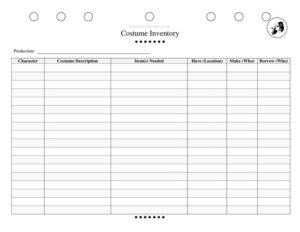
Costume Inventory
Track every costume piece per production and character with this free Costume Inventory template, available as a PDF and DOCX download for theater teams.
PDF
DOCX
5 downloads
0
likes
Download Files
- DOCX
A Costume Inventory is a tracking sheet that lists every costume and accessory a production requires, broken down by character, so wardrobe teams know exactly what they have, what they need to make, and what they must borrow. The most common reason people use one is to keep a show’s costuming organized from the first fitting through closing night without losing track of a single piece. You can download this Costume Inventory free as a PDF or DOCX — no signup required.
What Is a Costume Inventory?
A Costume Inventory is a working document maintained by a costume designer, wardrobe supervisor, or stage manager to catalog all the clothing, footwear, and accessories tied to a theatrical production. It records each character’s costume needs alongside the source of every item — whether it is already in stock, needs to be built, or must be rented or borrowed. The inventory functions as both a planning tool during pre-production and a reference during the run, helping the wardrobe team assign responsibilities, budget time and money, and ensure nothing is missing on opening night. It is especially valuable for shows with large casts, multiple costume changes, or pieces sourced from several places at once.
When Do You Need a Costume Inventory?
This form is useful any time a production has more costume pieces than one person can reliably remember. Common scenarios include:
- Pre-production planning — mapping every character’s looks before the budget and build schedule are set.
- Community and school theater — coordinating volunteer sewers, parents, and a small wardrobe stock for a single show.
- Multi-character musicals — managing dozens of costumes and quick changes across a large ensemble.
- Borrowing and rental tracking — keeping a record of which pieces come from another theater, a costume house, or a personal closet so they get returned.
- Costume builds — assigning who is responsible for making each custom garment and tracking progress.
- Strike and storage — reconciling what came in, what was used, and what needs to be returned or stored after the show closes.
What a Costume Inventory Should Have
A complete Costume Inventory ties every item to a specific character within a named production and makes the source of each piece unmistakable. At minimum it should capture the production title, the character, a clear description of the costume, the individual items that make it up, and three sourcing columns: what you already have (and where it is stored), what needs to be made (and by whom), and what must be borrowed (and from whom). Together these elements turn a vague costume concept into an actionable to-do list that any team member can read at a glance.
How to Fill Out a Costume Inventory
Work through the sheet one character at a time, using the actual fields on the template:
- Production — enter the show’s title so the inventory is clearly tied to the right project, especially if your space runs multiple productions.
- Character — name the role this row covers. Create a separate row or block for each costume a character wears if they change throughout the show.
- Costume Description — describe the overall look in plain terms, such as “Act 1 ballgown, deep blue with silver trim,” so anyone reading understands the intended outfit.
- Item(s) Needed — break the look into individual components: dress, petticoat, gloves, shoes, hat, jewelry. Listing each piece prevents small accessories from being forgotten.
- Have (Location) — note items already in stock and exactly where they are stored, such as “wardrobe rack 3” or “costume closet, bin 12.”
- Make (Who) — record any pieces that must be sewn or built and assign the person or team responsible.
- Borrow (Who) — list items coming from outside and the source, such as another theater, a rental house, or a cast member.
Organizing a Large Show’s Inventory
For productions with big casts, sort the inventory by act and scene first, then by character, so the wardrobe team can stage pieces in the order they are needed backstage. Color-code or flag quick changes that must happen in under a minute — these need dressers assigned and may require duplicate pieces. Keep a running tally of items in the “Make” column against your build calendar so nothing slips behind schedule, and review the “Borrow” column weekly to confirm loaned pieces have actually arrived. A well-sorted inventory doubles as your run sheet and your post-show return checklist.
Tracking Borrowed and Rented Pieces
Borrowed and rented items deserve extra attention because they are not yours to keep. In the “Borrow (Who)” field, record not just the source but ideally a contact and a return-by date in your description notes. Photograph each borrowed piece on arrival to document its condition, and inspect it again before returning it. Keeping these details inside the inventory means that when the show strikes, you already have a complete list of what must go back and to whom — protecting your relationships with lending theaters and cast members who contributed personal items.
Common Mistakes to Avoid
- Listing the look but not the pieces — writing “soldier uniform” without breaking out the jacket, belt, boots, and hat leads to missing accessories.
- Leaving the location blank — knowing you “have” a piece is useless if no one can find it during a quick change.
- Not assigning a name in the Make column — “to be made” with no person attached means it may never get built.
- Forgetting to track returns — borrowed items lost in storage damage trust with the people who lent them.
- One row per character on multi-costume shows — combining several outfits into a single line creates confusion when a character has multiple changes.
- Never updating the sheet — an inventory frozen at the planning stage doesn’t reflect what was actually built, found, or substituted.
Frequently Asked Questions
What is a Costume Inventory used for? It is used to catalog every costume and accessory a production needs, organized by character, and to track whether each piece is already in stock, needs to be made, or must be borrowed. It keeps the wardrobe team coordinated from planning through strike.
How do I fill out a Costume Inventory? Start with the production name, then go character by character, describing each costume and breaking it into individual items. For every item, mark whether you have it (and where it’s stored), need to make it (and who’s responsible), or must borrow it (and from whom).
Who should maintain the inventory? Typically the costume designer or wardrobe supervisor owns it, but in school and community theater the stage manager or a volunteer wardrobe lead often keeps it. The key is that one person is responsible for updating it as items are found, built, or returned.
Can I use this for a school or community production? Absolutely. The format works for any size show, and it is especially helpful when volunteers are sewing pieces or cast members are bringing items from home, since the Make and Borrow columns make responsibilities and sources clear.
Does this form cost anything? No. This Costume Inventory template is completely free to download as a PDF or editable DOCX, with no signup required, so you can customize it for your specific production.
How is this different from a costume plot? A costume plot usually maps out which costume each character wears in each scene for timing and continuity, while this inventory focuses on tracking the items themselves and their sources. Many productions use both — the plot for the run and the inventory for acquisition and returns.
This template is a general example provided for informational purposes only and is not professional, legal, or financial advice. Costume management practices and rental or borrowing agreements vary by organization and venue — consult your production’s leadership or a qualified professional for guidance specific to your situation.
Related Forms
- Callback Sheet
- Pre-Show Checklist
- Scene Breakdown Actors
- Script Breakdown
- Page Blocking Breakdown
- Production Schedule
Browse more in Theater.