
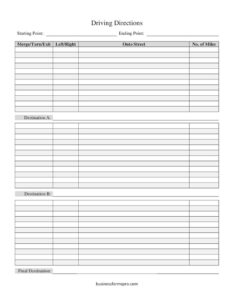
Driving Directions
Use this free Driving Directions template to write out clear, step-by-step routes for events, deliveries, and guests — free PDF and DOCX download.
PDF
DOCX
7 downloads
0
likes
Download Files
- DOCX
A Driving Directions form is a simple, fill-in template for writing out a clear, step-by-step route from one location to another. People most often use it to give guests, drivers, or delivery teams reliable directions that don’t rely on a phone signal, and you can download it free in both PDF and DOCX formats with no signup required.
What Is a Driving Directions Form?
A Driving Directions form is a structured document that breaks a journey into individual, easy-to-follow steps. Instead of a paragraph of vague instructions, it organizes each maneuver — a merge, turn, or exit — alongside the street name and the number of miles to travel before the next step. Anyone can issue it: a business sending visitors to its office, an event host directing wedding guests, a dispatcher routing a delivery driver, or a parent giving directions to a babysitter. It documents the exact path between a starting point and a final destination, often with intermediate waypoints, so the route is repeatable, shareable, and usable even when GPS is unavailable or unreliable.
When Do You Need a Driving Directions Form?
Written directions remain useful in plenty of everyday and professional situations, especially where a printed handout beats a flaky map app. Common scenarios include:
- Event invitations: Including a printed route with wedding, party, or reunion invitations so guests can find a venue tucked away on rural or unmarked roads.
- Business and office visits: Sending clients, vendors, or job candidates a consistent route to your location, including the best entrance or parking lot.
- Deliveries and service calls: Giving drivers or technicians a clear path to a site that GPS systems often misroute, such as a construction yard or a gated property.
- Areas with poor cell coverage: Providing a paper backup for destinations in mountains, parks, or remote regions where mobile data drops out.
- Multi-stop trips: Mapping a route that passes through one or two waypoints before the final stop, like picking up supplies before reaching a job site.
- Recurring routes: Standardizing a path your team drives regularly so every new driver follows the same proven directions.
What a Driving Directions Form Should Have
A complete set of written directions should leave no room for guessing. The strongest forms include a clearly labeled starting point and ending point, each step expressed as a single action (merge, turn, or exit), the direction of that action (left or right), the street or road the driver moves onto, and the distance to travel before the next step. When the trip includes stops, the form should name intermediate destinations and a final destination so the reader always knows where they are in the sequence. Sequential numbering, consistent street names, and accurate mileage are what turn a rough sketch into directions someone can actually trust on the road.
How to Fill Out a Driving Directions Form
- Starting Point: Write the full address or a recognizable landmark where the trip begins, so there’s no ambiguity about the origin.
- Ending Point: Enter the address of the destination this leg of directions leads to, giving the reader the goal up front.
- Merge/Turn/Exit: For each step, record the maneuver — whether the driver merges onto a highway, makes a turn, or takes an exit.
- Left/Right: Note the direction of that maneuver so there is no confusion about which way to go.
- Onto Street: Name the exact road, ramp, or highway the driver moves onto, matching the spelling on actual road signs.
- No. of Miles: State how far to continue before the next step, helping drivers know when to start watching for the upcoming turn.
- Destination A and Destination B: Use these to label intermediate stops or waypoints if the trip includes them.
- Final Destination: Confirm the ultimate arrival point, ideally with a note about parking or the correct entrance.
Tips for Writing Directions People Can Actually Follow
Clear directions are written from the driver’s point of view, not from a map. Always describe maneuvers in the order they happen, and pair every turn with a visible cue — a traffic light, a gas station, or a sign — so the reader can confirm they’re in the right place. Spell street names exactly as they appear on signage, since locals and visitors may know the same road by different names. Round mileage to a sensible precision (a tenth of a mile near turns, whole miles on long stretches) and mention what happens if someone goes too far, like “if you reach the river, you’ve passed it.” A short note about total drive time at the top helps people plan.
Driving Directions vs. a Digital Map
A printed Driving Directions form isn’t meant to replace navigation apps — it complements them. GPS excels at rerouting around traffic, but it can fail in dead zones, misname new roads, or send drivers to the wrong side of a large property. A written route, by contrast, reflects local knowledge: the correct gate, the unmarked turnoff, or the shortcut that saves ten minutes. Keeping a paper copy in the glovebox or attached to an invitation gives people a dependable fallback. For events and businesses, written directions also project care and professionalism in a way a dropped pin never quite does.
Common Mistakes to Avoid
- Skipping confirmation landmarks: Listing only turns without visible cues leaves drivers unsure whether they’ve gone too far.
- Inaccurate mileage: Guessing distances causes people to miss turns or turn too early — verify each segment.
- Inconsistent street names: Using a nickname in one step and the official name in another creates confusion.
- Forgetting the final detail: Omitting parking instructions or the correct entrance leaves drivers circling at the end.
- Out-of-order steps: Listing maneuvers out of sequence is worse than no directions at all.
- Not testing the route: Writing directions from memory without driving or mapping them often introduces small errors.
Frequently Asked Questions
What is a Driving Directions form used for? It is used to write out a clear, step-by-step route from a starting point to a final destination. People rely on it for event invitations, office visits, deliveries, and trips through areas with poor cell coverage where a printed backup is valuable.
How do I fill out the Driving Directions template? Enter the starting and ending points, then record each step in order using the merge/turn/exit field, the left/right direction, the street you move onto, and the miles to travel. Add intermediate stops as Destination A and B if needed, and finish with the final destination.
Is this Driving Directions template free? Yes. You can download it completely free in both PDF and DOCX formats, with no signup or payment required. Use it as often as you like and customize it for any route.
Can I edit the template for multiple stops? Absolutely. The form includes Destination A, Destination B, and a Final Destination so you can map multi-stop trips. In the DOCX version you can add more rows or steps to fit longer or more complex routes.
Should I still use this if I have GPS? Yes — written directions are a reliable backup when GPS loses signal, misnames a road, or routes you to the wrong entrance. They also let you include local knowledge, like the correct gate or parking lot, that maps often miss.
How do I make my directions easier to follow? Write each step in the order it happens, pair every turn with a visible landmark, spell road names as they appear on signs, and double-check mileage. Adding a note about total drive time and what to do if someone overshoots a turn also helps.
This Driving Directions template is provided as a general example for informational purposes only. It is not professional navigation, safety, or legal advice, and road conditions, signage, and routes change over time. Always verify your route and drive according to current traffic laws and conditions.
Related Forms
- Credit Information Release Authorization
- Class Reunion Registration
- Restaurant Shift Schedule
- US Time Zones Chart
- Raffle Ticket White
- Auction Bid Sheet
Browse more in Miscellaneous.