
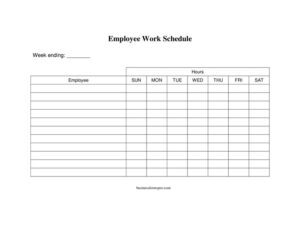
Employee Work Schedule
Download a free Employee Work Schedule template in PDF and DOCX to plan shifts, track hours, and keep your team organized — free download, no signup.
PDF
DOCX
1 downloads
0
likes
Download Files
- DOCX
An Employee Work Schedule is a document that lays out who is working, when, and where across a given day, week, or month. Managers and business owners use it most often to assign shifts clearly so staff know exactly when to show up and the workplace stays properly covered. You can download this Employee Work Schedule free in both PDF and DOCX formats — no signup required.
What Is an Employee Work Schedule?
An Employee Work Schedule is a planning tool that organizes staff working hours into a single, easy-to-read layout. It is typically created by a supervisor, shift manager, or HR coordinator and then shared with the team. The schedule documents each employee’s assigned shifts, start and end times, breaks, days off, and sometimes the role or station they cover. Beyond simply telling people when to work, it helps balance labor costs, prevent understaffing or overstaffing, and create a written record both employer and employee can reference. Whether for a small café, a retail store, a clinic, or a warehouse, a clear schedule keeps operations running smoothly and reduces confusion about who is responsible for what.
When Do You Need an Employee Work Schedule?
A written schedule becomes essential the moment more than one person needs to be coordinated. Common situations include:
- Shift-based businesses such as restaurants, retail, hospitality, or healthcare where coverage must be planned hour by hour.
- Rotating or alternating shifts where employees move between mornings, evenings, and weekends and need clear notice.
- Part-time and hourly teams whose hours vary week to week and must be tracked for payroll.
- Seasonal or peak-period staffing, when extra hands are added and assignments change frequently.
- Multi-location or multi-department operations that need to show who is working where.
- Compliance and record-keeping, where a documented schedule supports accurate timekeeping and resolves disputes about agreed hours.
Types of Work Schedules
Not every team works the same way, and the template can be adapted to several patterns. A fixed schedule keeps the same hours every week, ideal for stable office or administrative roles. A rotating schedule cycles employees through different shifts so no one is permanently stuck on nights. A flexible schedule sets core hours while letting staff adjust start and end times. An on-call schedule designates who is available outside normal hours. Choosing the right pattern up front makes the schedule easier to maintain and easier for employees to follow.
What an Employee Work Schedule Should Have
A complete schedule leaves no room for guesswork. The strongest versions include the business or department name, the schedule period (the specific dates it covers), and a clear grid of days. For each employee it should show the start time, end time, scheduled breaks or meal periods, and total hours. It is also helpful to note the role or location, days off, and any special instructions. Finally, include the name of the person who prepared the schedule and the date it was published so everyone knows which version is current.
How to Fill Out an Employee Work Schedule
- Add the business details. Enter the company or department name at the top and, if relevant, the location or team the schedule applies to.
- Set the schedule period. Write the start and end dates so it is obvious whether this is a daily, weekly, or biweekly plan.
- List your employees. Add each staff member’s name down the first column, grouping by role or department if that helps clarity.
- Lay out the days. Label the columns with the dates or days of the week the schedule covers.
- Enter shift times. For each employee and each day, fill in the start time and end time of their shift, leaving days off blank or marked clearly.
- Note breaks and totals. Record meal or rest breaks and calculate the total scheduled hours for each person.
- Add notes. Use a comments area for swaps, on-call status, or training assignments.
- Sign and distribute. Add the preparer’s name and the date issued, then share the finished schedule with the whole team.
Tips for Building a Schedule Your Team Trusts
A schedule is only useful if people actually follow it. Publish it with enough advance notice — many employees plan childcare, second jobs, and appointments around their shifts, and last-minute changes erode trust. Try to distribute hours fairly so the same people aren’t always stuck with weekends or closing shifts. Build in a buffer for predictable busy periods rather than scrambling to add coverage at the last minute. Keep a consistent format week to week so staff can read it at a glance, and always note clearly when an updated version replaces an older one to avoid confusion.
Communicating Changes and Tracking Hours
Even a well-planned schedule will need adjustments. Establish a simple process for shift swaps and time-off requests so changes are approved and recorded rather than handled by word of mouth. When an employee picks up or drops a shift, update the master schedule and re-share it so the version everyone sees is accurate. Because the schedule also reflects expected hours, it pairs naturally with timesheets at payroll time — comparing scheduled hours to actual hours worked helps catch errors and overtime early.
Common Mistakes to Avoid
- Forgetting the dates. A schedule without a clear period leads to people working the wrong week.
- Overlapping or double-booking. Assigning the same person to two places at once or leaving gaps in coverage.
- Ignoring break and overtime rules. Scheduling without accounting for required rest periods or hour limits can create compliance problems.
- Publishing too late. Releasing the schedule at the last minute frustrates staff and increases no-shows.
- Not tracking changes. Letting swaps happen informally so the official schedule no longer matches reality.
- Unreadable formatting. Cramming too much into one cell or using inconsistent layouts that staff can’t follow.
Frequently Asked Questions
What is an Employee Work Schedule used for? It is used to assign and communicate working hours so every team member knows when and where they are expected to work. It also helps managers plan coverage, control labor costs, and keep a record of agreed hours for payroll and reference.
How do I fill out the work schedule template? Start by entering your business name and the dates the schedule covers, then list each employee and fill in their start time, end time, and breaks for each day. Total each person’s hours, add any notes about swaps or time off, and include the preparer’s name before sharing it.
Is this Employee Work Schedule template free? Yes. You can download it free in both PDF and DOCX formats, with no signup or account required. The DOCX version is fully editable so you can adjust the days, columns, and employee list to fit your team.
How far in advance should I publish a schedule? Giving staff at least a week’s notice is a common practice, and some regions have predictive scheduling laws that require advance notice or extra pay for late changes. More notice generally leads to fewer no-shows and a happier, better-prepared team.
Does a work schedule need to be signed? A signature is not legally required for a schedule to be used, but adding the preparer’s name and the date issued shows which version is official. Some employers also ask employees to acknowledge receipt, which helps prevent disputes about who was scheduled when.
Can I use this for both full-time and part-time staff? Absolutely. The template works for any mix of employees because you simply enter each person’s specific shift times and total hours. You can group full-time, part-time, and on-call staff together or keep them in separate sections for clarity.
This Employee Work Schedule template is a general example provided for informational purposes only and is not legal, financial, or human-resources advice. Scheduling, break, and overtime requirements vary by jurisdiction — consult a qualified professional or your local labor authority to ensure compliance with applicable laws.
Official resource: for the rules that apply to your situation, see the U.S. Department of Labor.
Related Forms
- Monthly Time Card With Approval
- Bi-Weekly Time Card With Approval
- Paycheck Authorization Form
- Shift Trade Tracker
- Employee Complaint Form
- Employee Separation Report
Browse more in Employment.