
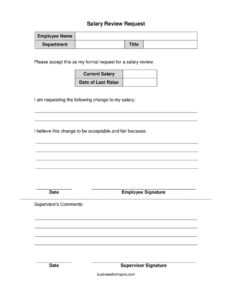
Salary Review Request
Download a free Salary Review Request form template in PDF and DOCX to formally ask your employer to review and adjust your pay — free download, no signup.
PDF
DOCX
3 downloads
0
likes
Download Files
- DOCX
A Salary Review Request is a short written document an employee submits to ask their employer to formally reconsider their current pay. People most often use it to put a raise request in writing — clearly, professionally, and on the record — instead of relying on a passing hallway conversation. This template is free to download in both PDF and DOCX formats, with no signup required.
What Is a Salary Review Request?
A Salary Review Request is a formal note from an employee to a supervisor or HR department asking that their compensation be evaluated and potentially adjusted. It documents who you are, your current role and salary, the change you are seeking, and the reasons that support it. Unlike a verbal ask, this form creates a clear written record that managers can route through approval channels, attach to a performance file, or reference during budget planning. It typically also leaves space for a supervisor’s response. The goal is simple: present a reasonable, fact-based case for a pay adjustment in a way that is easy for decision-makers to review and act on.
When Do You Need a Salary Review Request?
This form is useful any time you want to formalize a pay conversation. Common situations include:
- After a strong performance year — when your results, reviews, or completed projects clearly exceed expectations.
- Taking on more responsibility — you absorbed duties from a departing colleague, began managing people, or expanded your scope without a corresponding pay change.
- A long gap since your last raise — your compensation has not kept pace with your tenure, inflation, or market rates.
- Market data shows you’re underpaid — research indicates peers in similar roles and regions earn more.
- A title or role change — you were promoted in responsibility but not in pay, or your job description has shifted significantly.
- An annual or scheduled review window — when your company invites compensation discussions and you want yours documented properly.
What a Salary Review Request Should Have
A complete request is concise but specific. It should clearly identify the employee and role, state the current salary and how long it has been in place, name the requested change (ideally a number or percentage), and provide a short, factual justification. Including a date and signature makes the request official, and reserving space for supervisor comments turns the document into a two-way record. The strongest requests stay professional in tone and anchor the ask in contributions, results, and comparable data rather than personal need.
How to Fill Out a Salary Review Request
- Employee Name: Enter your full legal name as it appears in company records so HR can match it to your file.
- Department: Write the department or team you work in (for example, Marketing, Operations, or Customer Support).
- Title: List your current official job title, matching your offer letter or HR system.
- Current Salary: State your existing base salary, noting whether it is annual or hourly to avoid confusion.
- Date of Last Raise: Enter the date your pay was last adjusted; if you’ve never had a raise, write your hire date instead.
- Requested change: In the line provided, specify exactly what you’re asking for — a new salary figure, a percentage increase, or a target range.
- Justification: Use the “because” line to summarize your strongest reasons: measurable results, added responsibilities, tenure, or market comparisons.
- Date and Employee Signature: Sign and date the form to make it a formal, dated submission.
- Supervisor’s Comments: Leave this section blank — it is for your manager to record their response or decision.
How to Make a Strong Case
The justification line is where your request succeeds or stalls, so make it count even though space is limited. Lead with concrete accomplishments: revenue you helped generate, costs you reduced, deadlines you consistently met, or new skills and certifications you’ve added. If you’ve taken on duties beyond your original job description, name them. Where possible, reference reputable salary data for your role, industry, and location so your number looks researched rather than arbitrary. Frame the request as a recognition of value delivered, not a complaint. If the form’s line is too short, attach a brief one-page summary and note “see attached” so your full case travels with the form.
What Happens After You Submit It
Once submitted, the form usually goes to your direct supervisor and then to HR or finance for review against budget and pay bands. Decisions can take days to several weeks, especially if they’re tied to a review cycle or fiscal calendar. The supervisor’s comments section may be returned with an approval, a counteroffer, a deferral to the next review period, or questions. Treat any response as the start of a conversation: if the answer is “not now,” ask what specific results or timeline would make a yes possible, and request that the agreed criteria be documented.
Common Mistakes to Avoid
- Being vague about the number — “a raise” is harder to act on than a specific figure or percentage.
- Leading with personal expenses — base your case on contributions and market value, not rent or bills.
- Skipping the date of last raise — this context strengthens a long-overdue request.
- Submitting at a bad time — avoid budget freezes, layoffs, or immediately after a setback.
- An emotional or demanding tone — keep it professional; ultimatums rarely help.
- Forgetting to sign and date — an unsigned form may be treated as informal or ignored.
Frequently Asked Questions
What is a Salary Review Request form? It is a written document an employee uses to formally ask their employer to review and potentially increase their pay. It captures your current salary, the change you’re seeking, and your reasons, then leaves room for a supervisor’s response. It turns a casual conversation into a documented, trackable request.
How do I fill out a Salary Review Request? Enter your name, department, title, current salary, and the date of your last raise, then clearly state the change you want and the justification behind it. Sign and date the form, and leave the supervisor’s comments section blank for your manager. Be specific with your number and lead with measurable accomplishments.
Does a Salary Review Request need to be notarized or witnessed? No. This is an internal workplace document, not a legal contract, so it does not require notarization or witnesses. A simple signature and date from the employee is enough to make it a formal submission.
Is a Salary Review Request legally binding? No, the request itself does not obligate your employer to grant a raise or change your pay. It is a formal proposal that initiates a review. Any resulting pay change typically becomes effective only through your employer’s official approval and payroll process.
How much does this template cost? Nothing — it is completely free to download from Business Forms Pro in both PDF and DOCX formats, with no signup or account required. You can edit the DOCX version to match your situation and your company’s preferred wording.
When is the best time to submit a salary review request? Strong moments include after a successful project, around your work anniversary, during annual review windows, or when you’ve taken on added responsibilities. Try to avoid hiring freezes, budget cuts, or periods of organizational uncertainty. Aligning your request with your company’s review or budgeting cycle can improve your odds.
This template is a general example provided for informational purposes only and is not legal, financial, or HR advice. Employment and compensation practices vary by employer and jurisdiction. For guidance specific to your situation, consult your HR department or a qualified professional.
Official resource: for the rules that apply to your situation, see the U.S. Department of Labor.
Related Forms
- Employee Checkout
- Promotion Request Letter
- Employee Referral Form
- Candidate Evaluation
- Manual Timecard Semi-Monthly Mini
- Salary Verification Request Letter
Browse more in Employment.