
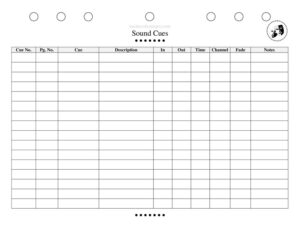
Sound Cues Sheet
Organize every audio moment of your show with a free Sound Cues Sheet template—track cue numbers, timing, and levels, and download free in PDF or DOCX.
PDF
DOCX
10 downloads
0
likes
Download Files
- DOCX
A Sound Cues Sheet is the master document a sound operator uses to track every audio moment in a production, from pre-show music to the final blackout. The most common reason people use one is to keep cues numbered, timed, and triggered in the right order during live performances so nothing is missed. You can download this Sound Cues Sheet free in PDF or DOCX, with no signup required.
What Is a Sound Cues Sheet?
A Sound Cues Sheet is a stage-management and audio document that lists every sound effect, music track, microphone change, and level adjustment in a show, in the order they occur. It is typically created by the sound designer or board operator and used during rehearsals and performances by the sound team and the stage manager who calls cues. The sheet documents what each cue is, when it fires, how loud it should be, and which channel or speaker it plays through. Its purpose is to turn a complex soundtrack into a clear, repeatable script the operator can follow flawlessly night after night, even under pressure or in the dark.
When Do You Need a Sound Cues Sheet?
Almost any production with more than a couple of audio moments benefits from a written cues sheet. Common situations include:
- Full-length plays and musicals with dozens of effects, underscoring, and entrance/exit music that must hit specific lines.
- Technical rehearsals where the team builds and refines cue timing before opening night.
- Touring productions that need a standardized reference so a new local operator can run the show.
- Community and school theater where volunteers or students need a clear, idiot-proof guide at the board.
- Live events and concerts involving walk-in music, announcements, and transition stingers.
- Handoffs between operators, when illness or scheduling means a substitute must run sound without prior knowledge of the show.
Types of Sound Cues to Track
Not every cue is the same, and a good sheet distinguishes between them. Sound effects (SFX) are discrete sounds like a doorbell, gunshot, or phone ring. Music cues include underscoring, scene-transition tracks, and pre-show or intermission playlists. Level changes adjust the volume of an already-playing source, such as fading music under dialogue. Microphone cues mute or unmute body mics and area mics as performers enter and exit. Labeling each cue by type helps the operator anticipate what kind of action a cue requires.
What a Sound Cues Sheet Should Have
A complete sheet gives the operator everything they need at a glance, without flipping pages. Essential elements include the production title and act/scene reference, a sequential cue number, the trigger or standby point, a description of the sound, the source or file name, the playback level or fader position, the output channel or speaker, the fade and timing notes, and a column to mark completed cues during the run. Clear, consistent formatting matters as much as the content, because the operator often reads it in low light during a fast-moving show.
How to Fill Out a Sound Cues Sheet
- Header: Enter the production name, theater or venue, sound designer, and operator, plus the performance date or rehearsal version so you always know which copy is current.
- Cue number: Assign sequential numbers (Q1, Q2, Q3) in the order cues fire; use decimals like Q5.5 when you insert a cue later.
- Page/scene reference: Note the script page, act, and scene so you can cross-check against the prompt book.
- Standby and go point: Write the line of dialogue, action, or visual cue that triggers the sound, plus the standby warning line before it.
- Description: Briefly describe the sound—”phone rings,” “storm builds,” “pre-show playlist fade”—so it’s unmistakable.
- Source/file: List the track name, file number, or device the audio plays from.
- Level and output: Record the target volume or fader setting and which speaker or channel it routes to.
- Timing/fade: Note fade-in, fade-out, and duration details.
- Done column: Leave a checkbox to mark each cue as it fires during the run.
Tips for a Reliable Run
The best cues sheets are designed for the conditions they’re used in. Print in a large, high-contrast font that’s readable under a dim console light. Group cues by act and add a page break at intermission so you never lose your place. Use standby warnings consistently so the stage manager and operator stay synchronized. After every rehearsal, update the sheet immediately—stale timing notes cause more missed cues than anything else. Keep a clean master copy and a marked-up working copy, and store a digital version so a substitute can reprint at a moment’s notice. If your show uses playback software, mirror the software’s cue numbers on the paper sheet to avoid confusion.
Sound Cues Sheet vs. the Prompt Book
A Sound Cues Sheet is sometimes confused with the stage manager’s prompt book, but they serve different roles. The prompt book is the master script that integrates all departments—lights, sound, set, and actor blocking—and is used by the stage manager to call cues. The sound cues sheet is the operator’s focused reference for executing audio cues only. In small productions one person may use both, but in larger shows the two documents work together: the stage manager calls “Sound Q12 go” from the prompt book, and the operator fires Q12 from the cues sheet.
Common Mistakes to Avoid
- Vague trigger points like “after the speech” instead of an exact line or action the operator can recognize instantly.
- Skipping standby warnings, which leaves the operator scrambling when a cue arrives without notice.
- Inconsistent numbering after edits, so the paper sheet no longer matches the playback software.
- Omitting level and output, forcing the operator to guess volume or which speaker to use.
- Tiny or cramped fonts that are unreadable at a dim console during a live show.
- Forgetting to update the sheet after rehearsal changes, leaving old timing that no longer works.
Frequently Asked Questions
What is a Sound Cues Sheet used for? It is used to organize and execute every audio moment in a production in the correct order. The sound operator follows it during rehearsals and performances to fire effects, music, and level changes on the right cue. It ensures the show sounds the same every night.
Who creates the Sound Cues Sheet? Usually the sound designer drafts it during the build, and the board operator and stage manager refine it through technical rehearsals. In small theaters, one person may handle the design, the sheet, and the operation. Regardless of who writes it, everyone on the sound and stage-management team should be able to read it.
How do I number sound cues? Number them sequentially in firing order—Q1, Q2, Q3—and use decimals like Q4.5 when you need to insert a cue between existing ones. This avoids renumbering the entire show every time a change is made. Keep the paper numbers identical to any playback software you use.
What’s the difference between a standby and a go? A standby is the warning that a cue is coming, given a few seconds before it fires so the operator is ready. The go is the moment the cue actually triggers. Listing both on your sheet keeps the operator and the stage manager perfectly in sync.
Can I use this for a digital playback system like QLab? Yes. The sheet works as a paper backup and a planning document even when you run cues from software. Mirror your software’s cue numbers and notes on the sheet so the two never conflict, and you’ll have a reliable fallback if technology fails.
How much does this Sound Cues Sheet template cost? It is completely free to download here in both PDF and DOCX formats, with no signup or payment required. You can edit the DOCX version to add columns, your venue’s branding, or extra notes for your specific production.
This Sound Cues Sheet template is a general example provided for informational and organizational purposes only and is not professional, technical, or legal advice. Production needs, equipment, and venue requirements vary—adapt the form to your show and consult your sound designer or technical director for guidance specific to your production.
Related Forms
- Script Assignment Tracker
- Conflict Calendar
- Focus Chart
- Audition Sheet Musical
- Instrument Schedule
- Scene Breakdown Action
Browse more in Theater.