
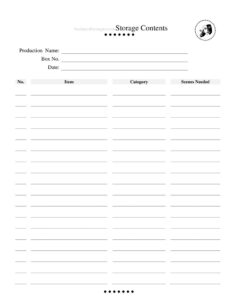
Storage Contents Tracker
Use the free Storage Contents Tracker template to log props, costumes, and set pieces by box and production for free download in PDF and DOCX.
PDF
DOCX
1 downloads
0
likes
Download Files
- DOCX
A Storage Contents Tracker is a simple inventory sheet that records what’s packed inside each storage box for a theater production, so a stage manager, props master, or wardrobe lead can find any item in seconds. The most common reason people use it is to avoid digging through unlabeled bins backstage during tech week or strike. It’s free to download here in both PDF and DOCX formats, with no signup required.
What Is a Storage Contents Tracker?
A Storage Contents Tracker is a documentation tool used by theater companies, school drama programs, community playhouses, and touring productions to log the contents of each storage container. It is usually filled out by the person responsible for packing or auditing inventory — often the stage manager, props master, costume designer, or technical director. The form pairs a box number with an itemized list of what lives inside, plus the production it belongs to and the scenes each item is needed for. Rather than memory or guesswork, it gives the whole crew a shared, reliable reference for locating props, costumes, set dressing, and consumables across the run of a show and beyond.
When Do You Need a Storage Contents Tracker?
This tracker earns its keep any time inventory has to be packed, moved, or located quickly. Common situations include:
- Striking a set — log every prop and costume as it goes into bins so nothing is lost between productions.
- Tech week and dress rehearsals — quickly pull the exact items a scene calls for without rummaging.
- Touring or transferring a show — give the load-in crew a precise manifest of what’s in each box.
- Seasonal storage — archive a production’s materials so they can be reused or rented later.
- Shared storage spaces — keep order when multiple productions store gear in the same room.
- Insurance and audits — maintain a written record of valuable props, instruments, or rented costumes.
What a Storage Contents Tracker Should Have
A complete tracker ties each box to a single production and breaks its contents into a clear, scannable list. At minimum it should identify the production, a unique box number, the date the inventory was recorded, and a numbered list of items. Each item entry benefits from a category — props, costumes, set dressing, hand props, electrics, consumables — and a note on which scenes it’s needed for. Together these fields let anyone match a physical box to a paper record, confirm nothing is missing, and plan retrieval around the show’s running order. Legible handwriting or a printed DOCX version keeps the document usable for the entire crew.
How to Fill Out a Storage Contents Tracker
- Production Name: Enter the title of the show the contents belong to, such as A Midsummer Night’s Dream or Spring Recital 2025, so boxes never get mixed between productions.
- Box No.: Write the unique number you’ve assigned to this container, and label the physical box to match. Sequential numbering (Box 1, Box 2…) keeps things simple.
- Date: Record the date the inventory was taken or last updated, which helps when a box is repacked mid-run.
- No.: Number each line item in the list (1, 2, 3…) so crew can reference an item by its position.
- Item: Describe each object clearly — “brass candlestick,” “Juliet’s blue gown,” “prop letter (sealed).” Be specific enough that two similar items don’t get confused.
- Category: Tag the item by type — prop, costume, set dressing, electrics, makeup, or consumable — to speed sorting and reordering.
- Scenes Needed: Note which scenes or acts use the item (e.g., “Act 2, Sc. 3”) so the crew can stage retrieval in show order.
Tips for Organizing Theater Storage
A tracker works best alongside a few practical habits. Label every physical box with its number on at least two sides so it’s visible no matter how it’s stacked. Keep one master tracker — a binder or shared spreadsheet — that lists all boxes for a production, then a copy of the relevant page inside or taped to each box. Color-code categories if your space allows: one color for costumes, another for props. When an item leaves a box for the stage, note it so the inventory stays accurate during the run. After strike, do a final audit against the tracker before the box goes into long-term storage, flagging anything broken, missing, or borrowed.
Tracker vs. a Full Inventory Database
For small and mid-size productions, a paper or DOCX tracker is faster to set up than a software database and travels easily backstage where laptops aren’t welcome. The trade-off is that it doesn’t auto-search or generate reports. Many companies use the tracker as the working backstage record and periodically transfer the data into a spreadsheet for season-long archives. Whichever you choose, consistency in box numbering and item naming matters more than the tool itself — a clear handwritten sheet beats a messy database every time.
Common Mistakes to Avoid
- Skipping the production name — boxes from different shows end up in the same bin and items go missing.
- Vague item descriptions — “vase” tells you nothing when three productions used vases; add color, size, or scene.
- Forgetting to update after repacking — an out-of-date tracker is worse than none because crew trust it.
- No box label on the physical container — the tracker is useless if you can’t match it to a box.
- Leaving Scenes Needed blank — you lose the ability to pull items in running order during tech.
- One giant list with no box numbers — split contents box by box so retrieval stays fast.
Frequently Asked Questions
What is a Storage Contents Tracker used for? It records what’s packed inside each storage box for a theater production, linking a box number to an itemized list of props, costumes, and set pieces. Crew use it to locate items quickly during rehearsals, performances, and strike. It also serves as an archive when a show goes into long-term storage.
How do I fill out the Scenes Needed field? List the acts or scenes where each item appears, such as “Act 1, Sc. 2” or “Finale.” This lets the crew pull and pre-set items in the order the show needs them, which is especially helpful during fast quick-changes and scene shifts.
Is this tracker only for large theaters? No. It works just as well for school plays, community theaters, dance recitals, and small touring acts. Any production that packs gear into boxes benefits from a clear contents record, regardless of size.
Can I use this for costumes and props together? Yes. The Category field lets you tag each entry as a prop, costume, set dressing, or other type, so a single tracker can cover mixed contents in one box or organize separate boxes by category.
How much does the template cost? Nothing — it’s a free download in both PDF and DOCX formats with no signup required. Use the PDF for quick printing or the DOCX if you want to customize the columns for your production.
Should I keep a copy somewhere besides the box? Yes. Keep a master copy of all your trackers in a binder or shared folder so you have a backup if a box label is damaged or a sheet is lost, and so you can plan inventory across an entire season.
This Storage Contents Tracker template is provided as a general example for informational purposes only and is not professional, legal, or insurance advice. Organizational needs and any inventory or insurance requirements vary by venue and situation — consult the appropriate qualified professional for your production.
Related Forms
- Comp Ticket Request Form
- Costume Inventory
- Audition Checklist
- Stage Choreography Numbers
- Performance Sign-In Sheet
- Rehearsal Schedule Month
Browse more in Theater.