
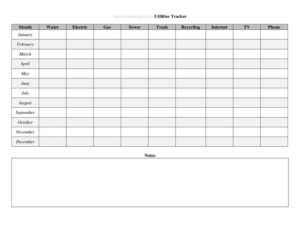
Utilities Annual Use Tracker
Track electricity, water, gas, and more all year with the free Utilities Annual Use Tracker template, available as a free download in PDF and DOCX.
PDF
DOCX
0
likes
Download Files
- DOCX
A Utilities Annual Use Tracker is a simple recordkeeping sheet that lets you log your household or business utility consumption and costs across all twelve months of the year in one place. People most commonly use it to spot rising bills, compare seasons, and budget more accurately for electricity, water, gas, and other services. It’s free to download here in both PDF and DOCX formats, with no signup required.
What Is a Utilities Annual Use Tracker?
A Utilities Annual Use Tracker is a year-long log used to capture how much you spend on and consume from your utility providers. Anyone can use one — homeowners, renters, landlords, small business owners, or property managers — to centralize information that would otherwise be scattered across paper statements, emails, and online portals. The tracker typically documents the utility type, the billing month, the amount used (such as kilowatt-hours or gallons), and the cost. Over a full year it becomes a clear picture of your consumption patterns, helping you identify waste, plan for seasonal spikes, and back up budget or tax decisions with real numbers rather than guesses.
When Do You Need a Utilities Annual Use Tracker?
This tracker is useful any time you want a complete, organized view of your utility spending. Common situations include:
- Annual budgeting — totaling a full year of electricity, water, and gas costs so you can set a realistic monthly average for next year.
- Comparing providers or plans — gathering twelve months of usage data before shopping for a cheaper energy or internet rate.
- Reducing consumption — measuring whether a new thermostat, insulation upgrade, or behavior change actually lowered your usage.
- Rental and property management — landlords tracking utilities across units or documenting average costs to share with prospective tenants.
- Home office tax records — self-employed people who deduct a portion of utilities need accurate annual totals to support the figure.
- Detecting billing errors — a month-over-month log makes an unexpected spike obvious so you can question a charge promptly.
What a Utilities Annual Use Tracker Should Have
A complete tracker keeps every entry consistent so the year-end totals are meaningful. The essential elements are a row or column for each utility type (electricity, water, gas, sewer, trash, internet, phone, and any others you pay), a slot for each of the twelve months, a place to record both the quantity used and the dollar amount billed, and space for running or annual totals. It also helps to note the account or meter number, the provider name, the billing or due date, and a remarks field for anomalies such as estimated readings or one-time fees. Together these fields let you sum each utility for the year and calculate averages.
How to Fill Out a Utilities Annual Use Tracker
Work through the sheet one utility and one month at a time:
- Label the year at the top so the record is unmistakable later.
- List each utility type — electricity, water, natural gas, sewer, trash, internet, phone — in its own row or section.
- Record the provider and account number for each utility so you can reference the right statement.
- Enter the billing month for the row you are completing, working chronologically from January through December.
- Log the usage quantity from your statement — kilowatt-hours for electricity, gallons or cubic feet for water, therms for gas.
- Enter the amount billed in dollars, including taxes and fees if you want the total to match what you paid.
- Note the due or payment date to confirm the bill was settled on time.
- Add remarks for anything unusual — an estimated reading, a rate change, or a seasonal surcharge.
- Total each column or row at year-end and divide by twelve to find your monthly average per utility.
Tips for Getting Useful Data
Consistency is what turns a tracker into insight. Always record both the usage units and the cost — cost alone hides whether a higher bill came from using more or from a rate increase. Update the sheet the moment each statement arrives rather than waiting until tax time, when receipts may be lost. If you compare year to year, keep the same categories and units so the numbers line up. For seasonal services like heating or cooling, glance at the same month in the prior year rather than the prior month, since weather drives big swings. Color-coding or flagging unusually high entries makes patterns jump out at a glance.
How It Differs From a Monthly Budget Sheet
A monthly budget sheet captures all of your spending for a single month and treats utilities as just one line item. A Utilities Annual Use Tracker zooms in on utilities specifically and stretches across the whole year, recording not only what you paid but how much you actually consumed. That usage dimension is what makes it valuable for energy-saving goals and for catching billing problems — information a general budget never shows. Many people use both: the tracker feeds an accurate annual utility figure into their broader budget.
Common Mistakes to Avoid
- Recording cost but not usage — without the quantity you can’t tell a rate hike from higher consumption.
- Mixing units — switching between gallons and cubic feet, or therms and dollars, breaks your annual comparisons.
- Skipping months — gaps make averages and totals unreliable; estimate from the statement if needed and flag it.
- Forgetting taxes and fees — decide whether your dollar figure is the base charge or the full bill, then stay consistent.
- Lumping all utilities together — combined totals hide which service is actually driving your costs.
- Leaving it until tax or renewal season — reconstructing a year from memory leads to errors and missed entries.
Frequently Asked Questions
What is a Utilities Annual Use Tracker used for? It is used to log a full year of utility consumption and costs in one organized sheet. People use it to budget, compare providers, measure conservation efforts, and catch billing errors. Because it spans twelve months, it reveals seasonal patterns a single statement can’t show.
How do I fill out the tracker? List each utility, then for every month record the provider, usage quantity, amount billed, and payment date, adding remarks for anything unusual. At year-end, total each utility and divide by twelve for a monthly average. Filling it in as each bill arrives keeps the data accurate.
Is this tracker free to download? Yes. You can download the Utilities Annual Use Tracker for free in both PDF and DOCX formats, with no signup required. The DOCX version is editable so you can add or remove utility categories to match your situation.
Can I use it for a rental property or business? Absolutely. Landlords use it to track utilities across units and document average costs for tenants, while small businesses and home-office workers use it to support utility budgets and expense records. Just create a separate sheet or section for each property or location.
Does a Utilities Annual Use Tracker need to be notarized? No. It is a personal or internal recordkeeping tool, not a legal or signed document, so it requires no notarization or witnesses. Keep it accurate and backed by your actual statements in case you need to reference it.
Can I use it for tax deductions? It can help you organize the utility figures you may need for a home-office or business deduction, but it is not a tax form itself. Keep your original statements as proof, and confirm what is deductible with a qualified tax professional.
This Utilities Annual Use Tracker template is provided as a general example for informational purposes only and is not legal, financial, or tax advice. Utility billing practices, deduction rules, and recordkeeping requirements vary by jurisdiction and provider — consult a qualified professional for guidance specific to your situation.
Official resource: for the rules that apply to your situation, see the Consumer Financial Protection Bureau.
Related Forms
- Automatic Payment Dates Tracker
- Daily Cash Sheet
- Charity Cash Envelope
- Debit Register Wallet
- Tip Jar Labels
- Daily Sales Commission Tracker
Browse more in Money.