
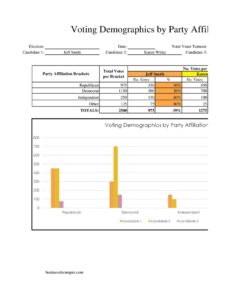
Voting Demographics By Affiliation
Use the free Voting Demographics By Affiliation template to organize voter counts by party, age, and region with a clean, ready-to-use free download.
PDF
XLSX
4 downloads
0
likes
Download Files
- XLSX
A Voting Demographics By Affiliation form is a structured worksheet used to record and summarize how voters break down across political parties and demographic groups within a defined area or election cycle. People most often use it to turn raw voter-roll data into a clear, side-by-side picture of party strength and turnout. It is free to download here in both PDF and DOCX formats, with no signup required.
What Is a Voting Demographics By Affiliation Form?
A Voting Demographics By Affiliation form is a data-collection and reporting template that organizes registered or active voters according to their declared party affiliation and key demographic attributes such as age range, gender, district, or precinct. It is typically used by campaign staff, party committees, civic researchers, student organizations, and local election volunteers who need a consistent way to log counts. Rather than serving as an official government record, it acts as a working summary that pulls publicly available or internally tracked figures into one place. The document documents who is registered under each affiliation, helping users spot patterns, plan outreach, and compare segments at a glance.
When Do You Need a Voting Demographics By Affiliation Form?
This template is useful any time you need to compare voter groups in an organized, repeatable format. Common situations include:
- A local campaign mapping party affiliation across precincts to prioritize door-knocking and phone-banking efforts.
- A county or district party committee preparing a quarterly membership and turnout summary for its leadership.
- A civics class or student researcher building a project that compares affiliation trends by age group or region.
- A nonpartisan voter-registration drive tracking how many new registrants chose each affiliation over a season.
- A community organization analyzing turnout gaps among independent, unaffiliated, and minor-party voters.
- A volunteer coordinator producing a simple briefing sheet before a strategy meeting or canvassing shift.
In each case, the form provides a shared structure so that numbers gathered by different people stay consistent and easy to combine.
Types of Affiliation Breakdowns to Track
Because affiliation data can be sliced many ways, it helps to decide your categories before you begin. Most users track the major parties (for example, the two largest national parties), one or more minor parties, and an “independent / unaffiliated” group. You may also add demographic layers such as age brackets, gender, voting district, or registration status (active versus inactive). Keeping these categories defined and consistent across every entry is what makes the final summary meaningful and comparable from one period to the next.
What a Voting Demographics By Affiliation Form Should Have
A complete and useful version of this form generally includes the following elements:
- A title block identifying the area, election cycle, or date range covered.
- Clearly labeled affiliation categories so every count lands in the right column.
- Demographic columns or rows (age, gender, district, precinct) appropriate to your purpose.
- A count field for each combination of affiliation and demographic.
- Subtotals and a grand total to confirm the numbers add up.
- A source and date line noting where the data came from and when it was pulled.
- A notes section for assumptions, exclusions, or anomalies.
How to Fill Out a Voting Demographics By Affiliation Form
Follow these steps to complete the template accurately:
- Enter the heading information: the jurisdiction or area name, the election or reporting period, and the date you compiled the figures.
- List your affiliation categories down the first column or across the header row, using the same labels you will reuse in future reports.
- Define the demographic dimension you want to analyze first, such as age range or district, and label those rows or columns.
- Pull your source data from your voter file, registration export, or published statistics, and note the source on the form.
- Record the count for each affiliation within each demographic segment, working one segment at a time to avoid skipping cells.
- Add subtotals for each affiliation and each demographic group as you go.
- Calculate the grand total and confirm it matches the sum of all affiliation subtotals.
- Use the notes field to flag inactive registrations, rounding, or any segment with unusually small numbers.
- Review every cell, save your file, and date the final version.
Tips for Accurate, Useful Data
The value of this form depends entirely on the quality and consistency of the numbers you enter. Always pull from a single, dated source per report so your totals reconcile. If you compare periods, freeze your category definitions so a shift you see reflects real change, not a relabeling. Consider tracking percentages alongside raw counts, since a small district and a large one are easier to compare proportionally. Finally, keep a copy of each completed report so you can build a trend line across multiple cycles.
Keeping Data Private and Compliant
Voter information is sensitive even when it is publicly available. Use this form to record aggregate counts rather than identifiable individual records whenever possible, and store any underlying lists securely. Rules about who may access voter rolls and how the data may be used vary by jurisdiction, so confirm local requirements before gathering or sharing data. Avoid mixing this aggregate summary with personal contact lists in the same shared document to reduce the risk of accidental disclosure.
Common Mistakes to Avoid
- Changing affiliation labels between reports, which makes period-over-period comparisons unreliable.
- Forgetting to note the data source and pull date, so the numbers can’t be verified later.
- Double-counting voters who appear in more than one segment or list.
- Mixing active and inactive registrations without a clear distinction.
- Skipping the subtotal and grand-total checks, allowing arithmetic errors to slip through.
- Treating the summary as an official or certified record rather than a working analysis tool.
Frequently Asked Questions
What is a Voting Demographics By Affiliation form used for? It is used to organize and summarize voter counts by party affiliation and demographic categories such as age, gender, or district. Campaign teams, party committees, and researchers rely on it to spot patterns and plan outreach. It turns scattered registration figures into a single, comparable overview.
How do I fill out the affiliation columns? List each party and an independent or unaffiliated category, then record the number of voters in each demographic segment under the matching affiliation. Work one segment at a time and add subtotals as you go. Confirm that all affiliation subtotals sum to your grand total before finalizing.
Is this form an official government document? No. It is a working template for organizing your own analysis, not a certified or official election record. Always treat published or government voter statistics as the authoritative source and cite them on the form.
Where do I get the underlying voter data? Most users draw from official voter-registration exports, public statistics published by election offices, or their own organization’s tracked records. Access rules differ by jurisdiction, so check what data you are permitted to obtain and how it may be used.
Is this Voting Demographics By Affiliation template free? Yes. You can download it free in both PDF and DOCX formats with no signup required. The DOCX version is fully editable so you can add or rename affiliation and demographic categories to fit your needs.
Can I customize the categories? Absolutely. Edit the DOCX file to add minor parties, change age brackets, or insert columns for precinct, district, or registration status. Just keep your labels consistent across every report so your comparisons stay accurate.
This template is a general example provided for informational purposes only and is not legal, electoral, or compliance advice. Rules governing access to and use of voter data vary by jurisdiction. Consult a qualified professional or your local election authority before collecting, analyzing, or sharing voter information.
Related Forms
- Voting Demographics By Gender
- Talking Points
- Endorsements Tracker
- Fundraising Budget Spreadsheet
- Candidate Information Form
- Candidates Comparison Chart
Browse more in Political.