
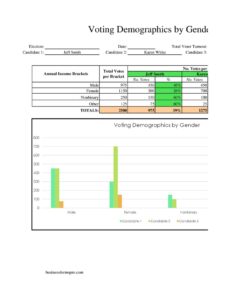
Voting Demographics By Gender
Track and report voter participation by gender with this free Voting Demographics by Gender form template, available as a free download in PDF and DOCX.
PDF
XLSX
7 downloads
0
likes
Download Files
- XLSX
The Voting Demographics by Gender form is a simple data-collection and reporting tool used to record how many voters in a given election, district, or survey identify within each gender category. It is most commonly used by election officials, campaign analysts, and researchers who need a clean, consistent way to break down turnout by gender. You can download it free in PDF and DOCX, with no signup required.
What Is a Voting Demographics by Gender Form?
A Voting Demographics by Gender form is a structured worksheet that organizes voter participation figures according to gender categories such as female, male, non-binary, and undisclosed. It is typically issued or maintained by election administrators, polling supervisors, political research teams, or civic organizations that compile turnout statistics. The form documents the number of registered voters, ballots cast, and percentage of turnout for each gender group, often alongside the election name, date, and reporting jurisdiction. Its purpose is to make demographic patterns visible at a glance — supporting transparency reports, post-election analysis, outreach planning, and academic study. Because the layout is standardized, results from one precinct or cycle can be compared cleanly against another.
When Do You Need a Voting Demographics by Gender Form?
This form is useful any time you need a structured snapshot of voter participation broken down by gender. Common situations include:
- Post-election reporting: Election offices summarizing turnout by gender for public transparency dashboards or board meetings.
- Campaign analysis: Political teams reviewing which gender segments turned out and where outreach fell short.
- Academic and policy research: Researchers studying gender gaps in participation across precincts, regions, or election cycles.
- Get-out-the-vote planning: Nonprofits and civic groups identifying under-represented groups to target with registration drives.
- Internal organizational votes: Unions, associations, or shareholder bodies recording demographic breakdowns of member voting.
- Year-over-year comparisons: Compiling consistent records so multiple elections can be measured against the same categories.
Types of Demographic Breakdowns
While this template focuses on gender, demographic reporting often layers several dimensions. Keeping gender as a standalone sheet keeps the data clean, but you may pair it with related breakdowns:
- Gender by age band: Cross-tabulating gender with age ranges to spot generational gaps.
- Gender by precinct: Adding a location column to compare neighborhoods or wards.
- Registered vs. actual voters: Showing the share who were eligible against those who actually cast ballots.
What a Voting Demographics by Gender Form Should Have
A complete and trustworthy form includes a few essential elements regardless of how detailed it gets:
- A clear heading identifying the election, survey, or vote being measured, with the date and reporting jurisdiction.
- Defined gender categories, including an option for undisclosed or non-binary so no voter is forced into a category that doesn’t fit.
- Columns for raw counts — registered voters and ballots cast — for each category.
- A column for the calculated turnout percentage per gender group.
- A totals row that reconciles all categories against the overall figure.
- The name of the person or office compiling the data and the date it was prepared.
How to Fill Out a Voting Demographics by Gender Form
Follow these steps to complete the form accurately and produce a report others can rely on:
- Label the report: At the top, enter the election or vote name, the date it was held, and the precinct, district, or organization being reported.
- List the gender categories: Use a row for each — for example female, male, non-binary, and undisclosed. Keep the same categories you use elsewhere so figures stay comparable.
- Record registered voters: For each category, enter the number of registered or eligible voters who identify within that group.
- Record ballots cast: Enter the number of voters in each category who actually voted.
- Calculate turnout: Divide ballots cast by registered voters for each row and enter the percentage.
- Total every column: Add the counts down each column and confirm the totals match your official overall figures.
- Sign and date: Add the name of the compiling official or analyst and the preparation date so the report is attributable.
Keeping the Data Accurate and Respectful
Because this form handles personal demographic information, treat it as sensitive. Report figures in aggregate rather than tying numbers to identifiable individuals, and store any underlying records securely. Where voters chose not to disclose gender, count them honestly in the undisclosed row rather than guessing or forcing an assignment — doing so keeps your report credible and respectful. If you publish the results, include a short note on how categories were defined and where the source data came from, so readers can interpret the numbers correctly.
Tips for Cleaner Reporting
- Standardize your category labels before you start so multiple sheets can be merged later.
- Double-check that the sum of all gender rows equals your independently known total turnout.
- Round percentages consistently — pick one decimal place and stick with it across the report.
- Date every version so you can tell preliminary counts from final certified figures.
Common Mistakes to Avoid
- Omitting an undisclosed category: Without it, voters who don’t report a gender vanish from the totals and the math won’t reconcile.
- Mixing registered and cast figures: Confusing eligible voters with actual ballots distorts every turnout percentage.
- Inconsistent categories: Changing labels between reports makes year-over-year comparison impossible.
- Unbalanced totals: Forgetting to verify that category rows add up to the overall figure.
- Publishing without context: Releasing raw numbers with no note on definitions or data source invites misinterpretation.
- Storing sensitive data carelessly: Leaving voter-level demographic records unsecured can create privacy problems.
Frequently Asked Questions
What is a Voting Demographics by Gender form used for? It is used to record and summarize how many voters participated in an election broken down by gender category. Election offices, campaigns, and researchers use it to spot turnout gaps, plan outreach, and report results transparently. The standardized layout makes it easy to compare across precincts or election cycles.
How do I fill out the form? Start by labeling the election, date, and jurisdiction, then list each gender category in its own row. Enter the number of registered voters and ballots cast for each, calculate the turnout percentage, and total every column. Finish by signing and dating the report so the figures are attributable.
What gender categories should I include? At minimum, include female, male, and an undisclosed or non-binary option so no voter is excluded. Use the same categories your jurisdiction or organization already uses for consistency. Keeping an undisclosed row ensures your totals reconcile even when some voters choose not to report.
Is this form legally binding? No — it is a data-reporting worksheet, not a contract or official ballot. However, if it is used as part of an official election record, it should follow your jurisdiction’s accuracy, retention, and disclosure rules. Always reconcile the figures against certified official totals before publishing.
How much does the template cost? Nothing — it is completely free to download here in both PDF and DOCX formats, with no signup or account required. The editable DOCX version lets you adjust categories, columns, and headings to match your specific election or survey.
Can I customize the form for my own organization? Yes. Download the DOCX version and add columns for precinct, age band, or party, rename categories, or insert your organization’s logo and reporting standards. Just keep your category definitions consistent so the data stays comparable over time.
This template is provided as a general example for informational purposes only and does not constitute legal, statistical, or compliance advice. Reporting and data-handling requirements vary by jurisdiction and organization — consult a qualified professional or your election authority before relying on it for official use.
Related Forms
- Voting Demographics By Affiliation
- Voting Demographics By Education
- Election Contributions Form
- Contribution Tracker
- Candidates Comparison Chart
- Campaign Donation Request Letter
Browse more in Political.