
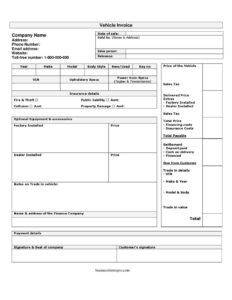
Vehicle Invoice
Download a free Vehicle Invoice template in PDF and DOCX to document car sales, pricing, financing, and delivery details — free download, no signup.
PDF
DOCX
2 downloads
0
likes
Download Files
- DOCX
A Vehicle Invoice is the itemized sales document a dealership or seller issues to a buyer to record the complete details and final cost of a vehicle purchase. People most commonly use it to provide a clear, signed breakdown of the vehicle, optional equipment, taxes, financing, and the total amount payable at delivery. You can download this Vehicle Invoice template free in both PDF and DOCX formats, with no signup required.
What Is a Vehicle Invoice?
A Vehicle Invoice is a formal billing document created by a seller — typically an auto dealer — that itemizes everything involved in a vehicle sale. It identifies the buyer, the salesperson, and the specific vehicle by year, make, model, and VIN, then lays out the base price, factory and dealer-installed extras, sales tax, insurance, and financing costs. The invoice also records how the purchase is being settled, whether through a deposit, cash on delivery, or financing. Both the company and the customer sign it, turning the document into a record of the agreed terms and the proof the customer needs for registration, financing, insurance, and warranty purposes.
When Do You Need a Vehicle Invoice?
Sellers and buyers rely on a Vehicle Invoice at the moment a sale is finalized and money changes hands. Common situations include:
- A dealership selling a new or used car and itemizing the delivered price, taxes, and accessories.
- An independent dealer closing a sale that involves a trade-in vehicle credited against the purchase.
- A buyer arranging financing who needs an invoice naming the finance company and the financed amount.
- Documenting insurance add-ons such as fire & theft, collision, and public liability bundled into the deal.
- Providing the buyer proof of purchase for vehicle registration, title transfer, and tax reporting.
- Recording a deposit and the balance due from the customer before delivery.
What a Vehicle Invoice Should Have
A complete Vehicle Invoice removes ambiguity about exactly what was sold and what is owed. At minimum it should contain the date of sale and a unique reference number, full buyer details under “sold to,” and the salesperson handling the deal. It must describe the vehicle thoroughly — year, make, model, body style, new/used status, VIN, key number, upholstery, and power train specifications. The financial portion should separate the base price, optional equipment, factory- and dealer-installed extras, sales tax, financing costs, and insurance costs, leading to a clear total payable. Settlement information — deposit paid, cash on delivery, financed amount, and the balance due from the customer — completes the picture, alongside signatures and the company seal.
How to Fill Out a Vehicle Invoice
- Enter the date of sale and a unique reference number for your records.
- Complete the sold to buyer details and the sales person responsible for the transaction.
- Describe the vehicle: year, make, model, body style, and whether it is new or used.
- Record identifiers including the key no and VIN, plus upholstery specs and power train specs (engine and transmission).
- Fill in insurance details — fire & theft, public liability, collision, and property damage coverage.
- List optional equipment & accessories, noting which are factory installed and dealer installed with their prices.
- Add any trade-in vehicle notes and the name & address of the finance company.
- Enter the price of the vehicle, extras, sales tax, and the delivered price, then calculate the total price.
- Add financing costs and insurance costs to reach the total payable.
- Record settlement: deposit paid, cash on delivery, financed amount, and the balance due from customer, with payment details.
- Have the buyer add a customer’s signature and apply the signature & seal of company.
Understanding the Pricing Breakdown
The strength of a Vehicle Invoice lies in how clearly it separates each cost. The base price of the vehicle is the starting figure, but the delivered price reflects the addition of factory-installed options chosen at the manufacturer level and dealer-installed accessories such as floor mats, window tint, or paint protection. Sales tax is then calculated and added, producing the total price of the vehicle itself. Financing and insurance costs are tracked separately because they relate to how the purchase is funded and protected, not to the vehicle’s intrinsic value. Keeping these lines distinct helps the buyer see precisely what they are paying for and supports accurate tax and registration reporting.
Trade-Ins, Financing, and Settlement
Many vehicle sales involve more than a simple cash transaction. The trade-in notes section lets you describe a vehicle the customer is exchanging, which can reduce the amount owed. When financing is used, naming the finance company and the financed amount creates a paper trail tying the invoice to the loan. The settlement block — deposit paid, cash on delivery, financed, and due from customer — should always reconcile back to the total payable. Before delivery, confirm that the deposit, any cash, and the financed portion together equal the full amount, so there is no confusion about the outstanding balance.
Common Mistakes to Avoid
- Leaving the VIN blank or transposing digits — this number must match the vehicle and title exactly.
- Failing to mark the vehicle as new or used, which affects pricing, tax, and warranty rights.
- Lumping factory- and dealer-installed extras together instead of itemizing each with its price.
- Forgetting to apply or correctly calculate sales tax on the delivered price.
- Not reconciling the settlement figures so the deposit, cash, and financed amounts equal the total payable.
- Issuing the invoice without both the customer’s signature and the company seal.
Frequently Asked Questions
What is a Vehicle Invoice used for? A Vehicle Invoice documents the full details and final cost of a car sale, including the vehicle description, pricing, taxes, insurance, and financing. Buyers use it as proof of purchase for registration, titling, insurance, and warranty claims, while sellers keep it as a sales record.
How do I fill out a Vehicle Invoice? Start with the date, reference number, and buyer details, then describe the vehicle by year, make, model, and VIN. Itemize the price, extras, sales tax, financing, and insurance costs to reach the total payable, record the settlement breakdown, and have both parties sign.
Is a Vehicle Invoice the same as a bill of sale? They overlap but serve slightly different roles. An invoice itemizes the charges and total amount owed for the purchase, while a bill of sale primarily transfers ownership. Some jurisdictions require a separate bill of sale or title transfer document in addition to the invoice.
Does a Vehicle Invoice need to be notarized? Notarization is generally not required for a Vehicle Invoice, though both the customer and the company sign it and the company applies its seal. Requirements vary by location, so check your local rules if a notarized document is needed for registration.
Is this Vehicle Invoice template legally binding? Once both parties sign and the agreed terms are recorded, a Vehicle Invoice can serve as evidence of the transaction. To be fully effective it should accurately reflect the price, settlement, and vehicle details and comply with any local sales and tax requirements.
How much does this Vehicle Invoice template cost? It is completely free. You can download the Vehicle Invoice template in PDF and DOCX formats from Business Forms Pro with no signup, then customize it for your dealership or private sale.
This Vehicle Invoice template is provided as a general example for informational purposes only and does not constitute legal, financial, or tax advice. Requirements for vehicle sales, taxes, and titling vary by jurisdiction — consult a qualified professional to ensure your invoice meets local rules.
Official resource: for the rules that apply to your situation, see your state DMV.
Related Forms
- Auto Estimate Form
- We Owe Form
- Used Car Comparison
- Miles Per Gallon Comparison
- Car Bill of Sale
- Auto Bill Of Sale
Browse more in Auto Sales.