
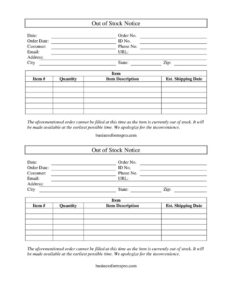
Out Of Stock Notice
Use this free Out of Stock Notice template to inform customers of a backordered item, expected ship date, and an apology — free PDF and DOCX download.
PDF
DOCX
0
likes
Download Files
- DOCX
An Out of Stock Notice is a short business letter a seller sends to inform a customer that an ordered item is temporarily unavailable and cannot be shipped immediately. The most common reason people use it is to manage customer expectations after an order is placed for a product that has sold out or is on backorder. This template is free to download in PDF and DOCX, with no signup required.
What Is an Out of Stock Notice?
An Out of Stock Notice is a written communication issued by a retailer, supplier, wholesaler, or e-commerce store to a customer whose order cannot be fulfilled because the item is currently unavailable. It documents the affected order, identifies the specific product, apologizes for the delay, and provides an estimated date when the item is expected back in stock. Unlike a cancellation notice, an out of stock notice signals that the order remains open and the seller intends to fulfill it once inventory is replenished. It serves as both a courtesy and a record, helping preserve goodwill while clearly explaining why a shipment has been postponed.
When Do You Need an Out of Stock Notice?
This letter is useful any time a paid or pending order hits an inventory gap. Common scenarios include:
- An online customer places an order, but the warehouse system shows zero quantity for that SKU.
- A popular product sells out faster than anticipated during a promotion or seasonal rush.
- A supplier delay leaves you unable to restock an item by the original ship window.
- A wholesale buyer orders a larger quantity than you currently have on hand.
- An item is discontinued by the manufacturer but a final replenishment is still expected.
- A backorder situation requires you to confirm the order is still active while customers wait.
In each case, a prompt, clearly written notice reduces support tickets, prevents chargebacks, and keeps the buyer informed rather than left guessing.
What an Out of Stock Notice Should Have
A complete out of stock notice clearly ties the message to a specific order and product. It should identify the customer and their contact details, reference the original order with its number and date, and name the exact item affected — including its item number and description. It should state plainly that the item is out of stock, offer a sincere apology, and provide a realistic estimated shipping date. Including a website URL or contact phone and email gives the customer an easy path to ask questions, request a refund, or check status. A date on the notice itself anchors the communication in time.
How to Fill Out an Out of Stock Notice
- Enter the Date the notice is being sent so the timeline is clear.
- Add the Customer name, then complete the Address, City, State, and Zip for proper delivery and records.
- Fill in the customer’s Phone No. and Email so they can reach you with questions.
- Record the Order No. and Order Date to reference the exact transaction affected.
- List the Item, Item #, and Item Description so there is no confusion about which product is unavailable.
- Enter the Quantity ordered that cannot currently be filled.
- Add the internal ID No. if your system assigns customer or account identifiers.
- Provide the Est. Shipping Date — a realistic projection of when the item will ship.
- Include your store URL so the customer can review status or alternatives.
- Review the standard apology language, confirm all fields are accurate, and send.
Tips for Writing an Effective Notice
The tone of an out of stock notice matters as much as the facts. A short, courteous message that takes responsibility and offers a clear next step tends to retain customers far better than a vague or defensive one. Whenever possible, give a conservative estimated shipping date you can actually meet — it is better to under-promise and deliver early than to set a date you miss. Consider offering the customer options: wait for restock, accept a comparable substitute, or receive a refund. If you have the customer’s email on file, sending the notice electronically creates a timestamped record and reaches them quickly.
How It Differs From an Order Cancellation
An out of stock notice is not the same as a cancellation. A cancellation closes the order and typically triggers a refund, while an out of stock notice keeps the order open and promises future fulfillment. Use this template when you intend to ship the item once it is restocked. If the product is permanently discontinued with no expected replenishment, a cancellation or refund notice is the more appropriate document. Clearly distinguishing between the two prevents customers from assuming their money has been returned when the order is actually still pending.
Common Mistakes to Avoid
- Leaving the Est. Shipping Date blank or giving an unrealistic date you cannot honor.
- Omitting the Order No. or Item #, forcing the customer to guess which purchase is affected.
- Failing to provide contact details, so the customer has no way to ask about refunds or alternatives.
- Sending the notice late, after the customer has already complained or filed a dispute.
- Using a cold or dismissive tone instead of a brief, genuine apology.
- Forgetting to update your inventory or order system after the notice goes out, leading to duplicate or conflicting messages.
Frequently Asked Questions
What is an Out of Stock Notice? It is a business letter that tells a customer their ordered item is temporarily unavailable and cannot be shipped right away. It references the specific order and product, apologizes for the delay, and provides an estimated date when the item is expected to ship. It keeps the order open rather than canceling it.
How do I fill out an Out of Stock Notice? Start with the date and the customer’s name and contact information, then reference the order number and order date. Identify the exact item by name, item number, description, and quantity, and provide a realistic estimated shipping date. Include your website or contact details so the customer can follow up.
Is an Out of Stock Notice legally binding? It is primarily a courtesy and a record rather than a binding contract, but it can document your communication and intent to fulfill the order. Your underlying obligations are governed by your sale terms, return policy, and applicable consumer protection rules. Always honor the estimated dates and options you state.
Do I have to offer a refund with this notice? Not automatically — an out of stock notice generally signals that the order remains open and will be filled once stock returns. However, many sellers offer the customer the choice to wait, substitute, or cancel for a refund, and some jurisdictions require refund options after certain delays. Check the rules that apply to your business.
How is this different from an order cancellation? An out of stock notice postpones fulfillment and promises shipment later, while a cancellation closes the order, usually with a refund. Use this template when you still intend to ship the item once it is restocked. If the product is discontinued, a cancellation notice is more appropriate.
Is this Out of Stock Notice template free to download? Yes. You can download it free in both PDF and DOCX formats with no signup required. Edit the fields to match your store’s branding, order details, and customer information before sending.
This Out of Stock Notice template is provided as a general example for informational purposes only and does not constitute legal, financial, or business advice. Consumer protection and refund requirements vary by jurisdiction — consult a qualified professional to ensure your notices and policies comply with the laws that apply to your business.
Related Forms
- Project Delay Letter
- Pandemic Employee Letter
- Recommendation for a Raise
- Unpaid Invoice
- Customer Appreciation Letter
- Request for Shipping Information
Browse more in Business Letters.