
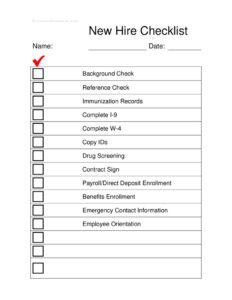
New Hire Checklist
Use this free New Hire Checklist template to track onboarding tasks, paperwork, and verifications for every new employee — free download in PDF and DOCX.
PDF
DOCX
0
likes
Download Files
- DOCX
A New Hire Checklist is a single-page tracking document HR and managers use to confirm that every onboarding task — from background checks to I-9 and W-4 paperwork — is completed for a new employee. Its most common use is making sure no required step is missed during the first days of employment, so the worker is legally cleared, paid correctly, and properly oriented. You can download this New Hire Checklist free in both PDF and DOCX formats, with no signup required.
What Is a New Hire Checklist?
A New Hire Checklist is an internal onboarding tool that lists, in one place, every action that must happen before and during a new employee’s start. It is typically prepared and maintained by a human resources coordinator, hiring manager, or small-business owner. The document records who was hired, when, and which onboarding items have been verified or collected — background and reference checks, identity copies, tax and eligibility forms, payroll setup, benefits enrollment, and orientation. Rather than relying on memory or scattered emails, the checklist creates a clear, auditable record. It standardizes onboarding so every new hire experiences a consistent process and the organization stays compliant with employment documentation requirements.
When Do You Need a New Hire Checklist?
The checklist is useful any time someone joins your team, whether you onboard one person a year or several a week. Common situations include:
- Hiring your first employee — a small business owner needs a reliable way to capture I-9, W-4, and payroll setup correctly the first time.
- Onboarding multiple new hires at once — HR can track each person’s progress side by side and spot incomplete files quickly.
- Roles requiring screening — positions that mandate background checks, drug screening, or immunization records benefit from a documented verification trail.
- Replacing a departed employee — a checklist ensures the replacement’s paperwork and access are set up before their start date.
- Preparing for an audit or compliance review — a completed checklist demonstrates that required forms and verifications were collected.
- Standardizing a growing company’s process — managers across departments follow the same steps for consistency.
What a New Hire Checklist Should Have
A complete checklist identifies the employee, dates the process, and lists each onboarding task with space to mark completion. The strongest versions group items logically: pre-employment verifications (background, reference, drug, immunization), required documentation (I-9, W-4, copies of identification, signed contract), administrative setup (payroll/direct deposit and benefits enrollment), and people-readiness items (emergency contact information and orientation). Each line should be clear enough that anyone picking up the file knows exactly what “done” looks like, and there should be room to note dates or initials so accountability is built in.
How to Fill Out a New Hire Checklist
- Name and Date: Enter the new employee’s full legal name and the start date or the date the checklist was opened.
- Background Check: Mark complete once results are received and reviewed, noting any consent obtained beforehand.
- Reference Check: Confirm prior employers or references were contacted and verified.
- Immunization Records: Check off if the role requires proof of vaccinations and records are on file.
- Complete I-9: Verify the employee’s work eligibility form is filled out and supporting documents reviewed.
- Complete W-4: Confirm the federal tax withholding form is completed and filed.
- Copy IDs: Note that identity documents were copied and stored securely.
- Drug Screening: Mark when the screening is completed and results cleared, if applicable.
- Contract Sign: Confirm the offer letter or employment agreement is signed.
- Payroll/Direct Deposit Enrollment: Check off after banking and pay details are entered.
- Benefits Enrollment: Mark when health, retirement, or other benefit elections are submitted.
- Emergency Contact Information: Record that contacts were collected.
- Employee Orientation: Confirm the new hire attended orientation and received policies.
Sequencing the Onboarding Steps
Not every item happens at the same time, and ordering them well makes onboarding smoother. Pre-employment verifications — background check, reference check, and drug screening — usually occur before the official start date, sometimes as a condition of the offer. Identity copies and the I-9 must be handled promptly at the start of employment under federal timing rules, while the W-4 should be completed before the first paycheck is processed. Payroll and direct deposit enrollment naturally follow the W-4, and benefits enrollment often opens within the first week or month. Emergency contact information and orientation round out the first days. Using the checklist to note dates next to each item helps you confirm that time-sensitive tasks were done within the right windows.
Keeping Onboarding Records Organized
Because the checklist references sensitive documents — identity copies, tax forms, and screening results — store the completed file and its attachments securely and limit access to authorized HR staff. Many employers keep certain records, such as the I-9, in a separate file from the general personnel folder. Retain the checklist itself as evidence that the process was followed, and review your list periodically to make sure it still reflects current legal requirements and company policy. Digital DOCX versions can be saved per employee, while a printed PDF works well for in-person sign-offs and physical files.
Common Mistakes to Avoid
- Skipping the date fields — without dates you can’t prove time-sensitive items like the I-9 were completed on schedule.
- Treating checked boxes as proof — always keep the underlying documents, not just the marked checklist.
- Mixing the I-9 into the general personnel file when your policy calls for separate storage.
- Forgetting consent — running background or drug screenings without required authorization.
- Leaving items blank for roles where they don’t apply instead of marking them “N/A.”
- Storing copies of IDs insecurely, exposing sensitive personal data.
Frequently Asked Questions
What is a New Hire Checklist used for? It is used to track and confirm that all onboarding tasks for a new employee are completed, including verifications, required paperwork, payroll, benefits, and orientation. It gives HR a single reference so nothing is overlooked. It also creates a record showing the process was followed consistently.
How do I fill out a New Hire Checklist? Start with the employee’s name and date, then work through each item — background and reference checks, immunization records, I-9 and W-4, ID copies, drug screening, contract signing, payroll and benefits enrollment, emergency contacts, and orientation. Mark each line as it is completed and note the date. Keep the supporting documents alongside the checklist.
Is a New Hire Checklist a legal document? The checklist itself is an internal administrative tool, not a legal contract. However, several items it tracks — such as the I-9 and W-4 — are legally required forms with their own rules. Completing the checklist helps you demonstrate that those requirements were addressed.
Does a New Hire Checklist need to be signed? It is not legally required to be signed, but many employers add space for the HR coordinator or manager to initial each item or sign the bottom. This adds accountability and shows who verified each step. The underlying forms it references, like the contract, do require signatures.
Can I customize this checklist for my company? Yes. The DOCX version is fully editable, so you can add, remove, or rename items to match your industry, your roles, and your local requirements. Many employers add steps like equipment assignment, badge access, or IT account setup.
How much does this New Hire Checklist cost? It is completely free to download here in both PDF and DOCX formats, with no signup or payment required. You can print the PDF for in-person onboarding or edit the DOCX to fit your process. Use it as many times as you need.
This New Hire Checklist template is a general example provided for informational purposes only and is not legal, tax, or HR compliance advice. Employment documentation and screening requirements vary by jurisdiction and industry — consult a qualified employment law or HR professional to ensure your onboarding process meets all applicable requirements.
Official resource: for the rules that apply to your situation, see the U.S. Department of Labor.
Related Forms
- Employee Disciplinary Notice
- Employee Personnel Data Change
- Hourly Wage Chart
- Employee Separation Form
- Tarjeta De Tiempo Manual Miniatura
- Check Driving Record
Browse more in Employment.