
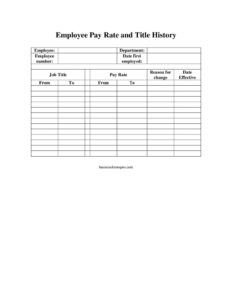
Employee Pay Rate and Title History Change
Track every salary and job title change with the free Employee Pay Rate and Title History Change form template — free download in PDF and DOCX.
PDF
DOCX
1 downloads
0
likes
Download Files
- DOCX
The Employee Pay Rate and Title History Change form is an HR document used to record and track every adjustment to an employee’s compensation and job title over time. Employers most often use it to create a clear, dated audit trail when granting a raise, promotion, or role change. It’s free to download in both PDF and DOCX formats with no signup required.
What Is an Employee Pay Rate and Title History Change Form?
An Employee Pay Rate and Title History Change form is a personnel record that documents each modification to an individual’s wage or position. It is typically prepared by a manager, HR administrator, or payroll specialist and filed in the employee’s personnel folder. Rather than overwriting old information, the form preserves the history of changes — showing what the rate or title was before and what it became after, along with the date the change took effect and the reason behind it. This running record helps payroll process accurate paychecks, supports performance and compensation reviews, and provides documentation in case of audits, disputes, or wage-and-hour inquiries.
When Do You Need an Employee Pay Rate and Title History Change Form?
This form is useful any time an employee’s compensation or job classification shifts. Common situations include:
- Annual or merit raises — recording a cost-of-living or performance-based increase to an hourly or salaried rate.
- Promotions — capturing a move from one job title to a higher-level role, often with a corresponding pay change.
- Lateral transfers — documenting a department change or title adjustment even when the pay stays the same.
- Demotions or restructuring — noting a reduction in title or rate during reorganizations.
- Conversion from part-time to full-time — or hourly to salaried status, which alters how pay is calculated.
- Periodic audits and reviews — when HR needs a single chronological summary of an employee’s career progression and earnings.
What an Employee Pay Rate and Title History Change Form Should Have
A complete and dependable form clearly identifies the employee, the change being made, and when it applies. Key elements include the employee’s name and employee number, the department they belong to, their original hire date, and their current job title and pay rate. The form should always capture the reason for change, the effective date, and the from and to values so the before-and-after is unmistakable. Together, these fields turn a simple note into a defensible record. The chronological layout matters too: each new entry should sit alongside earlier ones so the document tells the full story of the employee’s pay and title over time.
How to Fill Out an Employee Pay Rate and Title History Change Form
- Employee: Enter the full legal name of the employee whose record is being updated.
- Department: List the team, division, or department the employee currently works in.
- Employee number: Add the internal payroll or HR ID number that uniquely identifies this person.
- Date first employed: Record the original hire date to anchor the history and calculate tenure.
- Job title: Note the employee’s current title before the change takes effect.
- Pay rate: Enter the current rate (hourly wage or annual salary) prior to the adjustment.
- Reason for change: Briefly explain why the change is being made — for example “annual merit increase” or “promotion to senior analyst.”
- Date effective: Specify the exact date the new title or rate begins so payroll applies it correctly.
- From / To: In the from and to fields, document the previous value and the new value for the title and/or pay rate, making the change explicit and easy to verify.
Keeping an Accurate Compensation History
The real strength of this form is the running history it builds. Each time you complete a new line, you preserve the prior entry rather than erasing it. Over a few years, the document becomes a timeline that shows when an employee was hired, how their title evolved, and how their pay grew. This continuity is invaluable during performance reviews, internal pay-equity checks, and when justifying future raises. It also protects the employer: if a former employee questions a wage calculation or a regulator requests records, a dated, reasoned history is far more credible than scattered emails or verbal agreements.
Tips for Using This Form Effectively
Treat the form as a controlled HR record. Always have the appropriate manager or HR representative review and sign off before changes reach payroll, and date every entry. Coordinate the effective date with your pay-period calendar so increases or adjustments land in the correct paycheck. Store the completed form in a secure personnel file, since it contains sensitive compensation data. If your organization uses an HRIS or payroll software, mirror these entries in the system so the paper record and digital record always agree. For salaried-to-hourly or status conversions, note any change in overtime eligibility in the reason field.
Common Mistakes to Avoid
- Overwriting old values: Replacing the previous rate or title instead of recording it in the from field destroys the history this form is meant to preserve.
- Leaving the reason blank: Without a stated reason, the change looks arbitrary and is hard to defend later.
- Wrong effective date: An incorrect date can cause overpayments, underpayments, or back-pay disputes.
- Mismatched employee number: Entering the wrong ID can attach the change to the wrong person’s record.
- Skipping manager approval: Pushing a change to payroll without authorization invites errors and accountability gaps.
- Forgetting to update payroll systems: A completed form that never reaches payroll means the employee’s check won’t reflect the change.
Frequently Asked Questions
What is an Employee Pay Rate and Title History Change form used for? It is used to document and track every change to an employee’s pay rate or job title over the course of their employment. It records the previous and new values, the effective date, and the reason, creating a clear audit trail for HR and payroll.
How do I fill out the “from” and “to” fields? Enter the value as it existed before the change in the “from” field and the new value in the “to” field. Use them for whichever item is changing — pay rate, title, or both — so the before-and-after comparison is unmistakable.
Does this form need to be signed or notarized? It does not require notarization. Most organizations have the change approved and signed by a manager or HR representative as an internal control, but specific approval requirements vary by company policy.
Is this form legally binding? On its own it is primarily an internal record rather than a contract. However, it becomes an important supporting document for payroll accuracy and can serve as evidence of agreed compensation changes; binding effect depends on your employment agreements and local law.
How much does this template cost? Nothing — it is completely free to download from Business Forms Pro in both PDF and DOCX formats, with no signup or subscription required.
Can I edit the form to match my company’s process? Yes. The DOCX version is fully editable, so you can add fields such as approval signatures, overtime status, or pay-grade codes to fit your HR and payroll workflow.
This template is provided as a general example for informational purposes only and does not constitute legal, financial, tax, or HR advice. Employment and recordkeeping requirements vary by jurisdiction and by organization — consult a qualified HR or legal professional to ensure your forms and practices comply with applicable laws.
Official resource: for the rules that apply to your situation, see the U.S. Department of Labor.
Related Forms
- Employee Separation Report
- Employee Official Warning Letter
- Manual Timecard Bi-Weekly Mini
- Hazard Assessment
- Weekly Time Card With Approval
- Employment Verification Letter
Browse more in Employment.