
Employee Benefits Sheet
Download a free Employee Benefits Sheet template in PDF and DOCX to summarize medical, dental, retirement, and disability coverage — no signup, free download.
PDF
DOC
5 downloads
0
likes
Download Files
- DOC
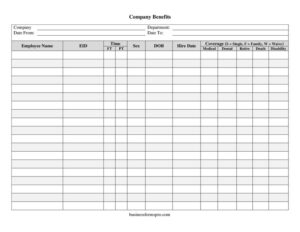
An Employee Benefits Sheet is a one-page summary that records the benefits an employee is enrolled in — medical, dental, retirement, death, and disability coverage — along with their basic employment details. People most often use it to confirm and document what each worker has elected during onboarding or open enrollment. You can download this template free in both PDF and DOCX, with no signup required.
What Is an Employee Benefits Sheet?
An Employee Benefits Sheet is an HR document that captures, in a single snapshot, which company-sponsored benefits a particular employee carries and the level of coverage they have chosen. It is typically issued and maintained by the human resources or payroll team and references a defined coverage period (a date range). The sheet ties together identifying information — the employee’s name, ID, department, and date of birth — with their benefit selections such as medical, dental, retirement, death, and disability. Rather than digging through multiple carrier portals, an employer can glance at one form to see whether someone has single, family, or waived coverage. It serves as an internal record, a reference for payroll deductions, and a quick verification tool during audits or enrollment reviews.
When Do You Need an Employee Benefits Sheet?
- New-hire onboarding — to capture a new employee’s benefit elections on or near their hire date.
- Annual open enrollment — to document changes when employees add, drop, or modify coverage for a new plan year.
- Qualifying life events — when a marriage, birth, or other event lets an employee switch from single to family coverage mid-year.
- Payroll setup — to give payroll a clear reference for which deductions apply to each person.
- Status changes — when an employee moves between full-time and part-time and their eligibility shifts.
- Audits and compliance reviews — to provide auditors a concise summary of who is enrolled in which plans during a specified period.
What an Employee Benefits Sheet Should Have
A complete benefits sheet ties identity, employment status, and coverage together so there is no ambiguity. It should clearly state the company and department, the reporting period (date from / date to), and the employee’s identifying details — full name, employee ID, and date of birth. It should record employment status (full-time or part-time) since that often determines eligibility. Most importantly, it should list each benefit category and the coverage level chosen. The form uses a simple coverage code: S for single, F for family, and W to waive. Applying that code consistently across medical, dental, retirement, death, and disability lines makes the document easy to read and audit.
How to Fill Out an Employee Benefits Sheet
- Enter the Company name and the Department the employee belongs to.
- Set the reporting window: write the Date From and Date To that the benefit elections apply to (often a plan year).
- Record the Employee Name exactly as it appears in your HR system, then add the EID (employee ID number).
- Indicate employment status under Time FT/PT — full-time or part-time — since this affects eligibility.
- Fill in Sex and DOB (date of birth) for identification and carrier matching.
- Enter the Hire Date, which can establish waiting periods or eligibility start dates.
- For each benefit line — Medical, Dental, Retire, Death, and Disability — enter the Coverage code: S for single, F for family, or W to waive.
- Review every line for accuracy, then have the employee and an HR representative confirm and sign or initial where your process requires.
Understanding the Coverage Codes
The single-letter codes keep the form compact while still capturing the essential decision for each benefit. S (Single) means coverage applies only to the employee. F (Family) extends coverage to eligible dependents such as a spouse and children. W (Waive) records that the employee declined that benefit — important to document, because a waiver shows the option was offered and refused. Apply a code to every line rather than leaving any blank; an empty field invites confusion about whether the person enrolled or simply was not asked. For benefits like death and disability, single coverage typically means the policy covers the employee alone, so the family option may not always apply depending on your plan design.
Tips for Keeping Accurate Benefit Records
Treat each completed sheet as a point-in-time snapshot tied to its date range, and create a fresh sheet whenever elections change rather than editing an old one. This preserves a clean history of what was elected and when. Store completed forms securely, since they contain personal information such as date of birth — limit access to HR and payroll staff. Cross-check the codes against the actual deductions running in payroll so the document and the money line up. When an employee transitions between full-time and part-time, revisit eligibility immediately, because part-time status can change which benefits are available.
Common Mistakes to Avoid
- Leaving coverage lines blank — always mark S, F, or W so no benefit is ambiguous.
- Omitting the date range — without Date From and Date To, you can’t tell which plan year the elections cover.
- Mismatched employee details — an incorrect EID or DOB can cause carrier enrollment errors.
- Forgetting to update FT/PT status — eligibility often hinges on it, so an outdated status can grant or deny coverage incorrectly.
- Not reconciling with payroll — elections that don’t match deductions create over- or under-charges.
- Storing the sheet insecurely — it holds personal data and should be kept confidential.
Frequently Asked Questions
What is an Employee Benefits Sheet used for? It is used to summarize and document the benefits an individual employee is enrolled in during a specific period, including medical, dental, retirement, death, and disability coverage. HR and payroll teams rely on it as a quick reference for eligibility and deductions. It also serves as a record during open enrollment and audits.
What do the coverage codes S, F, and W mean? S stands for Single coverage (the employee only), F stands for Family coverage (the employee plus eligible dependents), and W means the employee chose to Waive that benefit. You should apply one of these codes to every benefit line. Recording a waiver is important because it proves the benefit was offered and declined.
Do I need to fill out a new sheet every year? It is good practice to complete a fresh sheet whenever elections change, such as during annual open enrollment or after a qualifying life event. This keeps a clean historical record tied to each coverage period. Avoid editing an old sheet, since that erases the prior snapshot.
Is an Employee Benefits Sheet legally binding? The sheet itself is primarily an internal record rather than a contract; the binding terms come from your benefit plan documents and carrier agreements. However, accurate, signed records help demonstrate that elections were offered and made correctly. Follow your company’s own policies on signatures and acknowledgments.
Does the employee need to sign it? Many employers ask the employee to sign or initial to confirm their elections, and some also require an HR signature. Signing helps prevent disputes about what was chosen. This template can be adapted to include a signature line if your process requires one.
How much does this template cost? Nothing — the Employee Benefits Sheet template is completely free to download here in both PDF and DOCX formats, with no signup or payment required. You can edit the DOCX version to match your company’s plans and branding. Reuse it for every employee at no cost.
This Employee Benefits Sheet template is provided as a general example for informational purposes only and does not constitute legal, financial, tax, or HR advice. Benefit eligibility rules and recordkeeping requirements vary by jurisdiction, plan, and carrier — consult a qualified professional before relying on this document.
Official resource: for the rules that apply to your situation, see the U.S. Department of Labor.
Related Forms
- Direct Deposit Authorization
- Employee Disciplinary Notice
- Employee Separation Report
- Job Application Comparison Chart
- Harassment Log
- Shift Trade Tracker
Browse more in Employment.