
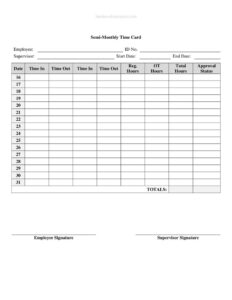
Semi-Monthly Time Card With Approval
Download a free Semi-Monthly Time Card With Approval template in PDF and DOCX to track hours twice monthly and capture supervisor sign-off easily.
PDF
DOCX
1 downloads
0
likes
Download Files
- DOCX
A Semi-Monthly Time Card With Approval is a payroll document used to record an employee’s hours worked across the two pay periods that occur each month, with a dedicated space for a supervisor to review and sign off before payroll runs. The most common reason people use it is to capture accurate work hours for semi-monthly payroll while building in an approval step that prevents errors and disputes. It’s free to download here in both PDF and DOCX formats, with no signup required.
What Is a Semi-Monthly Time Card With Approval?
A Semi-Monthly Time Card With Approval is a structured form that logs the daily hours an employee works during a half-month pay cycle—typically the 1st through the 15th and the 16th through the end of the month. Unlike a simple weekly timesheet, it aligns directly with a semi-monthly pay schedule, meaning employees are paid twice per month on fixed dates. The form is completed by the employee or timekeeper and then reviewed by a manager or supervisor, who confirms the totals are correct and signs to authorize payment. It documents regular hours, overtime, breaks, and leave, and creates a clear paper trail for both the worker and the payroll department.
When Do You Need a Semi-Monthly Time Card With Approval?
This form fits any workplace that pays staff twice a month and wants a verified record of hours before processing payroll. Common situations include:
- Running semi-monthly payroll — when your pay dates fall on set days (such as the 15th and the last day of the month) rather than weekly or biweekly cycles.
- Tracking hourly and non-exempt staff — to calculate gross pay accurately and capture any overtime worked beyond standard thresholds.
- Documenting paid leave and absences — recording vacation, sick time, or holidays alongside worked hours within the same period.
- Requiring managerial sign-off — when company policy or an auditor mandates supervisor approval before hours are submitted to payroll.
- Supporting compliance and recordkeeping — many jurisdictions require employers to retain accurate time records, and an approved card serves as supporting evidence.
- Resolving pay disputes — a signed card gives both employee and employer a reference point if a question about hours or pay arises later.
What a Semi-Monthly Time Card Should Have
A complete and useful semi-monthly time card includes the elements that make it valid for payroll and clear for everyone who reviews it:
- Employee name, ID or department, and the employer or company name.
- The pay period start and end dates that define the semi-monthly cycle.
- A daily grid with time in, time out, and break or lunch entries.
- Columns for regular hours, overtime hours, and leave categories.
- A running total of hours for the period.
- An employee signature certifying the hours are accurate.
- A supervisor or manager approval line with a printed name, signature, and date.
How to Fill Out a Semi-Monthly Time Card With Approval
- Enter the header details. Write the employee’s full name, employee ID or department, and the company name at the top of the card.
- Set the pay period. Record the start and end dates for this half-month cycle—for example, the 1st through the 15th or the 16th through the last day.
- Log each workday. For every date in the period, fill in the time you started, the time you stopped, and the start and end of any unpaid break or lunch.
- Calculate daily hours. Subtract break time from the span worked to get the hours for that day, and enter them in the regular hours column.
- Record overtime separately. If you worked beyond standard hours, note those amounts in the overtime column so payroll applies the correct rate.
- Note leave or absences. Mark vacation, sick, or holiday hours in their designated fields.
- Total the period. Add all daily entries to produce the period total of regular, overtime, and leave hours.
- Sign and submit. The employee signs and dates the card, then the supervisor reviews, signs the approval line, and dates it before sending to payroll.
Understanding the Approval Step
The approval line is what sets this card apart from a basic timesheet. By signing, the supervisor confirms that the hours match the schedule, that breaks were properly deducted, and that any overtime or leave is legitimate. This single step reduces payroll errors, discourages inflated hours, and creates accountability on both sides. In many organizations, payroll will not process a card without a completed approval signature and date, so treat that field as mandatory rather than optional. If a manager spots a discrepancy, they should resolve it with the employee and have the corrected card re-signed before approving, keeping the record clean and defensible.
Semi-Monthly vs. Biweekly Time Tracking
It’s easy to confuse semi-monthly with biweekly pay, but they differ in important ways. Semi-monthly means 24 pay periods per year on fixed calendar dates, so each period can contain a different number of days and the days of the week shift each cycle. Biweekly means 26 pay periods that always cover exactly two weeks ending on the same weekday. Because semi-monthly periods don’t align neatly to seven-day weeks, calculating overtime—which is often based on a workweek—requires extra attention. This card is designed for the semi-monthly rhythm, so be sure your overtime tracking follows your workweek definition rather than the pay period boundaries.
Common Mistakes to Avoid
- Leaving the approval line blank — an unsigned card may be rejected by payroll and delay the employee’s pay.
- Mixing pay periods — entering hours from the wrong half of the month throws off totals and creates reconciliation headaches.
- Forgetting to deduct breaks — counting an unpaid lunch as worked time inflates hours and overstates pay.
- Lumping overtime into regular hours — failing to separate overtime means it won’t be paid at the correct premium rate.
- Rounding inconsistently — apply the same rounding rule to every entry so totals stay accurate and fair.
- Submitting late — missing the payroll cutoff for a semi-monthly cycle can push payment to the next period.
Frequently Asked Questions
What is a Semi-Monthly Time Card With Approval used for? It records an employee’s hours for a half-month pay period and includes a supervisor sign-off that authorizes the hours for payroll. It is most useful for employers who pay staff twice a month and want a verified record before processing wages.
How do I fill out a semi-monthly time card? Enter the employee and company details, set the pay period dates, log time in and out plus breaks for each day, total the regular, overtime, and leave hours, then have both the employee and supervisor sign and date it. The supervisor’s approval is what finalizes the card for payroll.
Does the time card need a supervisor signature? The approval version of this card is built around a supervisor sign-off, and most payroll processes treat that signature as required. It confirms the hours are accurate and authorizes payment, so leaving it blank can delay processing.
Is a semi-monthly time card legally binding? A signed time card is a business record rather than a contract, but it serves as supporting documentation of hours worked and pay authorized. Many jurisdictions require employers to keep accurate time records, so a completed, approved card helps demonstrate compliance.
What’s the difference between semi-monthly and biweekly? Semi-monthly pay happens 24 times a year on fixed calendar dates, while biweekly pay happens 26 times a year every two weeks. Because semi-monthly periods don’t line up with seven-day weeks, overtime calculations should still follow your defined workweek.
How much does this template cost? Nothing—this Semi-Monthly Time Card With Approval is completely free to download in PDF and DOCX, with no signup required. You can print it as-is or open the DOCX to customize fields, columns, and your company name.
This template is a general example provided for informational purposes only and is not legal, financial, or tax advice. Payroll, overtime, and recordkeeping requirements vary by jurisdiction and by employer policy—consult a qualified professional or your HR and legal advisors to ensure your time-tracking practices comply with applicable laws.
Official resource: for the rules that apply to your situation, see the U.S. Department of Labor.
Related Forms
- Absentee Report Form
- Employee Evaluation
- Performance Improvement Plan
- Direct Deposit Authorization
- Employee Disciplinary Notice
- Accrued Benefits Statement
Browse more in Employment.