
Expense Reimbursement Request Report
Download a free Expense Reimbursement Request Report template in PDF and DOCX to itemize travel, mileage, meals and other costs for fast repayment.
PDF
DOCX
5 downloads
0
likes
Download Files
- DOCX
An Expense Reimbursement Request Report is a simple form an employee or contractor uses to itemize out-of-pocket business costs and ask their employer to pay them back. People most often reach for it after a business trip, a client lunch, or a supply run made with personal funds. You can download it free in PDF and DOCX, with no signup required.
What Is an Expense Reimbursement Request Report?
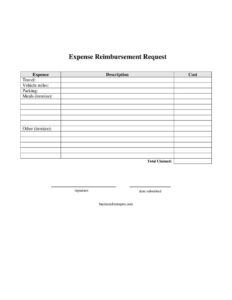
An Expense Reimbursement Request Report is a document that records the business expenses a person paid for personally and formally requests repayment from their organization. It is typically completed by an employee, freelancer, or volunteer and submitted to a manager, finance team, or accounts payable for approval. The report lists each expense with a description and cost, breaks out common categories such as travel, vehicle mileage, parking, and meals, and totals everything into a single claimed amount. It creates a clear paper trail that links spending to legitimate business activity, supports accurate bookkeeping, and helps the company stay compliant with internal policy and tax recordkeeping rules. Once approved and signed, it becomes the basis for issuing payment.
When Do You Need an Expense Reimbursement Request Report?
You need this report any time you spend your own money on something the business should ultimately pay for. Common situations include:
- Business travel: recovering airfare, hotel, rental car, or train costs from a work trip.
- Mileage on a personal vehicle: claiming reimbursement for driving to a client site, a conference, or a remote office.
- Client and team meals: itemizing a lunch meeting, a working dinner, or coffee with a prospect.
- Parking and tolls: recouping the parking garage fee or toll charges incurred while on company business.
- Supplies and incidentals: covering a last-minute purchase of materials, shipping, or printing made out of pocket.
- Remote or field work: contractors and volunteers logging approved costs for a project or event.
In each case, the report turns a pile of receipts into one organized, signed request that finance can review and pay quickly.
What an Expense Reimbursement Request Report Should Have
A complete report leaves no doubt about what was spent, why, and how much is owed. It should clearly identify the person requesting payment and the date the report is submitted. Every expense needs its own line with a plain description and the exact cost. The form should separate the common categories—travel, vehicle miles, parking, and meals—so reviewers can apply policy limits and tax treatment correctly. Meals and any “other” charges should be itemized rather than lumped together. Finally, the report needs a single total claimed figure and a signature attesting that the amounts are accurate and business-related. Attaching the underlying receipts makes the request easy to approve.
How to Fill Out an Expense Reimbursement Request Report
- Expense: Name each item on its own row—for example, “Hotel,” “Office supplies,” or “Client dinner.”
- Description: Add a short business reason for the expense, such as the trip, client name, or project it relates to.
- Cost: Enter the exact amount paid for that line, matching the attached receipt.
- Travel: Record airfare, lodging, rideshare, or other transportation costs in the travel section.
- Vehicle miles: Log the number of business miles driven; if your employer uses a per-mile rate, multiply to get the dollar amount.
- Parking: Enter parking fees and tolls incurred during the business activity.
- Meals (itemize): List each meal separately with its cost rather than entering one combined figure.
- Other (itemize): Detail any remaining expenses individually so reviewers can see exactly what they were.
- Total claimed: Add every line and category to a single grand total.
- Signature and date submitted: Sign to certify the claim is accurate, then enter the submission date and send it for approval.
Tips for Faster Approval and Accurate Records
The smoothest reimbursements share a few habits. Submit the report promptly—ideally within a week of the expense—while receipts are still in hand and details are fresh. Keep digital or paper copies of every receipt and label them to match the line items on your form. Use clear, specific descriptions; “Lunch with Acme procurement team, project kickoff” approves faster than a bare “Meal.” Round nothing—enter actual amounts to the cent so the total reconciles. If your company sets per-diem caps or a standard mileage rate, apply those before submitting to avoid back-and-forth. Finally, double-check that the total claimed equals the sum of all your itemized lines.
How It Differs From a Purchase Order or Invoice
It is easy to confuse expense reports with other money documents, but each plays a distinct role. A purchase order authorizes spending before it happens, while an invoice is a vendor’s request for payment for goods or services it provided. An Expense Reimbursement Request Report, by contrast, looks backward: it documents money an individual has already spent personally on the company’s behalf and asks the company to make them whole. Because reimbursements involve personal funds and often touch tax categories like mileage and meals, the itemization and signature on this form carry extra weight for both accounting accuracy and audit readiness.
Common Mistakes to Avoid
- Missing receipts: Submitting costs without supporting documentation, which delays or voids approval.
- Lumping meals together: Failing to itemize meals and “other” expenses as the form requests.
- Vague descriptions: Writing “travel” with no destination, date, or business purpose.
- Math errors: A total claimed that doesn’t match the sum of the lines, triggering a kickback.
- Mixing personal and business costs: Including non-reimbursable items that violate company policy.
- Forgetting the signature or date: An unsigned, undated report can’t be processed.
Frequently Asked Questions
What is an Expense Reimbursement Request Report used for? It is used to itemize business expenses you paid for personally and formally request repayment from your employer or organization. It documents each cost, the business reason, and a single total, giving finance a clear basis to approve and issue payment.
How do I fill out the report? List each expense with a description and cost, break out travel, vehicle miles, parking, and meals, and itemize meals and any “other” charges. Add everything to a total claimed amount, then sign and date the form and attach your receipts before submitting.
Do I need to attach receipts? Most employers require receipts to verify each claimed amount, especially for travel, lodging, and meals. Even when small purchases are exempt under policy, keeping receipts is wise because they support audits and tax recordkeeping.
How are vehicle miles reimbursed? You log the number of business miles driven, and many employers multiply those miles by a standard per-mile rate to calculate the dollar amount. Rates and rules vary by company and jurisdiction, so confirm the current rate your organization uses before submitting.
Is this report legally binding? The form itself is a request, not a contract; reimbursement depends on your employer’s policy and approval. Your signature does certify that the amounts are accurate and business-related, so submitting false or inflated claims can have serious consequences.
How much does this template cost? It is completely free to download here in both PDF and DOCX formats, with no signup or account required. You can edit the DOCX to match your company’s categories, policy limits, or branding before using it.
This template is a general example provided for informational purposes only and is not legal, financial, or tax advice. Reimbursement policies, mileage rates, and recordkeeping requirements vary by employer and jurisdiction—consult a qualified accounting or HR professional for guidance specific to your situation.
Related Forms
- Bill Tracker
- Company Overdue Accounts
- Business Trip Details List
- Travel Expense Report
- Check Register
- Expense Report Weekly
Browse more in Expense Reports.