
Gas Mileage Reimbursement
Download a free Gas Mileage Reimbursement form template to track business trips, miles driven, and amounts owed — easy PDF and DOCX free download.
PDF
DOCX
2 downloads
0
likes
Download Files
- DOCX
A Gas Mileage Reimbursement form is a simple document employees use to request payment for the business miles they drive in a personal vehicle. People most often reach for it after a work trip, client visit, or errand to recover the cost of fuel and wear at a set rate per mile. You can download this template free in both PDF and DOCX formats — no signup required.
What Is a Gas Mileage Reimbursement Form?
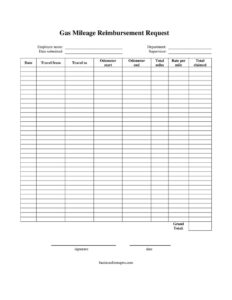
A Gas Mileage Reimbursement form is an expense document that records each work-related trip an employee takes in their own car and calculates the amount the employer owes. It captures who drove, when, where they went, the starting and ending odometer readings, the total miles, and the reimbursement rate applied. By documenting each leg of travel and converting miles into dollars, the form gives the company a clean, auditable record while ensuring the employee is fairly compensated. It is typically completed by the employee, signed, and routed to a supervisor or the accounting team for approval and payment. The form is most common in workplaces that do not provide a company vehicle.
When Do You Need a Gas Mileage Reimbursement Form?
Almost any role that involves driving for the job can generate a reimbursement claim. Use this form when:
- You drive your personal car to visit a client, customer, or job site away from your normal office.
- You travel between multiple company locations in a single day and want to recover the mileage.
- You run a work errand — picking up supplies, dropping off a deposit, or delivering documents.
- You attend an off-site conference, training session, or trade show using your own vehicle.
- You are a field technician, sales rep, caregiver, or contractor who logs frequent short trips throughout the week.
- Your employer or organization reimburses volunteers or part-time staff for approved travel.
In each case, the form turns a series of trips into a single, signed request that a supervisor can review at a glance.
What a Gas Mileage Reimbursement Form Should Have
A complete and approvable form leaves no room for guesswork. The essentials include clear identification of the employee and their department, the date the request is submitted, and the name of the approving supervisor. For each trip it should show the date of travel, the origin and destination, the odometer reading at the start and end, and the resulting total miles. It must then state the rate per mile used, the amount claimed for that trip, and a grand total across all trips. Finally, the employee’s signature and date confirm the claim is accurate. Together these fields make the request transparent, easy to verify, and ready for payment.
How to Fill Out a Gas Mileage Reimbursement Form
- Enter your employee name exactly as it appears in payroll, and add your department so the cost can be allocated correctly.
- Fill in the date submitted — the day you are turning the request in.
- Write the name of your supervisor or approver who will sign off on the claim.
- For each trip, record the date of travel.
- List the travel from location (your starting point) and the travel to destination.
- Note the odometer start reading and the odometer end reading for that trip.
- Subtract start from end to get total miles driven.
- Enter the rate per mile your organization applies, then multiply by total miles to get the total claimed for that trip.
- Add up every trip to produce the grand total owed.
- Review for accuracy, then add your signature and the date to certify the request.
Understanding the Per-Mile Rate
The reimbursement rate is the heart of the calculation. Many employers adopt a standard mileage rate published by their national tax authority, which is designed to cover not just fuel but also depreciation, insurance, and maintenance. Others set their own internal rate. Whatever figure your organization uses, enter it consistently in the rate per mile field so each trip is calculated the same way. Because rates can change from year to year, confirm the current figure before submitting a claim that spans a long period. Keeping the rate visible on the form also helps your supervisor verify the math quickly and protects you if questions arise later.
Tips for Accurate Mileage Records
Good records make reimbursement painless. Log your odometer readings at the moment you start and finish a trip rather than estimating later. Keep the form focused on business travel only — commuting between home and your regular workplace is usually not reimbursable. If you make several stops in one outing, you can record the full route as a single trip or break it into legs, as long as the odometer figures line up. Attaching a quick note about the trip’s purpose, even informally, helps your approver understand the claim. Submitting requests promptly, rather than letting weeks of trips pile up, reduces errors and speeds up payment.
Common Mistakes to Avoid
- Estimating miles instead of using actual odometer readings, which can lead to over- or under-claiming.
- Forgetting to enter the rate per mile, leaving the total impossible to verify.
- Including personal trips or daily commuting that does not qualify for reimbursement.
- Math errors when subtracting odometer readings or summing the grand total.
- Leaving the supervisor name or signature blank, which stalls approval.
- Submitting trips long after they happened, when details are harder to confirm.
Frequently Asked Questions
What is a Gas Mileage Reimbursement form used for? It is used to request payment for business miles driven in a personal vehicle. The form documents each trip’s date, route, odometer readings, and total miles, then converts those miles into a dollar amount using a per-mile rate so your employer can reimburse you accurately.
How do I calculate the amount to claim? Subtract the odometer start reading from the odometer end reading to find total miles for each trip, then multiply that figure by the rate per mile. Add the totals from every trip together to produce the grand total you are requesting.
What mileage rate should I use? Use the rate your employer or organization specifies. Many companies follow the standard mileage rate set by their national tax authority, while others use an internal figure — confirm the current rate before you fill out the form, since rates can change annually.
Does this form need to be notarized or witnessed? No. A mileage reimbursement request is an internal expense document, so it does not require notarization or witnesses. It typically just needs your signature and your supervisor’s approval to be processed for payment.
Is my regular commute reimbursable? Generally no. Travel between your home and your normal place of work is usually treated as a personal commute and is not reimbursed. This form is intended for business travel beyond your ordinary commute, such as client visits, job sites, or off-site meetings.
How much does this template cost? Nothing — it is completely free to download here in both PDF and DOCX formats with no signup required. You can fill out the PDF directly or open the DOCX to customize fields, add your company logo, or adjust the rate to match your policy.
This template is provided as a general example for informational purposes only and does not constitute legal, financial, or tax advice. Reimbursement rules, eligible expenses, and applicable mileage rates vary by jurisdiction and employer policy. Consult a qualified professional or your organization’s finance team before relying on this form.
Related Forms
- Mileage Reimbursement Form
- Travel Expenses
- Vehicle Expense Journal Monthly
- Event Budget Worksheet
- Credit Card Minimum Payment
- Business Trip Details List
Browse more in Expense Reports.