
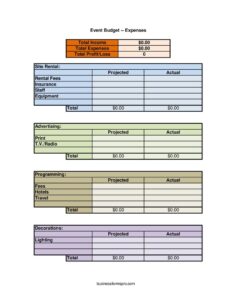
Event Budget Worksheet
Plan and track event costs with this free Event Budget Worksheet template, comparing projected vs. actual income and expenses — free download in PDF and DOCX.
PDF
DOCX
XLSX
0
likes
Download Files
- DOCX
- XLSX
An Event Budget Worksheet is a planning document used to estimate, organize, and track every dollar of income and expense tied to an event. People most often use it to compare projected costs against actual spending so an event finishes on budget rather than deep in the red. You can download this Event Budget Worksheet for free in both PDF and DOCX formats — no signup required.
What Is an Event Budget Worksheet?
An Event Budget Worksheet is a structured ledger that lists all anticipated revenue sources and cost categories for a single event, alongside columns for projected and actual amounts. It is used by event planners, nonprofit coordinators, conference organizers, festival committees, and corporate teams to forecast spending before commitments are made and to reconcile the numbers afterward. The worksheet documents site rental, staffing, advertising, travel, programming, and ticket revenue in one place, then rolls those figures into a clear bottom line — total income, total expenses, and total profit or loss. Because it captures both projections and real results, it doubles as a planning tool and a post-event report you can hand to stakeholders or use as a template for next time.
When Do You Need an Event Budget Worksheet?
This worksheet earns its keep any time an event involves real money moving in and out. Common situations include:
- Planning a fundraiser or gala where ticket sales, sponsorships, and merchandise must cover venue, catering, and entertainment costs.
- Organizing a conference or trade show with site rental, equipment, staff, and advertising spread across many line items.
- Hosting a community festival that sells admission to adults and children separately and offers food and merchandise booths.
- Coordinating a corporate retreat requiring hotels, travel, and programming for attendees.
- Producing a concert or performance with lighting, decorations, and printed programs as major expenses.
- Reviewing results after an event to record actual figures, calculate profit or loss, and improve the next budget.
What an Event Budget Worksheet Should Have
A complete worksheet separates revenue from expenses and shows both what you planned and what actually happened. The essentials are clearly labeled income categories (such as ticket sales, advertisements, merchandise, and food), detailed expense categories grouped by function, and side-by-side projected and actual columns for each line. It should total each section and then summarize three headline numbers: total income, total expenses, and total profit or loss. Notes or assumptions behind each estimate — like the expected attendance driving ticket revenue — make the figures easier to defend and adjust.
How to Fill Out an Event Budget Worksheet
- Start with the income section. Enter projected revenue from tickets, splitting adults and children by expected attendance and price, then add advertisements, sales, merchandise, food, and any other income sources.
- Move to expenses and record venue costs under site rental and rental fees, along with insurance for the event.
- Enter people and gear costs: staff wages and equipment rentals or purchases.
- Budget your marketing across advertising, print, and T.V./Radio placements.
- Add the content side under programming and any associated fees for speakers, performers, or permits.
- Capture logistics with hotels and travel for staff or guests, plus production items like decorations and lighting.
- Fill the projected column first using estimates, then complete the actual column as bills arrive.
- Sum everything into total income, total expenses, and total profit/loss to see whether the event nets a gain or a shortfall.
Projected vs. Actual: Why Both Columns Matter
The real power of this worksheet lies in tracking projected against actual figures. Projections set your spending limits and pricing strategy before any contracts are signed, while the actual column tells the true story once the event wraps. Comparing the two reveals exactly where you over- or underestimated — perhaps advertising ran higher than planned, or food sales beat expectations. Reviewing these variances after each event sharpens your forecasting for the next one. Over time, a folder of completed worksheets becomes an invaluable history of what events of a given size really cost, helping you negotiate better rates and price tickets with confidence.
Tips for a More Accurate Event Budget
Build a small contingency into your projected expenses — many planners add five to ten percent for surprises like last-minute equipment or overtime staff. Get written quotes for big-ticket items such as site rental, catering, and lighting rather than guessing. Be conservative on income: estimate ticket sales on the low side so a slow turnout does not turn a planned profit into a loss. Keep receipts and invoices organized by category as they arrive so filling the actual column at the end is quick and accurate. Finally, revisit the worksheet at key milestones, not just before and after, so you can course-correct mid-planning if costs drift.
Common Mistakes to Avoid
- Forgetting hidden costs like insurance, permit fees, or shipping for merchandise that quietly erode profit.
- Overestimating ticket revenue by assuming a sellout rather than realistic adult and child attendance numbers.
- Leaving the actual column blank, which turns a budget into a guess instead of a verifiable record.
- Lumping unrelated expenses together so you cannot tell whether advertising, print, or T.V./Radio was the costly item.
- Ignoring travel and hotel costs for staff, speakers, or performers until the bills surprise you.
- Skipping a contingency buffer, leaving no room for the inevitable last-minute expense.
Frequently Asked Questions
What is an Event Budget Worksheet used for? It is used to estimate and track all income and expenses for an event in one place. Planners use it to forecast costs, set ticket prices, and later compare projected figures with actual spending to confirm whether the event made a profit or a loss.
How do I fill out the projected and actual columns? Enter your best estimates in the projected column while planning, based on quotes and expected attendance. As real costs come in and revenue is collected, record those numbers in the actual column, then compare the two to spot where you missed your targets.
What expense categories should I include? This template covers site rental, rental fees, insurance, staff, equipment, advertising, print, T.V./Radio, programming, fees, hotels, travel, decorations, and lighting. You can rename or add categories to match your specific event, since no two events have identical cost structures.
How do I calculate profit or loss? Total all your income lines — including ticket sales, advertisements, merchandise, food, and sales — then total all expenses. Subtract total expenses from total income; a positive result is a profit and a negative result is a loss, both shown in the total profit/loss field.
Is this worksheet only for large events? Not at all. The same structure works for a small workshop, a community fundraiser, a corporate dinner, or a multi-day festival. You simply leave categories blank if they do not apply, making it flexible for events of any scale.
How much does this template cost? Nothing — the Event Budget Worksheet is completely free to download from Business Forms Pro in both PDF and DOCX formats, with no signup or account required. You can edit the DOCX version to add your own line items and reuse it for every event you plan.
This Event Budget Worksheet template is provided as a general example for informational purposes only and does not constitute financial, accounting, or tax advice. Budgeting needs and reporting requirements vary by organization and jurisdiction — consult a qualified financial or accounting professional for guidance specific to your event.
Related Forms
- Mileage Reimbursement Form
- Gas Mileage Reimbursement
- Balance Sheet Blank
- Expense Report
- Business Trip Details List
- Vehicle Expense Journal Monthly
Browse more in Expense Reports.