
Invoice
Download a free invoice template in PDF and DOCX to bill clients clearly, itemize charges, and get paid faster with this professional free download.
PDF
DOCX
3 downloads
0
likes
Download Files
- DOCX
An invoice is a document you send to a customer to request payment for goods or services you’ve delivered. The single most common reason people use one is simple: to bill a client clearly, itemize what was sold, and create a record that gets them paid. This invoice template is free to download in both PDF and DOCX formats, with no signup required.
What Is an Invoice?
An invoice is a commercial document issued by a seller, contractor, or business to a buyer that lists the products or services provided, the quantities, the prices, and the total amount owed. It is typically created after work is completed or goods are shipped, and it serves as both a formal payment request and a financial record for accounting and tax purposes. Freelancers, small businesses, retailers, and service providers all rely on invoices to track what they’re owed and to give customers a clear breakdown of charges. A well-built invoice includes identifying details like an invoice number and date so both parties can reference the transaction later. This template captures all of those essentials in a clean, reusable layout.
When Do You Need an Invoice?
You’ll reach for an invoice any time money is owed for something you provided. Common situations include:
- Completing a freelance or contract project — billing a client for design, writing, consulting, or development work.
- Selling and shipping physical products — listing each item, quantity, and unit price for an order being delivered.
- Providing recurring services — invoicing monthly for maintenance, subscriptions, or retainer arrangements.
- Requesting a deposit or final payment — billing part of a larger job before or after the work is done.
- Selling to a business that needs documentation — many companies require a formal invoice before they release payment.
- Keeping clean books — generating a paper trail for bookkeeping, tax filing, and reconciling accounts receivable.
In short, whenever you’d otherwise just ask for payment verbally, an invoice turns that request into a professional, trackable document.
What an Invoice Should Have
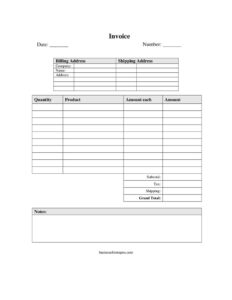
A complete invoice leaves no room for confusion about who owes what, for what, and when. The core elements are an invoice date and a unique invoice number for reference, your company’s name and contact details, and the customer’s name and address. It should clearly separate the billing address (who pays) from the shipping address (where goods go), then itemize each product or service with quantity and unit price. The math matters too: a subtotal, any applicable tax, shipping charges, and a clearly highlighted grand total. A notes field rounds it out, giving you space for payment terms or a thank-you. Together these details make the invoice valid, easy to pay, and audit-friendly.
How to Fill Out an Invoice
Work through the fields in order so nothing gets skipped:
- Date: Enter the date you’re issuing the invoice. This starts the clock on any payment terms.
- Number: Assign a unique invoice number (for example, INV-1001). Use a consistent sequence so you can track and reference invoices later.
- Company: Add your business name as the seller, along with your contact details.
- Name and address: Enter the customer’s name and address — the person or business being billed.
- Billing address: List where the invoice and payment responsibility go.
- Shipping address: If goods are being delivered, enter the destination; for services, this can match the billing address or be left blank.
- Product, quantity, amount each: For each line item, write a clear description, the quantity, and the price per unit.
- Amount: Multiply quantity by amount each for each line’s total.
- Subtotal: Add all line amounts together before tax and shipping.
- Tax: Apply any sales tax that applies in your jurisdiction.
- Shipping: Add delivery or freight charges if relevant.
- Grand total: Sum the subtotal, tax, and shipping — this is the final amount due.
- Notes: Add payment terms, due date, accepted methods, or a brief thank-you.
Setting Payment Terms and Getting Paid Faster
The notes field is more powerful than it looks. Use it to spell out exactly when and how you expect to be paid. State a due date or a term like “Net 30” (payment due within 30 days), list accepted payment methods such as bank transfer or card, and mention any late fee policy. Clear terms reduce back-and-forth and set expectations up front. Many sellers also include a short line confirming what the payment covers, which helps if a question arises later. The clearer and more professional your invoice, the more likely it is to be paid on time without follow-up.
Invoice vs. Receipt vs. Quote
These documents are often confused but serve different stages of a sale. A quote (or estimate) is sent before work begins and proposes a price the customer hasn’t yet agreed to pay. An invoice is sent after goods or services are delivered and formally requests payment for a specific amount. A receipt is issued after payment is made and confirms that the money was received. Using the right document at the right point keeps your records accurate and your customer communications clear.
Common Mistakes to Avoid
- Reusing or skipping invoice numbers — duplicate numbers make tracking and accounting messy.
- Vague line items — “services rendered” invites disputes; describe each product or service specifically.
- Math errors — double-check that quantities times unit prices match the subtotal and grand total.
- Forgetting tax or shipping — leaving these out means undercharging and having to issue a correction.
- No due date or terms — without a deadline in the notes, customers may delay payment indefinitely.
- Missing contact info — if your company details are incomplete, the customer may not know how or where to pay.
Frequently Asked Questions
What is an invoice used for? An invoice is used to formally request payment for goods or services you’ve provided. It itemizes what was sold, shows the total owed, and creates a record both you and your customer can reference for accounting and tax purposes.
How do I fill out this invoice template? Start with the date and a unique invoice number, then add your company details and the customer’s name and address. List each product with its quantity and unit price, total the line amounts into a subtotal, add tax and shipping, and show the grand total. Use the notes field for payment terms.
Is an invoice a legally binding document? An invoice itself is a payment request rather than a contract, but it becomes part of the legal record of a transaction, especially when tied to an agreed order or signed agreement. It can support a claim for payment if a dispute arises. Requirements for tax-compliant invoices vary by jurisdiction.
What’s the difference between billing and shipping address? The billing address is where the invoice goes and identifies who is responsible for paying, while the shipping address is where physical goods are delivered. They are often the same, but for businesses with separate accounts payable departments or multiple locations they can differ.
Do I need to charge tax on an invoice? Whether you charge sales tax depends on your location, the type of product or service, and your customer. The template includes a tax line so you can add the correct amount where it applies. Check the rules in your jurisdiction to be sure.
How much does this invoice template cost? It’s completely free to download in both PDF and DOCX formats, with no signup required. You can fill it out on screen or print it, and reuse it for every customer and job.
This invoice template is a general example provided for informational purposes only and is not legal, financial, or tax advice. Invoicing, tax, and record-keeping requirements vary by jurisdiction, so consult a qualified accountant or professional to ensure your invoices meet the rules that apply to your business.
Need to work out sales tax? Use our free Sales Tax Calculator to add or remove sales tax from any amount in seconds.
Official resource: for the rules that apply to your situation, see the U.S. Small Business Administration.
Related Forms
- Restaurant Order Pad
- Tailor Alterations Form
- Packing Slips Multiple
- Trade Credit Discount Calculator
- Receiving Record
- Statement of Work
Browse more in Invoices and Order Forms.