
Trucker Log
Download a free Trucker Log template to track trips, miles, fuel purchases, and maintenance. Free PDF and DOCX download, no signup required.
PDF
DOCX
5 downloads
0
likes
Download Files
- DOCX
A Trucker Log is a record-keeping form drivers use to track trips, mileage, fuel purchases, and maintenance over a given week. The most common reason people use one is to keep accurate, organized records for fuel tax reporting, expense tracking, and equipment upkeep. This template is free to download in PDF and DOCX with no signup required.
What Is a Trucker Log?
A Trucker Log is a structured worksheet that captures the operational details of a commercial driver’s work over a defined period, usually one week. It documents who drove, which truck and trailer were used, the routes and distances covered, how much fuel was purchased and at what cost, and any repairs performed. Owner-operators, fleet drivers, dispatchers, and small trucking companies all use it to keep their numbers straight. While it is not a substitute for the federal Hours of Service (HOS) duty log, this form complements it by tracking the financial and mechanical side of the job — the data you need for accounting, IFTA fuel tax filings, and maintenance scheduling.
When Do You Need a Trucker Log?
This log is useful any time you need a clear, written record of a truck’s activity and costs. Common scenarios include:
- Fuel tax reporting (IFTA): Tracking miles by state and gallons purchased so you can calculate quarterly fuel tax obligations accurately.
- Expense and revenue tracking: Recording the rate per trip and fuel costs to understand profit per load and per mile.
- Maintenance planning: Logging repairs and odometer readings so you know when the next service is due.
- Owner-operator bookkeeping: Keeping documentation for tax deductions on fuel, repairs, and mileage.
- Fleet oversight: Giving dispatchers and managers a weekly snapshot of each truck and driver’s productivity.
- Reimbursement and audits: Backing up expense claims with dated, itemized records if a customer, the IRS, or an auditor requests proof.
What a Trucker Log Should Have
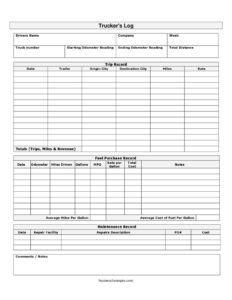
A complete Trucker Log ties together three kinds of records under one header. The header section identifies the driver, company, week, truck number, and the starting and ending odometer readings that produce the week’s total distance. The trip record lists each haul by date, trailer, origin city, destination city, miles, and rate. The fuel purchase record captures each fill-up — odometer, miles driven, gallons, MPG, rate per gallon, and total cost — and rolls up to average miles per gallon and average cost of fuel per gallon. Finally, the maintenance record documents the repair facility, a description of repairs, the PO number, cost, and any comments. Together these give a full picture of one week of operation.
How to Fill Out a Trucker Log
- Enter the driver’s name, company, and the week the log covers at the top.
- Record the truck number, then the starting odometer reading at the beginning of the week and the ending odometer reading at the end; subtract to get total distance.
- In the trip record, add a row for each haul: the date, the trailer used, the origin city, the destination city, the miles driven, and the agreed rate.
- In the fuel purchase record, log every stop: the odometer at fill-up, miles driven since the last fill, gallons purchased, calculated MPG, the rate per gallon, and the total cost. Add any notes.
- Compute the average miles per gallon and average cost of fuel per gallon for the week.
- In the maintenance record, note the repair facility, a repairs description, the PO#, the cost, and any comments/notes.
Using the Log for Fuel Tax and Cost Analysis
One of the biggest payoffs of keeping a Trucker Log is making fuel tax season painless. Because the form pairs miles driven with gallons purchased, you can compute your fleet’s true MPG and feed accurate numbers into IFTA reporting. Tracking origin and destination cities also helps you allocate miles by jurisdiction. Beyond taxes, the rate field on each trip lets you measure revenue per mile, while the fuel and maintenance totals reveal your cost per mile. Comparing these two figures over several weeks shows whether a route or load is actually profitable.
Trucker Log vs. Hours of Service Log
It is important to know what this form is and is not. A Trucker Log focuses on trips, mileage, fuel, and maintenance — the business and equipment side of driving. A federal Hours of Service (HOS) log or Electronic Logging Device (ELD) record tracks driving time, duty status, and rest breaks for safety compliance. They serve different purposes and are usually kept separately. Use this Trucker Log to support your accounting and upkeep; rely on a compliant ELD or HOS log for federal duty-status requirements.
Common Mistakes to Avoid
- Skipping odometer readings: Without accurate start, end, and per-fuel-stop readings, your total distance and MPG calculations will be wrong.
- Forgetting receipts: The log records totals, but keep your fuel and repair receipts attached for audit backup.
- Rounding gallons or costs: Small rounding errors compound across many fill-ups and distort your fuel tax math.
- Leaving origin or destination blank: Missing city data makes jurisdiction-by-jurisdiction mileage allocation impossible.
- Filling it out from memory days later: Record each trip and fuel stop the same day to avoid forgotten details.
- Ignoring the maintenance section: Logging repairs and PO numbers protects warranties and helps you schedule preventive service.
Frequently Asked Questions
What is a Trucker Log used for? A Trucker Log is used to track a truck’s trips, mileage, fuel purchases, and maintenance over a week. Drivers and trucking companies rely on it for fuel tax reporting, expense tracking, and equipment upkeep. It creates an organized paper trail that supports accounting and audits.
Is this the same as a Hours of Service or ELD log? No. This Trucker Log tracks the business and mechanical side — trips, miles, fuel, and repairs — not duty status or driving hours. Federal Hours of Service rules require a separate compliant log or ELD record. Use both forms together to cover all your bases.
How do I calculate MPG on the form? Divide the miles driven since your last fill-up by the gallons purchased at the current fill-up. The template includes columns for both figures plus a calculated MPG field. At the end of the week you can also compute an average miles per gallon across all stops.
Do I need to keep my fuel and repair receipts too? Yes, it is strongly recommended. The log summarizes your gallons, costs, and repairs, but receipts and PO documents are the underlying proof that auditors and tax authorities want to see. Attach or file them alongside each completed weekly log.
Is the Trucker Log legally required? The log format itself is not federally mandated, but accurate mileage and fuel records are required for IFTA fuel tax filings, and good records support tax deductions. Requirements vary by jurisdiction and by carrier. This template helps you stay organized and prepared for those obligations.
How much does this template cost? It is completely free. You can download the Trucker Log in PDF or DOCX with no signup required, print it for your cab, or edit the DOCX version to match your company’s needs.
This Trucker Log template is a general example provided for informational purposes only and is not legal, financial, or tax advice. Reporting and record-keeping requirements vary by jurisdiction and carrier — consult a qualified professional or your applicable regulatory authority to ensure compliance.
Related Forms
- List of Insurance Policies
- Outgoing Mail Detailed Log
- New Car Inventory Card
- Elapsed Time Log
- Beer Cider Tasting Log
- Inventory Report
Browse more in Log and Inventory.