
Phone Message Log
Free Phone Message Log template to record callers, times, and follow-ups so no message slips through the cracks — download free in PDF or DOCX.
PDF
0
likes
Download Files
A Phone Message Log is a simple form used to record incoming phone calls when the person being called is unavailable, capturing who called, when, and what they need. The most common reason people use it is to make sure messages are passed along accurately so important callbacks never get forgotten. You can download this template free in PDF or DOCX with no signup required.
What Is a Phone Message Log?
A Phone Message Log is a structured note-taking sheet used by receptionists, office staff, and small business owners to document telephone calls for a colleague or manager. It records the essential details of each message — the caller’s name and company, their phone number, the time and date of the call, and the action they want taken — along with the message itself and who recorded it. Rather than relying on memory or loose sticky notes, the log keeps every call captured in one consistent, legible place. It serves both as an immediate handoff tool and as a reference record you can revisit later to confirm exactly when someone called and what they wanted.
When Do You Need a Phone Message Log?
This form is useful any time a call comes in for someone who can’t take it. Common situations include:
- Front-desk and reception work — logging calls for staff who are in meetings, away from their desks, or out of the office.
- Small businesses without a voicemail system — capturing messages by hand so owners can return calls at the end of the day.
- Medical, legal, and professional offices — recording patient or client calls with accurate times and callback requests.
- Sales and service teams — tracking prospect or customer inquiries that need a prompt return call.
- Shared workspaces and home offices — passing messages between people who answer a common line.
- Busy retail or trade counters — noting when someone called or stopped by while the owner was unavailable.
What a Phone Message Log Should Have
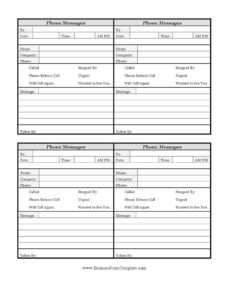
A complete phone message entry leaves no ambiguity about who called and what they want. The key elements are the recipient’s name (who the message is for), the date and time the call came in, and whether it was morning or afternoon. It should identify the caller by name, company, and phone number so the callback is easy. A set of checkboxes indicates the nature and urgency of the call — whether they called, stopped by, want a return call, marked it urgent, will call again, or wanted to see the recipient. Finally, a free-text message area and the name of the person who took the message round out a reliable, traceable record.
How to Fill Out a Phone Message Log
- To: Write the name of the person the message is intended for so it reaches the right desk.
- Date: Enter the calendar date the call came in.
- Time / AM-PM: Record the exact time and circle or check whether it was AM or PM — this matters for time-sensitive callbacks.
- Name: Write the caller’s full name, spelled as they say it.
- Company: Note the organization the caller represents, if any.
- Phone: Take down the callback number and read it back to confirm accuracy.
- Action checkboxes: Check the boxes that apply — called, stopped by, please return call, urgent, will call again, or wanted to see you.
- Message: Summarize what the caller said, including any reference numbers, deadlines, or specific requests.
- Taken by: Sign or initial so the recipient knows who to ask if they have questions.
Tips for Accurate, Useful Message Taking
The value of a phone message log depends entirely on the quality of the notes. Always repeat the caller’s name and phone number back to them before hanging up — a transposed digit can cost an entire day of missed callbacks. Write legibly; a perfectly recorded message is useless if no one can read it. When taking the message, capture the reason for the call rather than just “call back,” because a one-line summary helps the recipient prioritize. If a caller marks something urgent, deliver the slip in person or flag it immediately rather than leaving it in a stack. Note the time precisely, especially when several people call about the same matter, so the recipient can respond in the right order.
Paper Log vs. Digital Message Tools
A printed phone message log remains popular because it works without electricity, software, or training, and it produces a physical slip you can hand directly to a coworker. Many offices keep a carbon-copy pad so one copy goes to the recipient while a duplicate stays in the book as a running record. A digital approach — voicemail, email, or a shared spreadsheet — offers searchability and remote access but depends on devices and connectivity. Many teams use both: the paper log for live calls answered at the desk, and a digital follow-up to log outcomes. This DOCX template can also be typed into directly if you prefer keeping a searchable electronic version on a shared drive.
Common Mistakes to Avoid
- Skipping the AM/PM marker — an unmarked time like “4:30” can send someone calling back hours too late or too early.
- Guessing at the phone number — always confirm digits rather than assuming you heard correctly.
- Writing “please call back” with no context — a short reason helps the recipient prepare and prioritize.
- Forgetting the “taken by” field — without it, no one knows who to ask for clarification.
- Letting urgent messages sit in a pile — flag and deliver time-sensitive calls right away.
- Illegible handwriting — print names and numbers clearly, especially unusual spellings.
Frequently Asked Questions
What is a Phone Message Log used for? It is used to record the details of an incoming phone call when the intended recipient is unavailable. The log captures who called, when, their contact information, and what they need, so the message can be reliably passed along and the call returned promptly.
How do I fill out a phone message slip? Start with who the message is for and the date and time of the call, including AM or PM. Then record the caller’s name, company, and phone number, check the boxes that describe the call’s purpose and urgency, write a short summary of the message, and sign your name in the “taken by” field.
What do the checkboxes mean? They quickly classify the call without extra writing: “called” and “stopped by” note how the person reached out, “please return call” and “will call again” indicate next steps, “urgent” flags priority, and “wanted to see you” signals an in-person request. Check every box that applies.
Is a Phone Message Log a legal document? It is generally an internal record rather than a formal legal document, but a dated, signed message slip can still serve as helpful evidence of when a call occurred and what was communicated. Keep completed logs if your office needs a record of customer or client contact.
Can I use this template digitally? Yes. The DOCX version can be typed into and stored on a shared drive or printed for use at the front desk. Many offices print a stack for handwritten use while keeping a digital copy as a backup.
How much does this template cost? Nothing — it is completely free to download here in both PDF and DOCX formats, with no signup or account required. You can print as many copies as you need and customize it to match your workflow.
This template is a general example provided for informational purposes only and does not constitute legal, business, or professional advice. Recordkeeping requirements vary by industry and jurisdiction; consult a qualified professional if you have specific compliance needs.
Related Forms
- Client Call Log
- List of Vehicles
- Employee Covid Vaccine Log
- Social Media Tracker
- Inventory Cards — Black And White
- Submission Tracker Sent
Browse more in Log and Inventory.